EMOM Workout Music: Ready Mixes and Quick Setup
Jordan MillsAugust 15, 2026 · 10 min read

EMOM Workout Music: Ready Mixes and Quick Setup
Your fastest path to solid EMOM workout music is a pre-made 1-minute EMOM album or a timer-enabled mix; if you want the tempo to actually track how hard the minute feels, adaptive music that syncs to your heart rate is the better long-term fix. Pick based on how much control you need:
- Need something in the next five minutes? Grab a timer-enabled YouTube mix or an EMOM/Tabata playlist.
- Want exact one-minute tracks with countdowns? Use a dedicated EMOM album.
- Want the tempo to shift automatically as effort climbs? That’s where adaptive, sensor-linked music comes in.
The next sections walk through each option, plus a minute-by-minute plan you can copy today.
Key Takeaways
The most reliable EMOM workout music strategy pairs exact-length or timer-cued tracks for structure with tempo that adjusts to your real effort for performance.
| Point | Details |
|---|---|
| Start with ready-made options | Use timer mixes or 1-minute EMOM albums like Tabata Songs when you need something immediately. |
| Match BPM to the goal | Aim for 110 to 130 BPM for strength EMOMs and 140 to 160 BPM for conditioning-focused sessions. |
| Test before you commit | Run a two-minute playback check to catch gaps, crossfade issues, or mismatched cues. |
| Watch for fixed-track limits | Static 1-minute albums can’t adjust tempo mid-set if your effort or load changes. |
| Consider adaptive tempo | Repbeats syncs BPM to your heart rate and cadence in real time, removing manual setup for EMOM cues. |
Table of Contents
- Ready-Made EMOM Workout Music Options and Where to Find Them
- How to Choose the Right EMOM Fitness Playlist
- What BPM Works Best for Different EMOM Goals?
- Practical Setups for Pairing Music With EMOM Timing
- Why Adaptive Music Outperforms Fixed 1-Minute Tracks
- A Sample 10-Minute EMOM Music Plan You Can Copy
- Where to Find EMOM-Ready Playlists Fast
- A Coach’s Note on What Actually Trips People Up
- Get EMOM Music That Adjusts Itself
- Useful Playlists and Pages to Launch From
- Frequently Asked Questions
- Sources
Ready-Made EMOM Workout Music Options and Where to Find Them
You don’t have to build anything from scratch. Three formats cover most EMOM needs:
- Timer mixes (YouTube): Long-form videos with a visual countdown or beep overlaid on music, often in 15, 20, or 30-minute blocks.
- Streaming playlists labeled EMOM/Tabata: Spotify and Apple Music host user-curated lists, some tagged specifically for interval work, like EMOM with timer.
- Dedicated 1-minute EMOM albums: Tabata Songs built an EP of 20 one-minute EMOM songs with a 10-second countdown intro before each track starts.
Their 20 Minute EMOM album times every track to exactly one minute with an end-of-minute countdown baked in, so you press play once and the structure runs itself.
Pro Tip: Reach for a timer mix when you’re winging a session on the fly. Reach for a 1-minute track album when you’re running the same EMOM structure repeatedly and want the countdown baked into the music itself.
How to Choose the Right EMOM Fitness Playlist
Before you commit to any music for EMOM training, run through a short checklist. It takes two minutes and saves you from restarting mid-workout.
- Track length or cue clarity: Are tracks exactly one minute, or does the mix have an audible or visual cue at each minute mark?
- BPM and energy match: Does the tempo suit the exercise (heavy lifts need something different than sprint intervals)?
- Platform playback controls: Does your app support gapless playback, or will crossfade blur the minute boundary?
- Voice cues or beeps: Some albums, like Power Music Workout’s HIIT Cycle, include vocal cues alongside BPM-labeled tracks, which helps when you can’t glance at a screen.
- Licensing: If you’re running a class, confirm the platform or album covers commercial use.
Your goal also matters. Strength-based EMOMs with heavier loads usually pair better with steadier, mid-tempo tracks, while conditioning-focused EMOMs benefit from higher-energy music that keeps pace with faster movement. Group classes need reliable playback with no dead air between tracks; solo sessions give you more room to experiment.
Pro Tip: Run a two-minute test of your full setup, speakers, timer, and track transitions, before your actual EMOM starts. Catching a lag or a bad crossfade during a warm-up is a lot better than discovering it mid-set.
What BPM Works Best for Different EMOM Goals?
Tempo should match the physical demand of the minute, not just sound good. Strength-focused EMOMs with heavier resistance work tend to pair well with tracks in the 110 to 130 BPM range. That pace keeps you moving without rushing a heavy set. Conditioning and cardio-heavy EMOMs usually call for something faster, often 140 to 160 BPM, to match the higher heart rate and quicker movement patterns.
- 110 to 130 BPM: Rock, mid-tempo hip-hop, downtempo electronic
- 140 to 160 BPM: High-BPM pop, drum and bass, uptempo electronic
Some curated albums structure tracks by workout stage, warm-up, activation, intervals, peak, and cool down, which lines up with how BPM-labeled interval music tends to be organized. Perceived energy doesn’t always match the number on the label, though. A 128 BPM track with a driving bassline can feel faster than a 140 BPM track that’s more atmospheric, so trust your ears as much as the metadata.
Practical Setups for Pairing Music With EMOM Timing
Four setups cover almost every EMOM scenario, ranked roughly by how much manual work they require:
- Timer-enabled video mixes. Play a YouTube video with a built-in visual or audio countdown. Zero setup beyond hitting play.
- Single-minute tracks with autoplay. Queue an album like the 20 Minute EMOM set and let each exact one-minute track mark the interval for you.
- Playlist plus a separate interval timer app. More flexible on music choice, but you’re relying on two devices staying in sync.
- Adaptive music that injects cues and tempo shifts automatically. No manual syncing required at all.
To start reps cleanly, try to time your first movement to a downbeat rather than mid-phrase. It sounds minor, but locking your first rep to the beat makes the whole minute feel more controlled.
Pro Tip: Turn off crossfade if your app defaults to it. A three-second fade between tracks might not sound like much, but it can blur exactly the moment you needed a clean cue.

Adaptive platforms remove this syncing problem entirely by generating the cue and adjusting tempo from your live effort, rather than hoping your playlist behaves.
Why Adaptive Music Outperforms Fixed 1-Minute Tracks
Fixed 1-minute albums and static playlists solve the timing problem, but they create new ones. A track that’s exactly 60 seconds doesn’t know if you’re moving faster than expected this round, or slower because the load just went up. Length mismatch, tempo that can’t shift mid-set, and awkward silence at track changes are common complaints once you’ve used the same EMOM album for a few weeks straight.
Adaptive tempo music, like the technology behind Repbeats, addresses each issue directly:
- Wearable sync: Heart rate and cadence data from devices like Apple Watch and Fitbit inform the music in real time.
- Auto-DJ tempo changes: BPM updates every bar rather than staying locked to one static value for the whole track.
- Real-time control: You can adjust the session without breaking stride or reaching for a second app.
The practical result is fewer dead spots and a soundtrack that tracks your actual effort instead of a fixed guess made before you started the workout. A well-timed BPM increase in minute eight of a ten-minute EMOM, right when fatigue sets in, does more for output than any pre-set playlist can promise.
Pro Tip: If you’ve never used tempo-adaptive music, test it on an easier EMOM first so you can feel how the BPM shifts respond to your heart rate before trusting it in a max-effort session.
A Sample 10-Minute EMOM Music Plan You Can Copy
Here’s a minute-by-minute structure you can adapt to your own exercises:
- Minute 1 to 2 (warm-up intensity): 110 to 120 BPM, steady groove
- Minute 3 to 5 (working sets): 120 to 130 BPM, consistent energy
- Minute 6 to 7 (moderate push): 130 to 140 BPM
- Minute 8 to 9 (final push): 140 to 150 BPM, higher-energy track
- Minute 10 (finisher): 150+ BPM, your highest-energy track of the session
Raise BPM gradually rather than jumping straight to your loudest track in minute one. If you’re using adaptive tempo music instead of a fixed playlist, this entire progression happens automatically based on your heart rate climb, no manual track selection required.
Where to Find EMOM-Ready Playlists Fast
A few search phrases save you a lot of scrolling. Try “EMOM 1 minute,” “EMOM timer mix 20 min,” “Tabata 1-minute tracks,” or “interval music 60s cues” on YouTube or your streaming app of choice.
- On YouTube, timer mixes usually show the total length and countdown style right in the thumbnail.
- On Spotify or Apple Music, look for BPM labeling in the track or album description, similar to how SonicSoundWorkout’s CIRCUIT Vol.1 formats its interval tracks.
- Before committing, confirm the playlist has explicit cues, exact track durations, or gapless playback so you’re not guessing mid-set.
A Coach’s Note on What Actually Trips People Up
The most common mistake isn’t picking bad music, it’s never test-running the setup. Play your full playlist or mix for two minutes before the real session starts, checking for gaps, weird crossfades, or a track that doesn’t match your rep tempo. Build one habit: always run that two-minute check. It catches problems before they cost you a set.
Get EMOM Music That Adjusts Itself
Every option covered so far, timer mixes, 1-minute albums, curated playlists, works, but each one locks you into a fixed tempo decided before your workout even started. Repbeats skips that limitation by reading your heart rate and cadence from your Apple Watch or Fitbit and adjusting BPM every bar, so the music matches minute six the same way it matched minute one.

For EMOM sessions specifically, that means three things: cues that line up with your actual minute boundaries instead of a pre-recorded countdown, tempo that climbs as your effort climbs instead of staying flat for twenty minutes straight, and one less app to manage since the timing and the music come from the same source. If you’re tired of restarting playlists or fighting crossfade glitches mid-set, try a session with Repbeats and feel the difference between music that’s scheduled and music that’s actually listening.
Useful Playlists and Pages to Launch From
Bookmark a few of these before your next session:
- Tabata Songs’ EMOM album: exact one-minute tracks with countdown intros.
- 20 Minute EMOM playlist: timer-formatted for plug-and-play use.
- CROSSFIT WOD 2026 playlist: high-energy tracks for PR-day sessions and warm-ups.
- Repbeats: adaptive tempo music that syncs to your wearable data instead of a fixed track length.
Frequently Asked Questions
What is the best EMOM workout music for beginners? A timer-enabled YouTube mix is the simplest starting point since it requires no setup beyond pressing play, and the visual cues help you learn the one-minute rhythm before you commit to a specific album or app.
Do I need special EMOM songs, or can I use any playlist? You can use any playlist as long as you pair it with a separate interval timer, but dedicated EMOM tracks or timer mixes remove that extra step by building the cue directly into the music.
What BPM is best for EMOM workout beats during conditioning work? Most conditioning-focused EMOMs work well in the 140 to 160 BPM range, since that tempo tends to match faster movement and elevated heart rate better than slower, strength-oriented tracks.
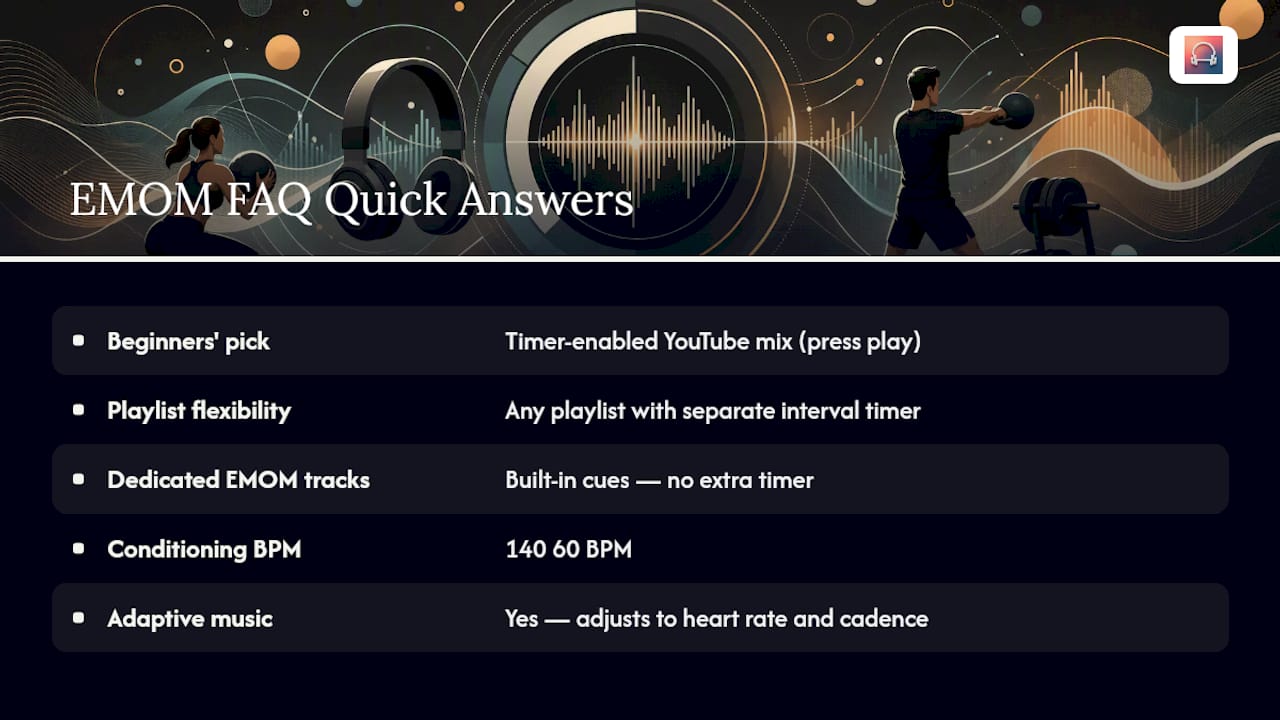
Can adaptive music replace a fixed EMOM playlist entirely? Yes, for most goals. Adaptive tempo music adjusts BPM based on your live heart rate and cadence, so it handles the tempo matching that a fixed playlist can only approximate ahead of time.
Sources
- EMOM Songs - Tabata Songs
- CIRCUIT Vol.1 45/15 Intervals HIIT Tabata Fitness Gym Workout Timer - Album by SonicSoundWorkout - Apple Music


