Match 2 Beats to 1 Stroke: Build Cadence Matched Climb Playlists
Jordan MillsSeptember 17, 2026 · 12 min read
Match 2 Beats to 1 Stroke: Build Cadence Matched Climb Playlists
For climbs, pick steady, cadence-matching music. This article gives you two ready-to-play playlists, simple BPM to cadence conversions, and a step-by-step way to build your own climb soundtrack for spin, turbo, or mapped outdoor segments. One safety note up front: outside, keep volume low enough to hear traffic.
TL;DR:
- Short, steep climbs benefit from BPMs between 150 and 170, with tracks featuring strong beats and minimal build-up to match high cadence efforts.
- Long, steady efforts should use tracks in the 120 to 140 BPM range that maintain a consistent groove, favoring instrumental and ambient electronic music for sustained pacing.
- Build your personalized playlist by selecting songs within your target BPM, sequencing them to follow climb phases, and testing with cadence feedback before riding outdoors.
- Indoor training requires downloaded, ad-free music to prevent interruptions, while outdoor riding demands low volume and terrain-aware playback for safety and awareness.
- Using apps that sync music tempo to real-time cadence, such as Repbeats, can improve rhythm stability and effort consistency during climbs, especially for adaptive, effort-driven sessions.
Table of Contents
- Climbing Cycling Music Playlists You Can Use Today
- How BPM Maps to Cadence on a Climb
- Choosing Songs by Climb Type and Pacing
- Music for Indoor Trainers vs Outdoor Climbs
- How to Build a Cadence-Matched Climb Playlist
- What Research and Rider Data Say About Climb Music
- Why Cadence-Aware Playlists Change How Climbs Feel
- Let Repbeats Match the Music to Your Climb Automatically
- Sources
- FAQ
Climbing Cycling Music Playlists You Can Use Today
You don’t need to build a climb playlist from scratch. Below are three ready-made structures, organized by the kind of climb you’re facing, with BPM ranges you can plug straight into Spotify, Apple Music, or a training app.
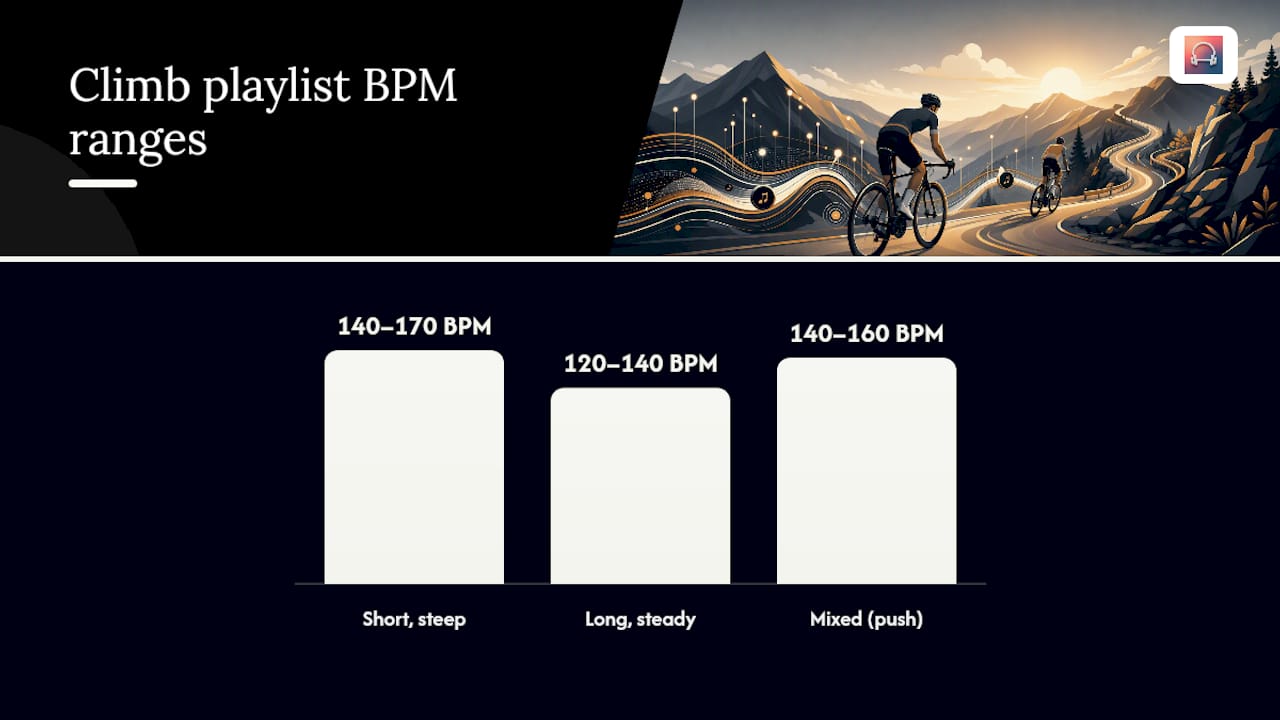
Short, steep climb playlist (2 to 5 minute efforts, 8 to 12 tracks). These climbs need punch, not meditation. Look for tracks in the 140 to 170 BPM range with a strong four-on-the-floor kick and minimal build-up time. Rock tracks with driving drums, uptempo hip-hop with a hard beat, and high-energy electronic tracks all work here because they hit their peak fast instead of making you wait through a slow intro. Community-tagged collections like the Climb and Jumping Songs (50–80 RPM) Spotify playlist are a good starting point since riders have already filtered for exactly this kind of track.
Long, steady climb playlist (10 minutes or more, 8 to 12 tracks). This is where motorik and ambient electronic music earns its keep. You want tracks in the 120 to 140 BPM range with almost no dynamic surprises, tracks that hold one groove for four or five minutes without a sudden breakdown or air horn drop. Krautrock-influenced electronic music, deep house, and instrumental post-rock all fit. Stubbleman’s Ventoux Trilogy, built from actual ride telemetry and organized into movements that mirror a climb’s phases, is one of the more unusual entries in this category and works well as background for a 20 to 40 minute ascent.
Mixed climb block (warm-up, build, crest, recovery). Structure this like a workout, not a random shuffle:
- Minutes 0 to 5 (warm-up): 100 to 115 BPM, low intensity, easy vocals or instrumental.
- Minutes 5 to 15 (build): 120 to 135 BPM, steady electronic or motorik tracks.
- Minutes 15 to 20 (push to crest): 140 to 160 BPM, higher-energy tracks with more urgency.
- Minutes 20 to 25 (recovery): drop back to 100 to 110 BPM, something with space to breathe.
Sequenced brand playlists follow a similar logic. Hincapie’s Tour de France playlist orders tracks specifically to sustain energy across a long stage rather than front-loading the excitement, which is the same principle at a smaller scale.
Pro Tip: Save your highest-energy track for the last 90-second before the crest, not the middle of the climb. A big chorus mid-climb pulls your attention away from pacing; the same chorus timed to the final push gives you something to chase.
How BPM Maps to Cadence on a Climb
The math is simple: match one pedal stroke to two musical beats. A track at 160 BPM gives you roughly 80 rpm. Drop to 140 BPM and you’re closer to 70 rpm. This one-to-two mapping is the same logic behind cadence-focused playlist guidance from Mixtuby, which recommends a 120 to 170 BPM range for most cycling efforts.
Climb type changes which end of that range you want. Short, steep efforts usually call for higher cadence and higher BPM. Long, steady grinds usually call for a lower, more sustainable cadence, and a lower BPM to match.
| Climb type | Target cadence (rpm) | Matching BPM (2 beats per stroke) |
|---|---|---|
| Short, steep (under 3 min) | 75 to 90 rpm | 150 to 170 BPM |
| Rolling or mixed grade | 70 to 80 rpm | 140 to 170 BPM |
| Long, steady (10+ min) | 70 to 75 rpm | 120 to 150 BPM |
| Recovery spin between climbs | 50 to 80 rpm | 100 to 115 BPM |
Riders commonly tag climb and jump tracks in the 50 to 80 rpm zone, which lines up with the Spotify climb playlist tagged specifically for that range, depending on whether they’re mapping one beat or two beats per stroke.
Sudden dynamics wreck this system fast. A track that jumps from a quiet verse to a booming drop forces your legs to react to the music instead of the other way around, and that’s the opposite of what you want on a climb where consistency matters more than excitement. Pick tracks that hold a steady groove for their full runtime, and skip anything with a big tempo shift buried in the middle. If you’re not sure, scan the track’s waveform on Spotify or Apple Music before you add it. A flat, even waveform usually means a flat, even tempo.
Choosing Songs by Climb Type and Pacing
Different climbs call for different musical decisions, and getting this wrong is the most common mistake riders make when building a climb playlist. Treat these as selection filters, not vibes.
For short steep climbs:
- Prioritize BPM between 150 and 180 to match a higher cadence effort.
- Choose tracks with short intros, you don’t have time to wait through 30 seconds of atmospheric buildup on a 90 second wall.
- Look for a strong kick drum on nearly every beat, since that’s what your legs will actually lock onto.
- Avoid tracks with a quiet bridge section in the middle. You will not make it through a steep pitch on a song that goes soft halfway.
For long steady climbs:
- Prioritize BPM between 120 and 150, favoring the lower end for climbs over 15 minutes.
- Lean toward motorik, krautrock-influenced, or ambient electronic tracks that repeat a groove without major variation.
- Favor instrumental tracks over vocal-heavy ones. Lyrics you know by heart can pull focus away from breathing and effort management over a long grind.
- Avoid tracks built around a single dramatic peak. You want steady output, not a three-minute emotional arc.
Using song structure to schedule effort. Most songs follow a predictable shape: intro, verse, chorus, bridge, outro. You can use that structure deliberately. Time your hardest surge to land on a chorus, and let the verse sections carry your steady-state effort. On a repeated local climb, this gets even more useful. A location-based music player can pin the same power track to the base of that climb every single time, so your legs start associating that song’s opening bars with the effort ahead.
Music for Indoor Trainers vs Outdoor Climbs
Indoors and outdoors call for different priorities, even with the same playlist.
On a trainer or spin bike, uninterrupted playback is everything. A mid-climb ad break kills your rhythm faster than any bad song choice. Download tracks for offline playback, or use an ad-free streaming tier, so nothing cuts in during a 20-minute effort.
Outside, the priority shifts to awareness. Keep one ear open for traffic, and avoid tracks with sudden loud drops that could startle you or mask an approaching car. Music should stay secondary to the road, always.
A few practical fixes for both settings:
- Download your climb playlist before you ride, so a dead connection or ad slot never interrupts mid-climb.
- Use a GPS-mapped, terrain-aware player so climbs automatically pull different tracks than flats or descents, without you touching your phone.
- Keep outdoor volume low enough that you can still hear a car approaching from behind.
- Test your playlist order once indoors before trusting it on an outdoor route you haven’t ridden before.
How to Build a Cadence-Matched Climb Playlist
Building your own playlist takes less time than scrolling through someone else’s for 20 minutes. Here’s the workflow:
- Pick your target cadence and segment length first. Know whether you’re training a short steep effort or a long steady grind before you touch a single track.
- Convert that cadence to a BPM range using the two-beats-per-stroke rule. A 75 rpm target lands you around 150 BPM.
- Search that BPM band in Spotify, Apple Music, or a dedicated BPM finder, then scan each candidate’s waveform for steady, consistent dynamics.
- Sequence the tracks to match your climb’s shape: warm-up, build, push, crest, recovery, in that order, not shuffled.
- Test it on a trainer with cadence feedback so you can see, in real time, whether your legs are actually locking onto the tempo you picked.
Pro Tip: Keep a short crossfade, around two to four seconds, between every track in your build phase. A hard stop between songs breaks cadence just as much as a tempo mismatch does.
A quick tooling checklist: a BPM analyzer or tagged playlist source, a streaming app with offline downloads, crossfade turned on, and a cadence sensor if your bike or trainer supports one. Wearable cadence data can also inform which BPM range actually matches your natural pedal stroke rather than a generic guess, which is worth checking before you lock in a playlist.
What Research and Rider Data Say About Climb Music
Riders who train with sprint-focused, cadence-matched music have shown measurable gains in a single session, evidence that tempo-matching does more than pass the time. Structured EDM cycling sessions built around steady BPM blocks follow the same logic used across the playlist examples above.
Ambient, telemetry-built compositions like Stubbleman’s Ventoux Trilogy are organized into movements that mirror the actual phases of a climb, letting a rider settle into steady effort instead of reacting to a stereotypical workout track.
Location-triggered players extend this idea further, automatically switching songs based on GPS waypoints so climbs get their own soundtrack without any manual playlist swapping. If you’re trying adaptive or cadence-synced music for the first time, expect an adjustment period. Your legs need a few sessions to start trusting the tempo instead of overriding it.
Why Cadence-Aware Playlists Change How Climbs Feel
Training music and entertainment music aren’t the same thing, and treating them as interchangeable is where most riders go wrong. A song you love in the car might be terrible for a climb if its tempo wanders or its energy peaks in the wrong place. The best climb tracks are almost boring in their consistency, and that’s exactly the point.
I’ve watched a punishing 12-minute grind feel shorter simply because the BPM stayed locked to cadence the whole way up. Nothing about the climb changed. The soundtrack just stopped fighting the effort. Try the mapping rules here on your next long climb before you judge whether it works.
— Jordan Mills
Let Repbeats Match the Music to Your Climb Automatically
Building and testing BPM-matched playlists by hand works, but Repbeats does the matching for you in real time. The app syncs music tempo directly to your cadence, heart rate, and session intensity, and its auto-DJ technology updates BPM bar by bar so the soundtrack tracks your effort instead of a fixed playlist order.

That means no more scanning waveforms or timing crossfades manually before a ride. Repbeats pulls live data from wearables like Apple Watch and Fitbit and adjusts the music as your cadence climbs or drops, so a steep pitch and a long grind each get the tempo they actually need. If you want to see how the adaptive engine works before committing, check the Repbeats app overview or visit the Repbeats homepage to get started.
Sources
- Cycling Music — Free Ride Playlist for Cadence | Mixtuby
- On Cue Music Player for Cyclists | Location-Based Cycling & MTB Music
- Meandering of the soul - Stubbleman on his Mont Ventoux-inspired album – Rouleur
- Vo. 4: Cycling Playlist: Tour de France - Hincapie Sportswear
- Climb and Jumping Songs (50-80 RPM) — Spotify playlist
FAQ
What are some popular songs for cycling?
Popular cycling tracks tend to sit between 120 and 170 BPM with a steady, driving beat, spanning genres from uptempo electronic music to motorik-influenced rock. Community playlists like Climb and Jumping Songs collect rider-tested picks specifically for climbing efforts.
What is the best song to use in a cycling reel?
For short video content, a track with an immediate, recognizable hook in the first five seconds works best, since viewers decide fast whether to keep watching. High-energy tracks in the 140 to 160 BPM range tend to match the visual pace of a climb or sprint clip.
What’s the most famous bicycle song?
Queen’s “Bicycle Race” is probably the most widely recognized song literally about cycling, though it’s better suited to entertainment than training given its shifting tempo and structure. For actual climb pacing, a steady, consistent track will always outperform a novelty pick.
What is good background music for bike riding?
For steady-state riding, instrumental or motorik electronic tracks in the 120 to 150 BPM range work well because they hold a consistent groove without demanding attention. Some fitness apps remove the guesswork entirely by adjusting tempo to your actual cadence as you ride.


