Make Music Follow Your Cadence: 4 BPM Matched Workout Music Templates
Jordan MillsSeptember 5, 2026 · 8 min read
Make Music Follow Your Cadence: 4 BPM Matched Workout Music Templates
Yes, matching music tempo to your workout phase reliably improves cadence, perceived effort, and motivation. Aim for tempos that generally increase from warm-up through steady cardio to sprints and HIIT, with typical ranges progressing accordingly. Bpm matched workout music works because your body naturally syncs movement to rhythm, and apps like Some apps now automate tempo matching in real time by using data from wearables.
TL;DR:
- Using personalized BPM ranges tailored to workout phases enhances cadence, effort perception, and motivation across different training activities.
- Streaming platforms and apps like Spotify offer curated BPM playlists, and tools such as tap-tempo apps and DJ software help verify and find correct song tempos.
- Structuring playlists with gradual tempo increases and smooth transitions maintains flow, especially during warm-up, steady effort, and cool-down phases.
- Wearable devices can automatically adjust music BPM in real time based on cadence and heart rate, improving synchronization and reducing manual playlist management.
- Building initial playlists or using adaptive music apps can optimize workout performance, especially in cadence-driven activities like running and cycling.
Table of Contents
- What BPM Range Fits Your Workout Type?
- How Do You Find Songs at a Specific BPM?
- How Do You Build a Playlist That Progresses Through a Workout?
- Can Wearables Automatically Match Music to Your Effort?
- Ready-Made Playlist Templates You Can Use Today
- What Should You Try First?
- When Tempo Matching Actually Moves the Needle
- Try Adaptive BPM Matching Without Building a Single Playlist
- Sources
What BPM Range Fits Your Workout Type?
Tempo needs shift as your body moves through a session, and the biggest mistake most people make is picking one playlist and running it for the whole workout regardless of phase. A warm-up at 170 BPM feels jarring. A cool-down at 140 BPM keeps your heart rate from settling.
Here’s how BPM tends to map across common training phases:
- Warm-up: lower tempos that ease joints and muscles into motion without spiking heart rate too fast
- Aerobic or steady cardio: moderate tempos depending on pace and cadence
- Tempo and threshold work: moderately high tempos for sustained, challenging efforts
- HIIT and sprints: high tempos for short, explosive bursts, with sustained speed efforts somewhat lower
- Strength training: controlled tempos suitable for reps, varying by lifter preference
- Yoga and cool-down: lower tempos to slow breathing and calm the nervous system
These bands align closely with the ranges fitness instructors use to select class music, and they’re a solid starting point even if you never take a group class. For a fuller breakdown by activity, Repbeats’ tempo chart covers running, cycling, and lifting side by side.
How Do You Find Songs at a Specific BPM?
Once you know your target tempo, actually locating tracks that hit it takes a bit of legwork. Here’s a workflow that keeps you from guessing:
- Start with streaming filters. Spotify and Apple Music both host curated collections organized by BPM band, including tempo-tagged workout mixes built specifically for training sessions.
- Use a tap-tempo app. Tap along to the beat on your phone for ten to fifteen seconds and most tempo apps will spit out a BPM reading within a beat or two of accuracy.
- Check desktop BPM detection tools. Software built for DJs analyzes a track’s waveform and returns an exact tempo, useful when you’re building a playlist from your own library rather than a streaming service.
- Watch for half-time and double-time confusion. A song tagged at 85 BPM might actually feel like 170 BPM if the drum pattern emphasizes every other beat. Tap along yourself to confirm which speed the track actually drives your movement at.
- Verify with a quick gut check. Play 30 seconds and see if your natural step or pedal cadence lines up. If it doesn’t feel right, the metadata is probably off.
Repbeats’ guide to finding songs by BPM walks through this same verification process in more detail, especially for wearable-synced sessions.
How Do You Build a Playlist That Progresses Through a Workout?
A good tempo-matched playlist has a shape to it, not just a target number. Structure it in three phases: a warm-up ramp that gradually climbs over several minutes, a main set that holds steady or alternates for intervals, and a cool-down with slower tempos toward the end.
Transitions matter more than most people realize. A few things that keep the flow intact:
- Use a 3 to 5 second crossfade between tracks so the tempo shift doesn’t feel abrupt
- Favor remixes or extended edits when you need to hold a tempo for longer than the original song runs
- Match energy, not just BPM. Two songs at 140 BPM can feel completely different if one is stripped down and one is a full wall of sound
For a typical cardio session, that might mean several minutes of warm-up, a sustained middle section at moderate tempos, then several minutes cooling down. For a HIIT session, you’d swap the steady middle section for short bursts at higher tempos separated by lower-tempo recovery tracks.
Pro Tip: Keep a small bank of tempo-locked remixes on hand, five or six tracks you know hit an exact BPM. They’re your safety net when a transition would otherwise jolt your pace.
Can Wearables Automatically Match Music to Your Effort?
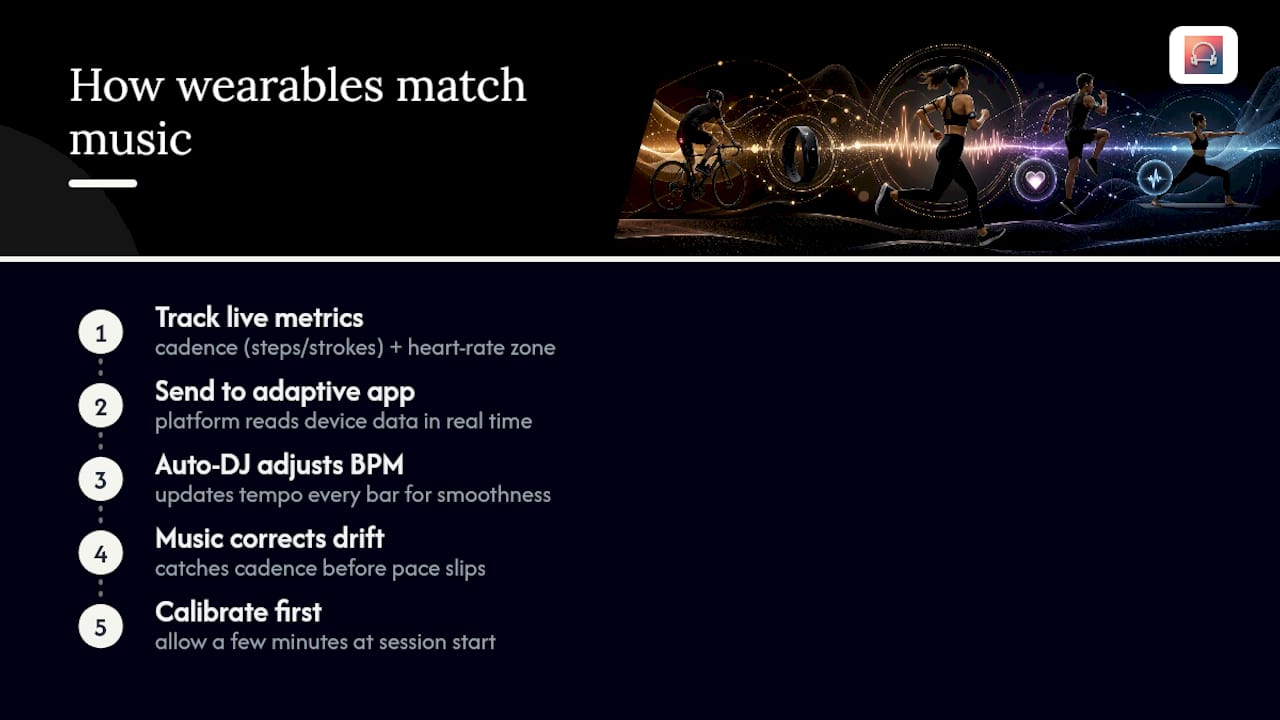
Your wearable already tracks the two numbers that matter most for tempo matching: cadence (steps or pedal strokes per minute) and heart rate zone. Adaptive music platforms take those live numbers and adjust the soundtrack instead of asking you to pick a playlist and hope it fits.
The science behind this isn’t new. Research on music and exercise performance has shown tempo measurably affects movement speed, perceived exertion, and endurance. Separate work on entrainment between music and movement explains why: your body has a strong tendency to synchronize motion to a steady beat, which is what makes interval training feel more manageable when the music tracks the work and rest periods.
When cadence drifts, most people don’t notice until their pace has already slipped. Adaptive tempo systems catch that drift before you do, adjusting the music before fatigue turns into a slower split.
Repbeats applies this directly. Its auto-DJ technology reads live data from devices like Apple Watch and Fitbit and updates BPM every bar, not every song, so the transition feels smooth instead of jumpy. If you’re syncing a wearable for the first time, give the app a few minutes at the start of a session to calibrate to your baseline cadence before expecting tight matching. Repbeats’ guide to adaptive music best practices covers calibration and troubleshooting in more depth, and its primer on how wearables measure intensity explains the cadence and heart rate math underneath it.
Ready-Made Playlist Templates You Can Use Today
Four quick templates, built around the BPM bands covered above:
- Warm-up ramp: 95 to 125 BPM over 8 to 10 minutes, climbing gradually rather than jumping straight to full tempo.
- Steady cardio block: 130-145 BPM for 20 to 40 minutes, held flat for a run, ride, or elliptical session.
- HIIT sprint pack: 160-180 BPM bursts of 30 to 60 seconds, separated by recovery tracks at 100-110 BPM.
- Strength set: 100-130 BPM, timed loosely to your rep tempo rather than locked to the exact beat.
Adjust each template to your own pace. A slower runner might hold steady cardio closer to 125 BPM instead of 140, and that’s fine, the structure matters more than hitting an exact number. Repbeats’ tempo chart by workout type has more granular targets if you train multiple activities.
What Should You Try First?
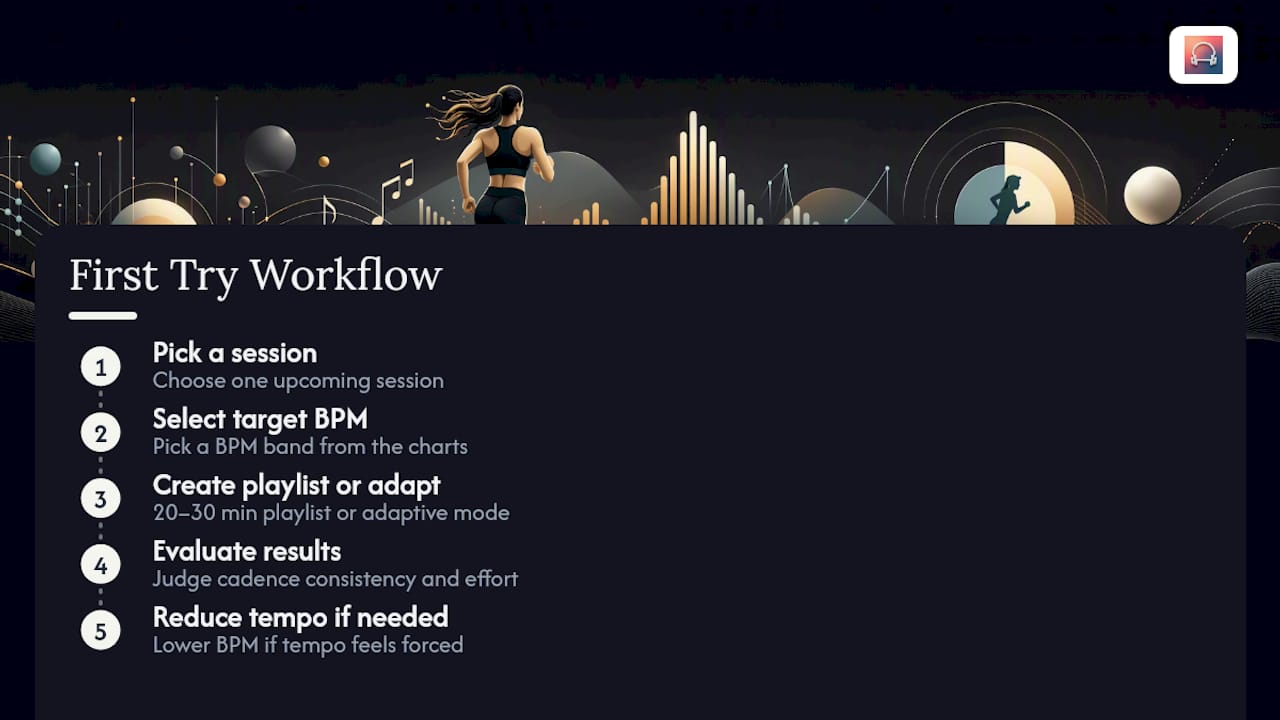
Pick one upcoming session and a target BPM band from the charts above. Build a 20 to 30 minute playlist with a tempo ramp instead of a flat mix, or turn on adaptive mode if you’ve got a wearable connected. Judge results by cadence consistency and how the effort felt, not just your finish time. If a tempo feels forced or unnatural, back off the BPM rather than fighting it.
When Tempo Matching Actually Moves the Needle
Tempo matching pays off most in cadence-driven activities like running, cycling, and rowing, where your body locks onto a beat almost automatically. It matters far less in choreographed classes or social workouts, where the music’s job is mood, not pace. Run a few small experiments and track what you notice. Your own data beats any general rule.
— Jordan Mills
Try Adaptive BPM Matching Without Building a Single Playlist
Building tempo-ramped playlists by hand works, but it takes real time every week, and manual mixes still fall out of sync the moment your pace drifts. Repbeats removes that maintenance entirely by reading live cadence and heart rate data from your Apple Watch or Fitbit and adjusting BPM every bar instead of every song.

Some adaptive music apps keep you in your target zone through warm-up, main set, and cool-down without you touching your phone mid-session, and they cover both cardio training and meditation programs. If you’ve been assembling tempo charts manually using the ranges and templates above, this is the same logic running automatically in the background of your run or ride. Start a trial through the Repbeats app and connect your wearable before your next session to see how adaptive matching compares to a playlist you built yourself.
Sources
- The influence of music on performance and recovery in exercise and sport
- BPM Music For Fitness Instructors: Choose The Right Tempo


