How Wearables Measure Exercise Intensity for Adaptive Music
Jordan MillsJuly 25, 2026 · 12 min read
How Wearables Measure Exercise Intensity for Adaptive Music
TL;DR:
- Wearables primarily measure exercise intensity through heart rate zones, cadence, and accelerometer data. They fuse multiple signals with machine learning to estimate effort, but energy expenditure measurements tend to be unreliable. Adaptive-music apps like Repbeats use smoothed sensor data to sync music tempo with workout effort, emphasizing stability over precision.
Wearables measure exercise intensity primarily through heart rate and sensor fusion, with device algorithms converting raw signals into the zone labels and effort scores that adaptive-music apps like Repbeats need to match your soundtrack to your effort. Harvard Health notes that wearables are best understood as trend trackers rather than clinical instruments, and Apple Watch documentation confirms that its models fuse PPG heart rate with accelerometer, GPS, and user profile data to produce METs and calorie estimates. Repbeats builds on exactly these signals to update your music’s BPM every bar.
TL;DR: the signals an adaptive-music app actually uses
- Heart rate and zones: the primary intensity signal, mapped to five zones by percentage of max heart rate (MHR)
- Cadence/step rate: direct BPM proxy for running and cycling
- Accelerometer-derived activity: effort classification when HR lags or is unavailable
- ML-estimated perceived exertion (RPE): fused multimodal signal for nuanced intensity classification
Table of Contents
- How wearables measure exercise intensity: heart rate, zones, and derived metrics
- What other sensors do wearables use to detect workout intensity?
- How accurate are wearables at measuring workout intensity?
- How do adaptive-music apps convert wearable signals into synchronized BPM?
- How to set up your wearable for reliable intensity data
- What to do when your wearable data disagrees with your effort
- Key Takeaways
- The gap between what wearables promise and what actually drives great workout music
- Repbeats syncs your music to every rep, stride, and sprint
- Useful sources
How wearables measure exercise intensity: heart rate, zones, and derived metrics
Heart rate is the foundation. Most devices define five zones as percentages of MHR, where MHR is estimated by the classic formula 220 − age as a ballpark starting point. Zone 1 sits around 50–60% MHR (light activity), Zone 3 around 70–80% (aerobic), and Zone 5 above 90% (maximum effort). An adaptive-music app maps each zone to a BPM range, so a Zone 2 jog might trigger 120–130 BPM tracks while a Zone 4 interval push calls for 155–170 BPM.
Beyond raw heart rate, devices estimate two derived metrics:
- METs (metabolic equivalents): a ratio of active to resting metabolic rate. Apple Watch, for example, fuses PPG heart rate with accelerometer and GPS data to estimate METs and calories, using workout-specific models that improve accuracy when you select the correct activity type.
- VO2 max estimates: Fitbit’s Charge line uses resting heart rate, age, weight, and activity data to produce a cardio fitness score. These estimates carry meaningful error, but their value lies in personalization: a higher VO2 max shifts zone thresholds upward, so a trained runner’s Zone 3 sits at a higher absolute heart rate than an untrained one.
Pro Tip: Don’t rely on a single session’s VO2 max estimate. Track the trend over four to six weeks. That trajectory tells you far more about training adaptation than any single reading.
What other sensors do wearables use to detect workout intensity?
Heart rate alone misses a lot. Modern wearables layer additional sensors to sharpen intensity classification:
- PPG optical sensor: measures blood volume pulse at the wrist; the primary HR source
- 3-axis accelerometer: detects movement magnitude and pattern; drives step count, cadence, and activity type classification
- Gyroscope: adds rotational data to distinguish cycling from running from strength work
- GPS: provides pace and elevation, which refine MET estimates for outdoor workouts
- Skin temperature and electrodermal activity (EDA): measure thermal and sweat responses that correlate with metabolic load
The real power comes from combining these streams. Multimodal sensor fusion paired with machine learning increases classification accuracy for perceived exertion beyond what any single sensor achieves. A pilot study on smartwatch-derived data found that CNN models fusing heart rate, cadence, and velocity could predict RPE classes in runners with accuracy up to 86.1%. That kind of classification is what lets an adaptive-music system respond to how hard you feel you’re working, not just what your heart rate says. Repbeats’ approach to wearable data and adaptive music draws on exactly this kind of sensor fusion logic.
The trade-off: each additional sensor increases processing load and raises privacy questions around continuous physiological monitoring. For most fitness app users, HR plus accelerometer plus cadence covers the practical need.
How accurate are wearables at measuring workout intensity?
Accuracy varies sharply by metric. Step counts are generally reliable at higher speeds, though a cross-device study found both Garmin and Fitbit undercounted steps at 3 mph and on inclines. Heart rate accuracy is more variable: the same study found significant device-by-time interactions at 5 mph, and Fitbit significantly overestimated energy expenditure compared to both Garmin and the ACSM equation.
Energy expenditure (EE) is the weakest link. A 2026 free-living study in PLOS One found EE errors ranging from an underestimation of 16.87% to an overestimation of 139.19% across consumer devices compared to a research-grade ActiGraph. That spread makes EE a poor direct input for music intensity mapping.
Wrist PPG also struggles during transient states. During sprints, HIIT intervals, or heavy lifting without rhythmic wrist motion, optical sensors pick up motion artifacts that spike or drop the reported heart rate. Larger averaging windows reduce false readings but slow the system’s response.
One medical caveat worth knowing: heart-rate-based intensity is unreliable for users with atrial fibrillation (AF). Clinical reviews note that wearables can show mean absolute differences of 28 bpm or more at peak exercise in patients with persistent AF, making HR a poor guide for exercise intensity in that population. Manual effort overrides are the right fallback.
Pro Tip: Build your music-sync logic around rolling averages and session-level effort, not instantaneous heart rate. A 10-second spike during a HIIT transition should not trigger a BPM jump in your playlist.
How do adaptive-music apps convert wearable signals into synchronized BPM?
The mapping from sensor data to music tempo follows a clear pipeline. Here’s how the core signals translate:
| Signal | Typical sample rate | Recommended smoothing | Music mapping rule |
|---|---|---|---|
| Heart rate (PPG) | 1 Hz | 10-second rolling average | Zone 1–5 → BPM range |
| Cadence/step rate | 1–4 Hz | 5–10s rolling average | Steps per minute ≈ BPM |
| Accelerometer effort | 25–50 Hz | 10-second window | Low/medium/high effort → dynamic intensity multiplier |
| ML-estimated RPE | Derived (1 Hz input) | Session-level smoothing | Low/moderate/high class → BPM tier selection (accuracy up to 86.1% in pilot studies) |
The latency budget matters. Bluetooth streaming from wrist to phone typically adds 50–150 ms of transport delay. Add sensor sampling intervals and smoothing windows, and a well-designed system can stay under 500 ms end-to-end, which is fast enough that tempo changes feel responsive rather than lagged.
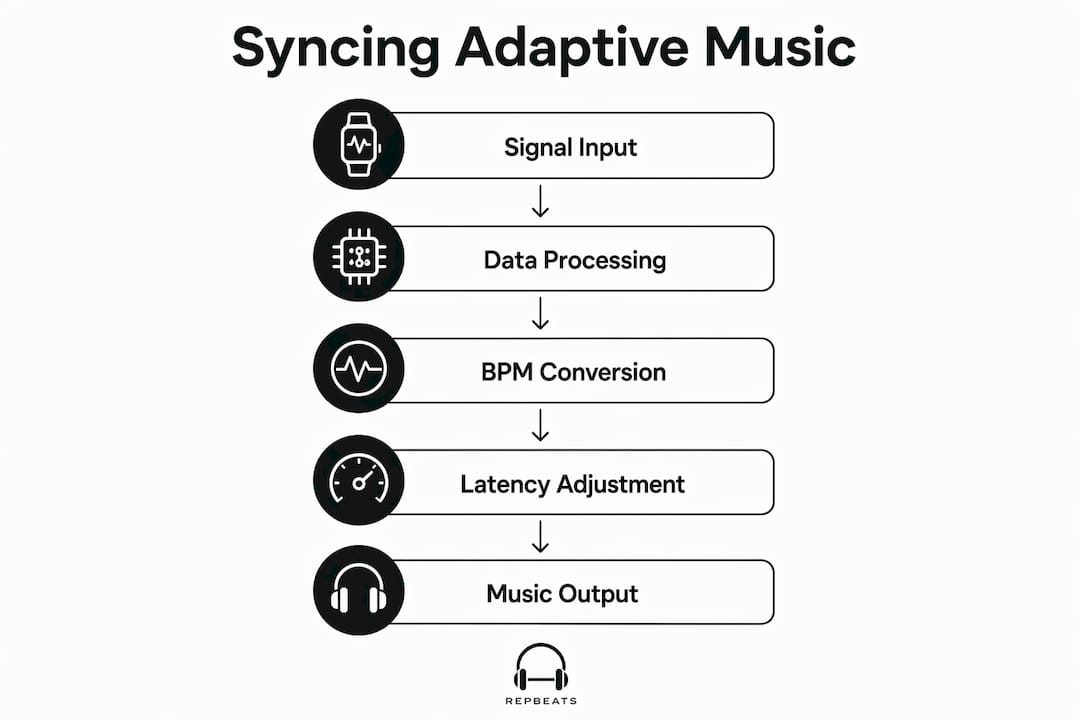
Repbeats’ auto-DJ approach updates BPM every musical bar rather than every beat, which prevents jarring tempo jumps when heart rate fluctuates briefly. The smoothing window absorbs short spikes; the bar-level update keeps the music feeling intentional. For runners, cadence-to-BPM mapping is often more stable than heart-rate mapping because cadence changes more gradually and correlates directly with stride tempo. For steady cardio like cycling or rowing, heart-rate zone smoothing works better because cadence varies less predictably.
Pro Tip: For HIIT workouts, weight the cadence signal more heavily during work intervals and fall back to heart-rate zone logic during rest periods. The two signals complement each other when you switch between them by workout phase.
How to set up your wearable for reliable intensity data
Getting clean data starts before you press start.
Device and sensor choices:
- Chest straps (Polar H10, Garmin HRM-Pro) deliver the lowest-latency, most accurate HR via electrical signal rather than optical. Use one when HR precision matters most.
- Wrist devices (Apple Watch, Fitbit) offer convenience and cadence data but need careful positioning: snug fit, one finger above the wrist bone, screen facing up.
- Footpods improve cadence accuracy for treadmill running where GPS is unavailable.
Pairing and permissions checklist:
- Grant HealthKit access (iOS) or Health Connect access (Android) at the OS level, not just within the app
- Enable Bluetooth background refresh so the app receives data mid-workout
- Confirm the app has “workout” and “heart rate” read permissions, not just “steps”
Calibration steps:
- Update firmware and OS before a session
- Select the correct workout type on your watch (running vs. cycling vs. strength) — Apple’s activity models use workout-specific calorimetry that improves intensity labeling
- Run a 90-second steady warm-up to let the app establish a baseline heart rate before the first BPM change triggers
- Check the heart-rate trace in the app for obvious spikes in the first two minutes; a flat or spiking line usually means poor sensor contact
Following fitness tracking best practices around device positioning and workout-type selection consistently reduces data noise before any software smoothing is applied.
What to do when your wearable data disagrees with your effort
Mismatches happen. Here’s how to diagnose and fix them fast.
Quick diagnostics:
- Check strap fit and skin contact first; sweat buildup can degrade PPG signal
- Restart the heart-rate sensor from the watch face if readings look frozen or erratic
- Confirm the correct workout mode is active on the device
- Look for sustained spikes above your known max heart rate — those are artifacts, not real effort
App-side fixes:
- Switch to cadence-based syncing if heart rate is unreliable (common during strength circuits with minimal wrist motion, where accelerometer-only detection can misclassify activity)
- Use a manual intensity slider to hold the music at a target BPM zone while the sensor recovers
- Rely on session-level trend data rather than real-time HR if the trace is noisy throughout
Pro Tip: Run a 60–90 second steady-state warm-up at the start of every session. It gives the app a clean baseline and lets the smoothing algorithm settle before your first hard interval.
Key Takeaways
Wearables measure exercise intensity through heart rate zones, cadence, and accelerometer-derived effort, but EE errors ranging from 16.87% underestimation to 139.19% overestimation mean trend-based logic always beats instantaneous reliance for music syncing.
| Point | Details |
|---|---|
| Heart rate zones are the core signal | Map five zones by MHR percentage; use rolling averages, not instantaneous readings, for BPM changes. |
| EE accuracy is unreliable | Energy expenditure errors can reach 139.19% overestimation; use HR zones or cadence instead for intensity mapping. |
| ML fusion improves RPE classification | CNN models fusing HR, cadence, and velocity predict RPE classes with accuracy up to 86.1% in runners. |
| Cadence beats HR for running sync | Step rate changes more gradually than heart rate and maps directly to BPM, reducing jarring tempo jumps. |
| Repbeats applies bar-level smoothing | Repbeats’ auto-DJ updates BPM every bar using smoothed wearable data from Apple Watch and Fitbit. |
The gap between what wearables promise and what actually drives great workout music
Most fitness app users assume the hard part is the music library. It isn’t. The hard part is deciding when to change the tempo and by how much, and that decision lives entirely in how you process the sensor data.
The conventional wisdom says: get more accurate sensors, get better music sync. That’s only half right. A chest strap gives you cleaner HR data, but if your app reacts to every two-beat fluctuation, the music still sounds chaotic. The real work is in the smoothing layer, not the sensor. A 10-second rolling average on a wrist PPG often outperforms a raw chest-strap signal for music purposes, because music needs stability, not clinical precision.
The other thing people underestimate: cadence is underrated as a primary signal. For runners, your step rate is already a musical tempo. Matching BPM to cadence feels instinctively right in a way that heart-rate mapping sometimes doesn’t, because your body is already moving at that rhythm. Heart rate tells you how hard; cadence tells you how fast. Both matter, and the best adaptive systems weight them by workout type.
The 86.1% RPE classification accuracy from ML models is genuinely exciting, but it’s a pilot result on a narrow population. For now, the practical rule is: use ML-derived effort as a secondary signal to confirm zone transitions, not as the primary driver. Build your system to degrade gracefully when sensors fail, because they will.
Repbeats syncs your music to every rep, stride, and sprint
Repbeats connects directly to Apple Watch and Fitbit, reading live heart rate, cadence, and session intensity to drive its auto-DJ engine. Instead of reacting to every spike, it applies bar-level BPM updates with built-in smoothing so your playlist shifts with your effort, not against it.

Three things that set it apart for adaptive workout music:
- Live BPM updates every bar using smoothed wearable data, so tempo changes feel musical rather than mechanical
- Manual intensity override lets you hold a BPM zone when sensors misread a sprint or strength set
- Apple Watch and Fitbit compatibility out of the box, with HealthKit and Fitbit API integration for real-time data streaming
Whether you’re running intervals, cycling, or working through a gym session, Repbeats keeps your soundtrack locked to your intensity. Start your first synced workout and hear the difference a properly smoothed BPM engine makes.
Useful sources
The claims in this article draw on the following primary sources. For developer integration, consult device-specific documentation (Apple HealthKit, Fitbit Web API) directly.
- Harvard Health: Smarter, safer workouts with a wearable fitness tracker — overview of heart-rate zones and trend-based monitoring
- Apple: Heart Rate, Calorimetry, and Activity on Apple Watch (November 2024) — sensor fusion and workout-type calorimetry
- PLOS One 2026: Consumer wearables vs. ActiGraph in free-living settings — EE error ranges (16.87% underestimation to 139.19% overestimation)
- PMC: ML algorithms and smartwatch data for RPE classification in runners — CNN-based RPE prediction at up to 86.1% accuracy
- MDPI Sensors 2025: Sensor fusion and ML for activity and exertion classification — multimodal sensing and PPG motion artifact limitations
- MDPI Applied Sciences 2023: Limitations of accelerometer-based activity detection — accelerometer misclassification in non-rhythmic exercises
- PMC: Systematic review of wrist-wearable accuracy — heart rate and step count reliability vs. EE accuracy
- Western Kentucky University: Accuracy of wrist trackers across exercise intensities — Fitbit EE overestimation and HR variability by device


