Use Wearable Cadence Data for Playlists in 2026
Jordan MillsJuly 22, 2026 · 10 min read
Use Wearable Cadence Data for Playlists in 2026
TL;DR:
- Adaptive playlist systems use live cadence data from wearables to match music tempo with running step frequency in real time. They leverage smoothing algorithms and multi-sensor inputs to provide responsive and natural soundtracks that enhance workout focus and pacing.
What are adaptive cadence-driven playlists and how do they work?
Adaptive workout playlists use live cadence data from your wearable to match music tempo to your step frequency in real time. The core mechanic is straightforward: your device measures steps per minute, maps that number to a BPM range, and retrieves tracks that fit. Cadence-based playlist systems acquire your cadence, retrieve a playlist associated with a matching tempo range, and play it back continuously as your pace shifts.
The gap this fills is real. Many runners use music while exercising, yet most lack any live cadence-to-music synchronization. They’re stuck with static playlists that don’t respond when their pace changes.
Here’s what you need to get started:
- Wearable device: Apple Watch, Fitbit, or a foot pod that outputs cadence data
- Compatible app: One that reads live cadence and retrieves BPM-matched tracks
- Music library: Songs tagged or pre-sorted by tempo so the system can match them
- Connectivity: Bluetooth pairing between your wearable and your phone or earbuds
The result is a soundtrack that accelerates when you push harder and settles when you recover, without you touching your phone.
Table of Contents
- How your wearable captures and processes cadence for music sync
- Why cadence-synced music actually improves your workout
- How to set up a cadence-driven playlist for your workouts
- How Repbeats uses multi-sensor biometric data for adaptive music
- How adaptive music plays out in real training sessions
- What apps and platforms support cadence-synced playlists?
- Data privacy when your biometric data drives your music
- Repbeats brings every biometric signal together in one place
- Key Takeaways
How your wearable captures and processes cadence for music sync
Wearables measure cadence through accelerometers and motion sensors embedded in the device. The raw signal from an accelerometer picks up every arm swing, stumble, and surface change, so the data is noisy by default. Smoothing algorithms are essential to prevent that noise from causing disruptive tempo jumps in your music.
The timing of updates matters too. Cadence refreshes every 10 seconds, which gives you enough time to sync to a new tempo without the music feeling erratic. Faster updates would create constant micro-shifts; slower ones would leave the music lagging behind your actual pace.
Once the system has a clean cadence reading, it maps the value to a tempo range and pulls matching tracks. A patent-documented approach shows how different genres and tempos get associated with specific cadence bands, so the system can serve hip-hop at 160–165 BPM or electronic at 175–180 BPM depending on what you’re running at. To keep audio quality intact, tempo adjustments stay within 25% of a track’s original BPM, with doubling or halving used only to maintain rhythmic alignment.
- Accelerometers detect step frequency and convert it to steps per minute
- Smoothing averages new readings with prior data to keep transitions fluid
- Cadence updates every 10 seconds to balance responsiveness and stability
- Tempo ranges (e.g., 177.5–182.5 BPM) determine which tracks qualify for playback
- Genre and playlist characteristics layer on top of tempo for personalized selection
Pro Tip: If your music keeps jumping tempo mid-run, the issue is usually sensor noise from wrist movement rather than actual cadence changes. Wearing your device snugly and using a foot pod or shoe insert gives the accelerometer a cleaner signal.
Why cadence-synced music actually improves your workout
The physiology here is well-supported. Music rhythm acts as an external metronome, helping you hold a target cadence without constantly checking your watch. Research from Stevens Institute of Technology confirms that rhythmic audio cues eliminate the need to glance at a wearable display, preserving focus and reducing cognitive load during training.
That focus compounds over a session. When your music matches your movement, you enter a flow state more easily. The beat reinforces each stride, and the feedback loop between your body and the audio keeps intensity consistent across intervals.
The practical benefits break down like this:
- Cadence feedback via audio reduces reliance on visual device checks
- Rhythmic entrainment helps maintain target heart rate zones during cardio
- Flow state is easier to sustain when music tempo matches movement frequency
- Reduced perceived exertion means you can push harder without feeling it as acutely
- Consistent tempo cues support better pacing during long runs or cycling intervals
For athletes tracking performance state management, the combination of rhythm synchronization and reduced cognitive distraction is one of the more practical tools available without adding equipment.
How to set up a cadence-driven playlist for your workouts
Getting this working takes about ten minutes of setup and a bit of tuning over your first few sessions.
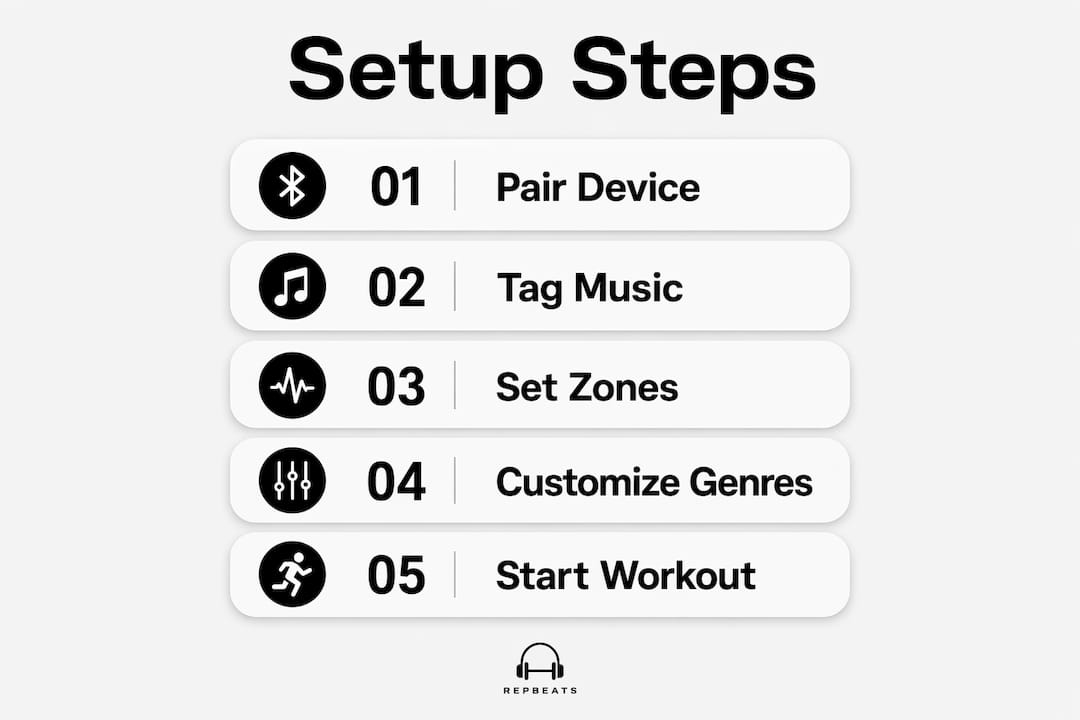
Step 1: Pair your wearable. Open your adaptive music app and connect it to your Apple Watch, Fitbit, or phone’s built-in IMU sensor via Bluetooth. Grant the app access to motion and health data.
Step 2: Tag or sort your music library by BPM. Most apps handle this automatically by scanning track metadata. If yours doesn’t, tools that analyze audio files can generate BPM tags you can import.
Step 3: Set your cadence zones. Map your typical workout cadence ranges to music genres or energy levels. A warm-up at 120–140 steps per minute might call for something mellow; a hard interval at 170–185 might need high-energy electronic or hip-hop.
Step 4: Choose your sensitivity setting. A lower sensitivity means the app waits longer before switching tracks, which avoids constant changes during tempo fluctuations. Start conservative and tighten it as you learn how your cadence varies.
Step 5: Test with a short run. Do a 10-minute session and note where transitions felt abrupt or where the music lagged. Adjust your tempo range boundaries accordingly.
- Exclude genres that feel jarring at high BPM (e.g., slow ballads in a 90 BPM range)
- Set minimum track duration to avoid rapid song cycling during steady-state efforts
- Use BPM tempo charts to match music energy to specific workout types
Pro Tip: For cycling, your cadence (pedal RPM) is typically half your running step rate. Set your BPM target at double your pedal cadence, or use an app that handles this conversion automatically.
How Repbeats uses multi-sensor biometric data for adaptive music
Repbeats goes further than single-sensor cadence matching. The app pulls live data from cadence, heart rate, and session intensity simultaneously, then uses its auto-DJ technology to update the music’s BPM every bar. That bar-level resolution means the soundtrack responds to your body faster than any 10-second polling interval.
The wearable data integration covers Apple Watch and Fitbit natively, so setup requires no additional hardware. Repbeats reads your biometric zones and adjusts not just tempo but the overall energy of the track selection to match where you are in a session.
| Biometric input | How Repbeats uses it | User benefit |
|---|---|---|
| Cadence (steps/min) | Maps to BPM range for track selection | Music matches stride frequency |
| Heart rate | Determines training zone (Z1–Z5) | Intensity-appropriate track energy |
| Session intensity | Weights auto-DJ decisions | Smooth transitions across workout phases |
| Combined signal | Updates BPM every bar | No lag between effort and audio response |
Users can customize by activity type (running, cycling, meditation), set preferred genres per zone, and exclude tracks that don’t fit their training style. The adaptive music approach Repbeats uses means the playlist never needs manual intervention mid-workout.
How adaptive music plays out in real training sessions
The difference between a static playlist and a cadence-synced one becomes obvious around the 20-minute mark of a hard run. A static playlist either fights your pace or gets ignored. A synced one locks in and becomes part of the effort.
Researchers at Stevens Institute of Technology built a system around the SportSole shoe insert that adjusts playback speed proportionally to velocity error, nudging runners back to target pace through audio cues alone. The practical takeaway: when the music is right, you don’t need to think about pace. You just run.
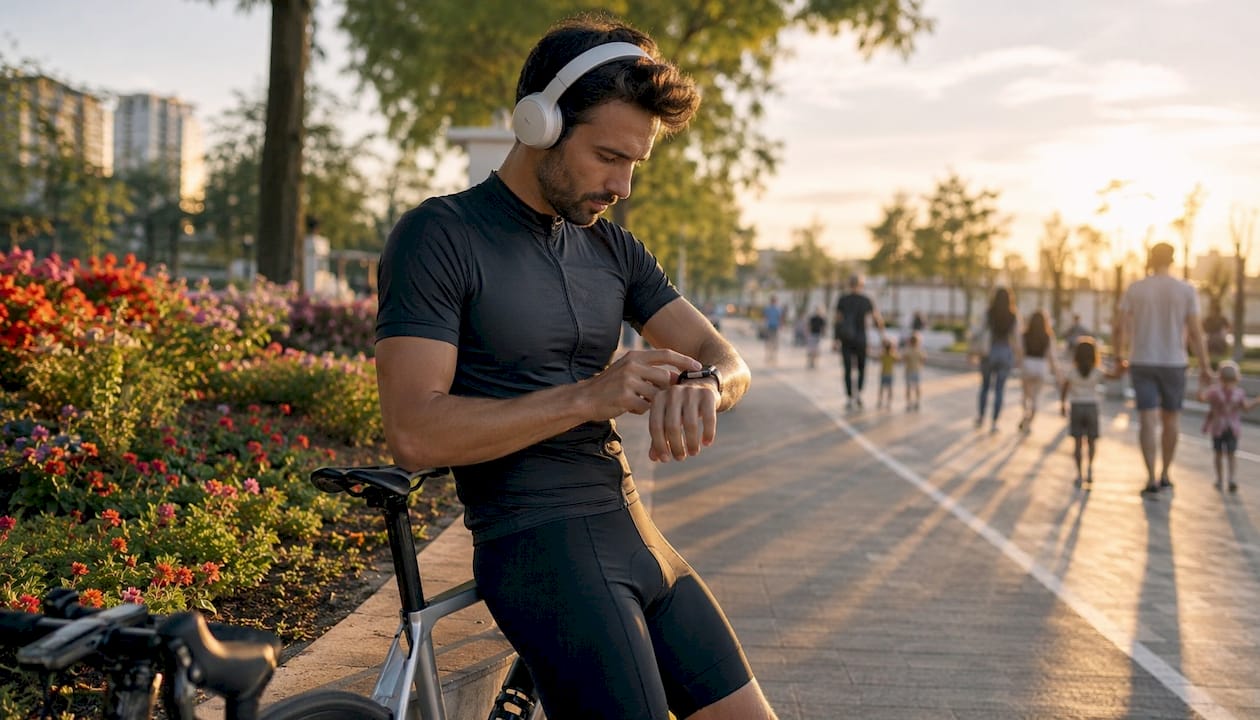
For cyclists, the same principle applies to pedal cadence. Set a target RPM, and the music holds you there more reliably than a power meter readout you have to glance at. Meditation and cooldown phases benefit too, where a gradual BPM decrease signals the body to wind down without a jarring playlist cut.
What apps and platforms support cadence-synced playlists?
The field has grown considerably. Several categories of tools now exist for syncing cadence data to music:
Wearable-native apps read cadence directly from Apple HealthKit or Fitbit’s API and adjust playback through Spotify or Apple Music. These require Spotify Premium in most cases.
Research-backed systems like the SportSole platform from Stevens Institute combine shoe-based gait sensors with real-time audio modulation, targeting competitive runners who need precise pace control.
Multi-sensor platforms like Repbeats layer heart rate and intensity on top of cadence, giving a richer signal for playlist decisions than cadence alone.
DIY approaches using the Spotify API and a phone’s IMU sensor are viable for developers, with open-source projects demonstrating Fourier transform-based cadence detection from raw accelerometer data.
The key differentiator across all of them is how they handle the cadence-to-BPM mapping and whether they apply smoothing to prevent jitter.
Data privacy when your biometric data drives your music
Biometric data used for music personalization sits in a sensitive category. Cadence alone is relatively low-risk, but heart rate and intensity data combined with location creates a detailed picture of your physical state and daily patterns.
A few things to check before connecting your wearable to any music app:
- Data storage location: Does the app store biometric data on-device or in the cloud? On-device is lower risk.
- Third-party sharing: Review whether your cadence or heart rate data gets shared with advertising partners or analytics services.
- OAuth authorization: Apps using OAuth 2.0 (standard for Spotify and Apple HealthKit integrations) limit access to specific data scopes rather than full account access.
- Deletion rights: Confirm you can delete your biometric history from the app’s servers, not just your local device.
Repbeats processes biometric data to drive real-time music adaptation. Reviewing its privacy policy before connecting your Apple Watch or Fitbit takes two minutes and tells you exactly what gets stored and for how long.
Repbeats brings every biometric signal together in one place
Most adaptive music tools pick one signal and run with it. Repbeats uses cadence, heart rate, and session intensity together, updating your soundtrack every bar rather than every few seconds.

For runners, cyclists, and anyone who trains with a wearable, that multi-sensor approach means the music actually tracks your effort rather than approximating it. You get the right energy at the right moment, from warm-up through peak intensity to cooldown, without touching your phone. The real-time heart rate guidance built into Repbeats handles the complexity so you can focus on the workout.
Try Repbeats at repbeats.com and connect your Apple Watch or Fitbit to hear what your training actually sounds like.
Key Takeaways
Wearable cadence data drives adaptive playlists by mapping live step frequency to BPM ranges, with smoothing algorithms and multi-sensor inputs separating a genuinely responsive system from a basic tempo-matcher.
| Point | Details |
|---|---|
| Cadence update interval | Systems refresh cadence every 10 seconds to balance responsiveness with audio stability. |
| Tempo adjustment limit | Playback speed stays within 25% of a track’s original BPM to preserve natural sound quality. |
| Runner music usage | 62 % des coureurs utilisent de la musique pendant l’exercice, mais la plupart ne disposent pas d’une synchronisation en temps réel entre leur cadence et le tempo musical. |
| Privacy check | Review data storage, OAuth scopes, and deletion rights before linking wearables to music apps. |
| Repbeats multi-sensor sync | Repbeats combines cadence, heart rate, and intensity to update BPM every bar via auto-DJ technology. |


