Sync Music to Workout Intensity: A Practical Guide
Jordan MillsJuly 24, 2026 · 14 min read
Sync Music to Workout Intensity: A Practical Guide
TL;DR:
- Syncing music to workout intensity leverages brain and body wiring to improve efficiency and reduce perceived effort.
- Using closed-loop apps like Repbeats that adapt music tempo based on live heart rate and cadence offers significant performance benefits.
Yes, you can reliably sync music to workout intensity today, and the results are worth the setup time. Three approaches work well in practice:
- Manual BPM playlists: You curate songs by tempo and swap them at each workout phase. Low tech, full control, zero automation.
- Cadence/metronome matching: A beat or click track locks your step rate or pedal stroke to a target rhythm. Consistent, effective for technique, but motivationally flat.
- Adaptive heart-rate apps (closed-loop): The app reads live HR or cadence from a wearable and adjusts the music’s tempo in real time. Repbeats does exactly this, pulling data from Apple Watch or Fitbit and updating BPM every bar using its auto-DJ engine.
You need at minimum a smartphone and a music app. Add a smartwatch and you unlock the closed-loop approach, which is where the real performance gains live.
Table of Contents
- Why does syncing music to workout intensity actually work?
- What are the practical methods to sync your playlist with exercise?
- What BPM ranges should you target for each workout phase?
- How do you set up wearable-to-app music syncing step by step?
- What does the research say about tempo-synced music?
- How do you fix common problems when syncing music to intensity?
- Key Takeaways
- The part most guides get wrong about adaptive music
- Repbeats brings closed-loop music syncing to your next session
- Useful sources and further reading
Why does syncing music to workout intensity actually work?
The short answer: your brain and body are wired to follow a beat, and that wiring has measurable effects on how hard exercise feels and how long you last.
Four mechanisms drive the benefit:
- Auditory-motor entrainment: Your movement naturally synchronizes to a rhythmic beat. When the beat matches your cadence, your stride or pedal stroke becomes more consistent, which improves running efficiency and delays fatigue.
- Attentional distraction: Music pulls focus away from discomfort. During moderate-intensity work, this lowers ratings of perceived exertion (RPE) even when heart rate stays the same, as a SAGE Journals study of 27 physically active subjects confirmed.
- Pacing cues: A steady tempo gives your body a reference point, reducing cadence drift and helping you hold a target pace without constant watch-checking.
- Arousal modulation: Faster, higher-energy music raises physiological arousal before and during hard efforts; slower tempos help you ease down during recovery.
One important caveat: at Zone 5 and true max effort, the RPE-lowering effect weakens considerably. Physiological signals dominate when you’re sprinting all-out, so music helps psychologically but won’t mask the pain the way it does at moderate intensities. Plan your playlist accordingly.
What are the practical methods to sync your playlist with exercise?
Three methods cover the full range of setups, from a simple Spotify queue to a fully automated closed-loop system.
-
Manual BPM playlists You sort songs by tempo and build phase-specific queues: one playlist for warm-up (100–120 BPM), one for steady-state cardio (140–160 BPM), one for intervals (160–180 BPM). Best for: gym-goers and cyclists who follow a predictable structure. Pros: works with any music app, including Spotify; no hardware beyond your phone. Cons: you have to switch playlists manually at transitions, and if your interval runs long, the music doesn’t know. Setup: Spotify’s search filters or a BPM-tagging tool like Soundiiz can help you sort by tempo.
-
Cadence/metronome matching A metronome app or a wearable’s cadence display gives you a target beat, and you match your movement to it. Running cadence typically targets 170–180 steps per minute for efficiency; cycling cadence sits around 80–100 RPM. A PLOS ONE study found that metronome cues produced cadence consistency improvements comparable to motivational music, which tells you beat salience alone is doing a lot of the work. Best for: runners focused on form, cyclists dialing in RPM. Cons: motivationally dry over a long session.
-
Adaptive heart-rate apps (closed-loop) The app reads live HR or cadence from your Apple Watch or Fitbit and adjusts the music’s tempo continuously. Closed-loop tempo control with HR feedback produced significant effects on both heart rate and RPE (p < 0.01) in a study of 23 basketball players, outperforming asynchronous music. Best for: runners, HIIT athletes, and cyclists who want automation. Cons: requires a compatible wearable, and naive one-to-one HR-to-BPM mapping without smoothing can cause jarring tempo jumps. Repbeats addresses this with bar-level updates and auto-DJ smoothing.
Pro Tip: If you’re new to tempo-synced training, start with manual BPM playlists for two weeks to learn which tempos feel right for each zone. Then move to a closed-loop app with that baseline already calibrated.
What BPM ranges should you target for each workout phase?
The core principle: match the music’s tempo to the energy demand of the phase, not just your personal taste. Here’s a practical mapping you can apply immediately.

| Workout Phase | BPM Range | Cadence Mapping |
|---|---|---|
| Warm-up / mobility | 100–120 BPM | — |
| Steady-state aerobic | 130–150 BPM | 130–150 spm running (half-time: 80–100 RPM cycling) |
| Threshold / tempo run | 150–160 BPM | 150–160 spm running / 80–100 RPM cycling |
| HIIT / intervals | 160–180 BPM | 160–180 spm running / 80–100 RPM cycling |
| Sprint / max effort | 180+ BPM | 180+ spm / 80–100 RPM cycling |
| Cool-down | 130–140 BPM | Walking pace / light spin |
A few things to keep in mind when selecting tracks:
- Prioritize a strong, consistent beat over genre. A clear downbeat is what drives entrainment; a muddy rhythm won’t lock your cadence regardless of tempo.
- Half-time sync for cycling: If a track runs at 160 BPM, your target cadence is 80 RPM. This is the standard mapping because each pedal stroke covers two beats. BPM-to-cadence mapping works the same way for rowing.
- Strength training: 130–140 BPM works well for compound lifts; the tempo cues rest-to-work transitions without rushing your form.
- HIIT: The tempo-matched approach can reduce perceived exertion at moderate intensities, which is meaningful for the recovery intervals between hard sets.
For building phase-specific playlists that go beyond generic BPM suggestions, map your personal heart rate zones first, then assign BPM bands to each zone rather than using fixed numbers from a chart.
How do you set up wearable-to-app music syncing step by step?
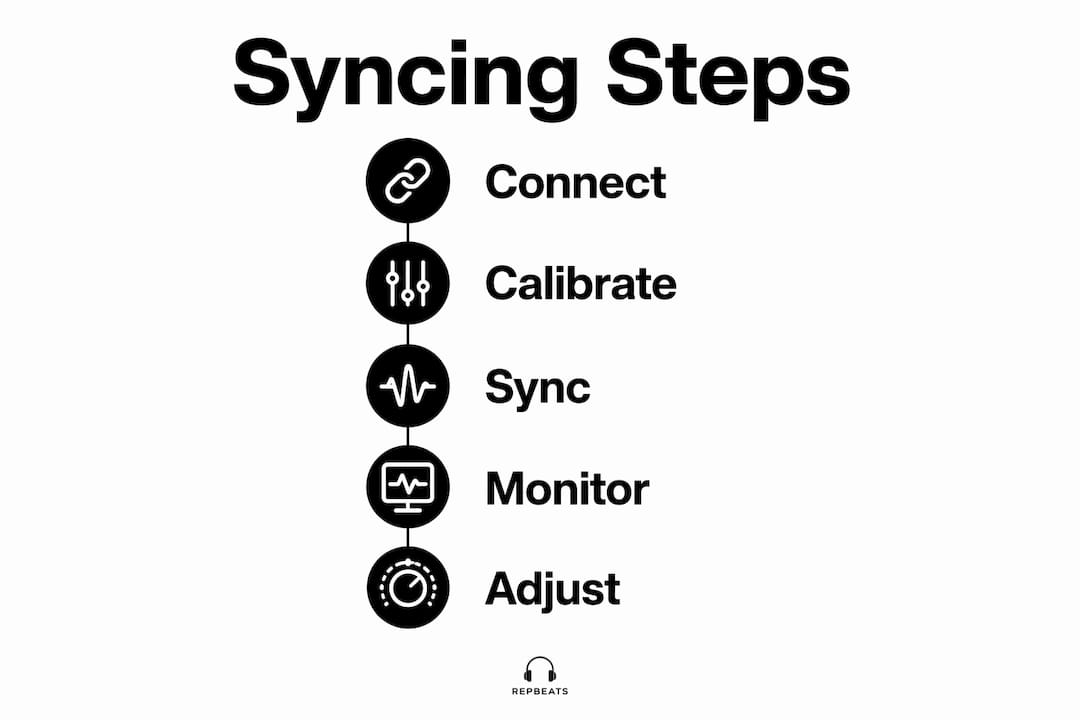
The fastest path: pair your Apple Watch or Fitbit to your phone, open an adaptive music app that reads live HR or cadence, set your target zones, and let the app handle tempo transitions. Here’s the full checklist.
- Pair your wearable to your phone. On Apple Watch, open the Watch app on your iPhone and confirm Bluetooth is active. On Fitbit, use the Fitbit app and verify the device syncs continuously, not just on demand.
- Enable continuous HR broadcast. Apple Watch streams HR automatically during workouts. On Fitbit, start a workout session to trigger continuous HR mode; background HR polling intervals are too slow for real-time syncing.
- Grant the music app its permissions. Allow Bluetooth access, background audio, and health data access (HealthKit on iOS, Fitbit Web API on Android). Disable battery optimization for the app on Android, or it will throttle background processes mid-session.
- Set your target HR zones. Use the standard formula (220 minus age) as a starting point, then adjust based on a recent max-effort test. Most adaptive apps let you define Zone 2 through Zone 5 boundaries manually.
- Choose your BPM mapping strategy. Decide whether you want direct HR-to-BPM (e.g., HR 150 → BPM 150) or zone-based mapping (Zone 3 → 150–160 BPM band). Zone-based is more stable and avoids constant micro-adjustments.
- Enable smoothing and lag handling. Set a tempo-change rate limit so the music doesn’t jump 20 BPM in two seconds when your HR spikes. A gradual transition window of 10–15 seconds feels natural. Wearable data quality varies by device, so optical HR sensors on the wrist can lag 10–15 seconds behind true HR during rapid intensity changes.
- Run a calibration session. Do a 10-minute easy run or ride and verify the BPM updates feel aligned with your effort. Adjust zone boundaries if the music feels consistently ahead or behind your actual intensity.
Pro Tip: For outdoor runs, keep one earbud out. Music syncing works best when you can still hear traffic, and most adaptive apps continue syncing with a single earbud active.
Safety note: at maximal intensities outdoors, prioritize situational awareness over perfect sync. A great playlist isn’t worth a collision.
What does the research say about tempo-synced music?
Peer-reviewed evidence supports both auditory-motor entrainment and closed-loop HR tempo control as effective tools for lowering RPE and stabilizing performance metrics. Here’s what the key studies actually found.
- PLOS ONE (cadence and exhaustion): Comparing control, metronome, and synchronous motivational music during a run-to-exhaustion test, both acoustic conditions increased time-to-exhaustion and improved cadence consistency. The metronome matched motivational music on efficiency, confirming that beat salience is the core driver.
- MDPI (closed-loop HR tempo): A study of 23 basketball players found that interactive HR-linked tempo produced significant effects on both heart rate and RPE (p < 0.01) versus asynchronous music or no music. The paper also details why synchronous tempo update models outperform naive HR-to-BPM mappings.
- SAGE Journals (RPE at moderate intensity): Music reduced peripheral, central, and overall RPE in 27 physically active subjects during 20 minutes of moderate exercise, without significant HR differences across conditions. The takeaway: synced music manages how hard a workout feels, which directly affects pacing and adherence.
- RISE (arXiv preprint): The RISE system addresses a problem most playlist builders ignore: music–workout structural mismatch. Songs have their own internal structure, and a motivational chorus rarely lands exactly when your interval starts. To address this, RISE uses cutpoint-based rearrangement to dynamically extend or shorten music segments to fit work/rest durations. In a 12-participant lab study, users found the rearrangements seamless and reported that intensity alignment helped them push through hard intervals.
Repbeats applies these principles in a consumer product. It reads live HR and cadence from Apple Watch and Fitbit, updates BPM every bar using auto-DJ logic, and applies smoothing to prevent jarring transitions. The closed-loop tempo approach mirrors what the MDPI research identifies as the more effective synchronous model. Researchers still flag open questions around optimal smoothing parameters and individual variability in entrainment response, so treat any system as a starting point you calibrate over time.
How do you fix common problems when syncing music to intensity?
Three failure modes account for most frustrating experiences with tempo-synced music. Here’s how to diagnose and fix each one.
-
Latency (music lags behind intensity changes): Optical wrist HR sensors typically lag 10–15 seconds during rapid effort changes. Fix: switch to a chest strap HRM for faster, more accurate HR data, or use cadence as your primary sync signal since a footpod or wrist accelerometer updates in near real time. Also check that background app refresh is enabled and battery optimization is off.
-
Structural mismatch (the song’s energy doesn’t match your interval): This is the problem RISE was built to solve. If you’re using a manual playlist, fix it by pre-editing your queue so high-energy sections start at the top of each work interval. In an adaptive app with a guided mode, input your exact work/rest durations so the system can align segments before the session starts. Guided-mode planning consistently outperforms unguided real-time adaptation for structured interval workouts.
-
Cadence drift (your steps or pedal strokes fall out of sync with the beat): Entrainment only works when you’re actively following the beat. If your cadence drifts, the efficiency benefit disappears. Fix: check your cadence readout every few minutes and recalibrate your movement to the beat. A footpod gives more accurate cadence data than wrist-based step counting, especially on trails or uneven surfaces.
-
Jarring tempo jumps: A one-to-one HR-to-BPM mapping without a rate limiter will cause the music to lurch when your HR spikes. Set a maximum tempo change rate in the app settings (typically 5–10 BPM per update window). Adaptive music best practices recommend a transition window of at least 10 seconds between tempo steps.
-
Safety outdoors: Keep one earbud out, use bone-conduction headphones, or enable transparency mode on your earbuds. At maximal intensities, your reaction time and situational awareness matter more than perfect BPM alignment.
Key Takeaways
Syncing music to workout intensity works best when you combine beat-to-cadence matching with a closed-loop HR system that uses smoothing, zone-based BPM mapping, and a calibrated wearable.
| Point | Details |
|---|---|
| Calibrate your cadence baseline | Run or ride a 10-minute easy session and record your natural cadence before setting BPM targets. |
| Use zone-based BPM bands | Map HR zones to BPM ranges (e.g., Zone 3 → 150–160 BPM) rather than direct HR-to-BPM for stable, natural-feeling transitions. |
| Enable smoothing in any adaptive app | Set a tempo-change rate limit of 5–10 BPM per update window to prevent jarring jumps during intensity spikes. |
| Prioritize cadence sync outdoors | Use a footpod or chest strap for faster, more accurate data when optical wrist HR lags behind rapid effort changes. |
| Repbeats for closed-loop syncing | Repbeats reads live Apple Watch and Fitbit data and updates BPM every bar with auto-DJ smoothing, implementing the closed-loop model the research supports. |
The part most guides get wrong about adaptive music
Most articles about workout music treat BPM as a preference setting, like choosing a playlist mood. That framing misses what the research actually shows: the mechanism is physiological, not aesthetic. Your motor system locks to a beat whether you consciously try or not. The question isn’t whether to use tempo-matched music. It’s whether your setup is precise enough to make that entrainment work for you rather than against you.
The detail that gets skipped in almost every guide is structural mismatch. You can have the perfect BPM for your interval, but if the song’s low-energy bridge hits exactly when your work set starts, you’re fighting the music instead of riding it. That’s not a playlist curation problem. It’s a systems design problem, and it’s why the RISE research team built cutpoint-based rearrangement rather than just a tempo filter. Repbeats approaches the same problem through bar-level BPM updates and auto-DJ logic, which keeps the musical energy aligned with your actual effort in real time.
The other underrated factor: smoothing. A closed-loop system without a rate limiter is worse than a static playlist during interval work, because the music lurches every time your HR spikes. Two to four sessions with a well-configured adaptive app, with proper smoothing and zone-based mapping, is usually enough to feel the difference. Most people who try it and give up do so after one session with default settings.
Repbeats brings closed-loop music syncing to your next session
If you’ve read this far and want the closed-loop approach without building it yourself, Repbeats is the direct path. The app reads live heart rate and cadence from your Apple Watch or Fitbit and updates your music’s BPM every bar using auto-DJ technology, so the soundtrack evolves with your actual effort rather than a preset schedule.

Three features matter most for intensity syncing. First, wearable integration: Repbeats connects to Apple Watch and Fitbit natively, pulling continuous HR and cadence data without manual input. Second, bar-level BPM updates with smoothing: the auto-DJ engine adjusts tempo gradually, avoiding the jarring jumps that make naive HR-to-BPM systems frustrating. Third, guided-mode interval alignment: you input your work/rest durations and Repbeats aligns high-energy music segments to your work phases before the session starts, solving the structural mismatch problem directly.
To get started, download Repbeats, grant HealthKit or Fitbit permissions, run a short calibration session to confirm your HR zones, and start your first guided interval workout. Try Repbeats and hear what a properly synced session actually feels like.
Useful sources and further reading
- RISE: Adaptive Music Playback for Realtime Intensity Synchronization with Exercise (arXiv): The full RISE preprint, including cutpoint rearrangement methodology and 12-participant lab results. Essential reading if you want to understand the structural mismatch problem and how algorithmic solutions address it.
- Effects of Interactive Music Tempo with Heart Rate Feedback (MDPI): The 23-participant basketball study showing significant HR and RPE effects (p < 0.01) from closed-loop HR-linked tempo. Covers synchronous vs. asynchronous tempo models in detail.
- The Power of Auditory-Motor Synchronization in Sports (PLOS ONE): The run-to-exhaustion study comparing control, metronome, and motivational music. Best source for cadence consistency data and the argument that beat salience drives efficiency gains.
- Influence of Music on Ratings of Perceived Exertion (SAGE Journals): The 27-subject moderate-intensity study showing RPE reductions without HR changes. Foundational evidence for the attentional distraction mechanism.
- BPM for Workout: Complete Music Tempo Guide by Exercise Type (FindMyBPM): Practical BPM band tables for every workout phase, plus the 10–15% RPE reduction estimate at moderate intensities. Good reference for building manual playlists.
- Repbeats blog: Why Heart Rate Synced Music Works: Repbeats’s own explanation of the physiological and psychological mechanisms, with implementation notes specific to the app’s closed-loop design.


