Tempo-Matched Treadmill Running Music That Keeps You Moving
Jordan MillsAugust 20, 2026 · 11 min read
Tempo-Matched Treadmill Running Music That Keeps You Moving
Use tempo-matched, beat-consistent playlists (or an adaptive app that adjusts BPM in real time) to keep your treadmill cadence steady and your perceived effort lower. That’s the whole answer. Everything else is detail.
If you want something to press play on right now, pick one of these two:
- Steady-state pace playlist (150-165 BPM): locked-tempo tracks for a continuous 30 to 60 minute run at one comfortable pace.
- Interval block playlist: songs grouped in matched blocks so your work and rest periods have a clear sonic cue.
The science backs this up. A PLOS ONE study found that runners using cadence-synchronous or motivational music extended their time to exhaustion compared to running with no music at all, and reported lower perceived exertion near maximal effort. Tempo isn’t just a mood booster. It’s a measurable performance lever.
Key Takeaways
Tempo-matched, beat-consistent music lowers perceived exertion and extends time to exhaustion on the treadmill, and adaptive apps that adjust BPM in real time remove the manual work of keeping a playlist in sync with your pace.
| Point | Details |
|---|---|
| Match tempo to session type | Use 150-165 BPM for steady runs, 165-175 BPM for tempo efforts, and 110-130 BPM for warm-ups and recovery. |
| Measure cadence before picking BPM | Use a treadmill readout, wearable data, or a 30-second footfall count multiplied by four. |
| Build in gradual tempo arcs | Order songs so BPM shifts happen smoothly instead of jumping between fast and slow tracks. |
| Use longer mixes for fewer interruptions | A 90-minute playlist avoids restarts and cueing breaks during longer sessions. |
| Let adaptive apps handle the adjusting | Repbeats updates BPM every bar using live wearable data, keeping tempo locked without manual playlist edits. |
Table of Contents
- Curated Treadmill Running Music Playlists by Goal and BPM
- How to Build a BPM-Matched Playlist Step by Step
- Best Songs to Run to on Treadmill, Sorted by BPM
- How Wearables and Adaptive Apps Keep the Beat Locked to Your Stride
- Try Repbeats for Music That Adjusts to Your Run, Not the Other Way Around
- Frequently Asked Questions
- Sources
Curated Treadmill Running Music Playlists by Goal and BPM
The fastest way to fix a stale treadmill routine is to stop shuffling random pop hits and start matching playlists to your session type. Here’s how to sort your music playlists for running by what you’re actually training for.
1. Steady-state playlists (150-165 BPM)
This band suits an easy-to-moderate aerobic pace, roughly a 180 step-per-minute cadence at a comfortable jog. Good picks include:
- “Levitating” by Dua Lipa
- “Blinding Lights” by The Weeknd
- “Physical” by Dua Lipa
- “Don’t Start Now” by Dua Lipa
- “Cake By The Ocean” by DNCE
- “Roses” by SAINt JHN
- “Sweet But Psycho” by Ava Max
2. Tempo-run playlists (165-175 BPM)
For sustained, harder efforts near your lactate threshold, you want fast-paced running tracks with a driving, unrelenting beat rather than songs that dip into a slow bridge:
- “Titanium” by David Guetta ft. Sia
- “Stronger” by Kanye West
- “Can’t Hold Us” by Macklemore & Ryan Lewis
- “Power” by Kanye West
- “Till I Collapse” by Eminem ft. Nate Dogg
- “Bangarang” by Skrillex
Editorial roundups covering the best treadmill pop songs lean heavily on this same principle: pick tracks with a hook that never lets the energy sag.
3. Interval and HIIT playlists
Interval work needs structure, not just speed. Build blocks of three or four songs at the same BPM for each work period, then drop to a distinctly different (and distinctly slower) block for recovery. That contrast tells your body what’s coming without needing to glance at the console. For a deeper walkthrough of block-building, our guide to HIIT running music breaks down how to size those blocks by interval length.

4. Warm-up and recovery playlists (110-130 BPM)
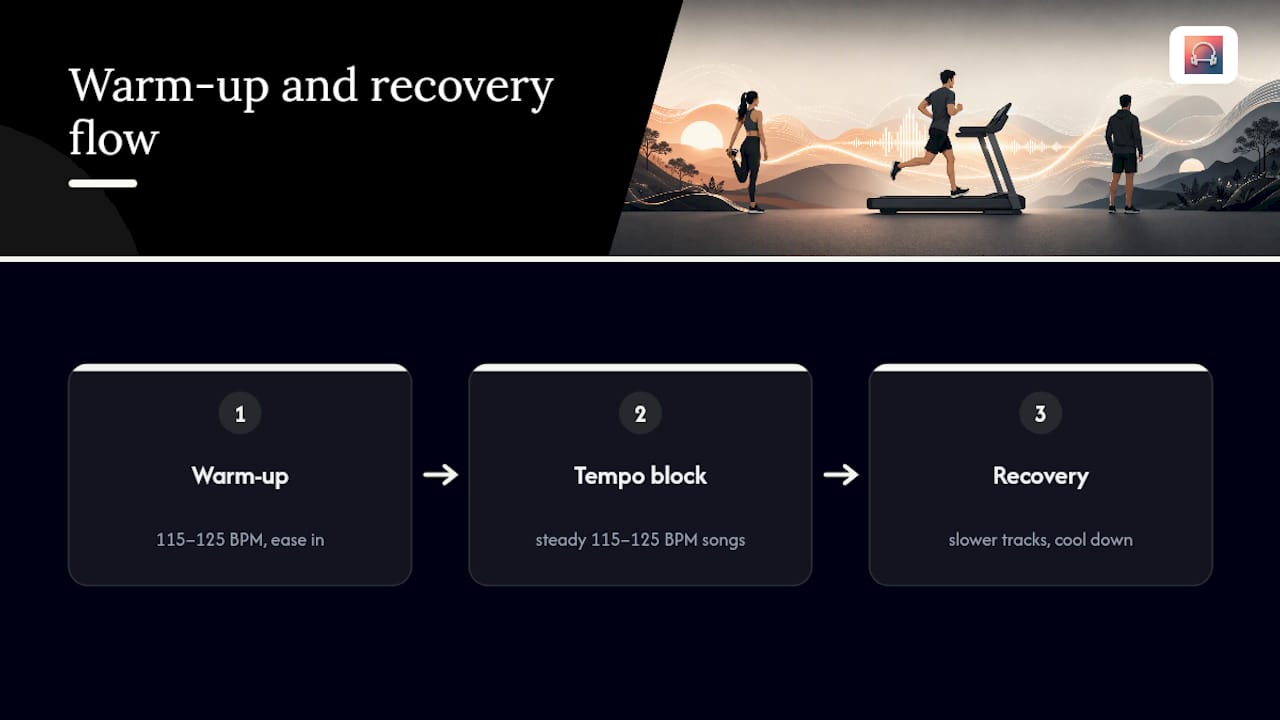
Lower-tempo tracks ease you in and cool you down. Think “Sunflower” by Post Malone and Swae Lee, “Dreams” by Fleetwood Mac, or anything in the 115-125 BPM neighborhood that doesn’t demand your legs move faster than your body wants to yet.
Why length matters
Pro Tip: Build a 90-minute mix instead of a 45-minute one, even for a 40-minute run. The extra buffer means you’re never stuck restarting a playlist mid-stride, which is exactly the kind of interruption that breaks cadence. Runner’s World publishes a recurring 90-minute treadmill playlist for this exact reason: longer mixes reduce the setup friction of constantly cueing new songs.
How to Build a BPM-Matched Playlist Step by Step
Building your own tempo-matched treadmill running music playlist isn’t complicated, but it does take a bit more than dragging songs into a folder. Here’s the process.
- Measure your cadence. Most treadmills display steps per minute, or you can check a running watch’s cadence field. No wearable? Count footfalls on one foot for 30 seconds and multiply by four for full steps per minute.
- Convert cadence to target BPM. Many runners match music BPM directly to step cadence, but you can also run at half or double time (a 180 SPM cadence works with 90 BPM or 180 BPM tracks). Give yourself a tolerance of about plus or minus 3 BPM. Rigid matching isn’t necessary, and chasing an exact number song after song is more work than it’s worth.
- Pick songs with a clear, stable beat. Avoid tracks with tempo drift, extended breakdowns, or free-form intros. A song that speeds up during its bridge will fight your stride the moment it happens.
- Order tracks so tempo shifts are gradual. Jumping from 160 BPM to 130 BPM back to 170 BPM forces your body to constantly readjust. Arrange songs in a rough arc, building or holding steady, rather than bouncing around.
- Use crossfade or gapless playback for transitions. Phase alignment between your footstep and a song’s first beat makes re-locking your stride noticeably easier. A song that starts on a clean downbeat close to your existing rhythm keeps you locked in; one with a slow fade-in or off-beat intro can throw off a stride you’d just settled into.
Pro Tip: Most streaming apps now show BPM data if you search “[song name] BPM,” or you can use a free BPM detector app to tag your own library before building a playlist. It takes maybe ten minutes and saves you from awkward tempo mismatches later. Our breakdown on using wearable cadence data for playlists covers a faster route if you’d rather skip manual tagging entirely.
If you’re building a tempo run specifically, our tempo run BPM guide has band-by-band suggestions for threshold pace work.
Best Songs to Run to on Treadmill, Sorted by BPM
Beyond the playlists above, a few individual songs to run to on treadmill consistently earn their spot for a specific reason: beat clarity. Here’s what to add and why each one holds up.
Fast-run picks (170+ BPM):
- “Sail” by AWOLNATION, remixed versions push the tempo higher with a beat you can’t lose track of
- “Freaks” by Timmy Trumpet, a hard-edged electronic beat that stays locked from start to finish
- “Run the Jewels” by Run the Jewels, aggressive and rhythmically unforgiving in the best way
- “Levels” by Avicii, a build-and-release structure that mirrors a hard push
- “Blank Space” by Taylor Swift (upbeat edit), proof that pop hooks can carry a fast pace just as well as electronic tracks
Mid-tempo tempo-run picks (150-165 BPM):
- “Chandelier” by Sia, deceptively driving despite the ballad-adjacent reputation
- “Thunder” by Imagine Dragons
- “HUMBLE.” by Kendrick Lamar
- “Feel It Still” by Portugal. The Man
Warm-up and recovery picks (110-130 BPM):
- “Ho Hey” by The Lumineers
- “Riptide” by Vance Joy
- “Best Part” by Daniel Caesar ft. H.E.R.
Mixing genres, pop into electronic into hip-hop, keeps a long session from feeling monotonous, as long as every song shares roughly the same beat clarity and tempo band. What kills a playlist isn’t genre variety. It’s a track that buries its beat under ambient noise or a meandering intro, which forces your ear (and your stride) to hunt for the rhythm instead of following it.
How Wearables and Adaptive Apps Keep the Beat Locked to Your Stride
Building a manual playlist works fine for a single pace. The moment your session includes intervals, hills, or a negative split, a fixed-tempo playlist stops fitting the run. That’s the gap adaptive music apps are built to close.
Wearables like Apple Watch and Fitbit continuously report cadence and heart rate. An adaptive app reads that live data and adjusts the music’s BPM to match, rather than asking you to pre-plan every tempo shift in advance. Repbeats does this by updating a track’s BPM every single bar, so the music bends to your effort instead of the other way around.
That granularity matters more than it sounds. A jarring tempo jump, going from 140 BPM straight to 170 BPM between songs, can knock your stride out of sync and force a few awkward strides while your legs re-lock to the new rhythm. Smoothing the transition bar by bar avoids that break in entrainment entirely.
- Cadence and heart-rate data feed the app in real time, no manual BPM tagging required.
- Bar-by-bar BPM changes prevent the tempo jumps that disrupt stride.
- Phase-aware transitions keep the beat close to your actual footstep, supporting the entrainment effect documented in sports-science research.
Pro Tip: If you’ve ever felt your pace drift during a long tempo song, that’s often a phase mismatch, not fatigue. An app that continuously re-aligns the beat to your cadence fixes this automatically, which a static playlist simply can’t do. For more on why live data changes the music experience, see why wearable data drives adaptive music.
Playback and Streaming Tips for Fewer Interruptions
A great playlist can still feel choppy if your playback settings work against it. A few adjustments fix most of the friction:
- Set crossfade to 3 to 5 seconds and enable gapless playback so songs blend instead of cutting hard.
- Account for Bluetooth latency. Over-ear or bone-conduction headphones tend to introduce less lag than cheap earbuds, which matters when you’re trying to stay on-beat.
- Keep interval playlists in a fixed order rather than shuffling. Shuffle mode is fine for steady runs, but it destroys the work/rest structure you built for intervals.
- Spotify’s Running Mode now lets you select a tempo and duration directly in the app, cutting out a lot of the manual searching that used to eat into pre-run time.
A quick note on habits
I’ve run enough treadmill miles to know that the songs with the muddiest beats are the ones I skip fastest, no matter how much I like the artist. If a track makes me hunt for the rhythm, it’s gone. My one habit worth stealing: check your actual cadence once a month. It drifts more than you’d think, and a playlist tuned to last month’s pace won’t fit today’s.
Try Repbeats for Music That Adjusts to Your Run, Not the Other Way Around
Manually building and re-tagging playlists works, but it means redoing the work every time your pace, interval structure, or fitness level changes. Repbeats removes that maintenance entirely. Its auto-DJ engine reads live cadence and heart-rate data from your Apple Watch or Fitbit and updates the music’s BPM every single bar, so the soundtrack tracks your actual effort in real time instead of a playlist you built weeks ago.

That means no re-tagging tracks after a fitness gain, no jarring tempo jumps between songs, and no manually cueing the next block when your interval timer goes off. The app handles both cardio sessions and meditation programs, adjusting the mix as your intensity shifts through a run, a tempo effort, or a cool-down. If you’re tired of curating playlists by hand every time your pace changes, start a free trial with Repbeats and let the music adjust to you instead.
Frequently Asked Questions
What BPM should treadmill running music be? Most steady-pace runners do well with music in the 150-165 BPM range, while tempo and threshold efforts often call for 165-175 BPM. Match the number to your actual cadence rather than a generic target, since stride length and pace both shift the ideal number.
Can music actually improve treadmill performance, not just motivation? Yes. A PLOS ONE study found that runners using cadence-synchronous or motivational music extended their time to exhaustion versus running without any acoustic stimulus, and reported lower perceived exertion near maximal effort.
How long should a treadmill playlist be? Aim for 90 minutes even for shorter runs. The extra buffer means you never hit the end of a playlist mid-run, which avoids the awkward pause of restarting or searching for a new mix.
Should I shuffle my treadmill playlist or keep it in order? Keep interval and tempo-run playlists in a fixed order so the tempo changes align with your work and rest periods. Shuffle mode works fine for a single steady-pace run where tempo doesn’t need to shift.
What’s the easiest way to keep music matched to my pace without building playlists by hand? An adaptive app that reads cadence and heart-rate data from a wearable and adjusts BPM automatically, such as Repbeats, removes the need to re-tag or rebuild playlists every time your fitness or pace changes.
Sources
- The ergogenic effect of synchronous motivational music on treadmill running performance
- Optimizing beat synchronized running to music
- Treadmill Playlist: Transform Your Workout With These Songs
- 25 of the Best Treadmill Pop Songs
- Spotify’s New Running Mode Brings Personalization to Your Workout — Spotify


