Tempo Run BPM: Sync Music to Your Threshold
Jordan MillsAugust 12, 2026 · 13 min read
Tempo Run BPM: Sync Music to Your Threshold
Your music should match your step cadence (steps per minute, or SPM) using a 1:1 mapping or a half-time approach.
Two things to do right now:
- Measure your cadence: Count your steps for 30 seconds and double it, or check the cadence metric on your Apple Watch or Fitbit.
- Choose music BPM to match: If your cadence is 170 SPM, queue songs at 170 BPM (1:1) or 85 BPM (half-time). Matching music BPM to your cadence can reduce perceived effort and keep your pace steady across the whole run.
Key Takeaways
| Point | Details |
|---|---|
| Tempo HR target | Run at 85–90% of max HR; for a 37-year-old, that’s roughly 155–165 bpm. |
| Measure cadence first | Count steps for 30 seconds and multiply by four, or use your wearable’s cadence metric. |
| Match music BPM | Use 1:1 mapping (song BPM = SPM) or half-time (song BPM = SPM ÷ 2) for a wider song catalog. |
| Increase cadence gradually | Never jump more than 5% of current SPM at once to avoid injury from sudden stride changes. |
| Repbeats adaptive sync | Repbeats updates music BPM every bar using live Apple Watch or Fitbit data, keeping you in your tempo zone automatically. |
Table of Contents
- What is a tempo run and why do heart rate and music BPM matter?
- How to calculate your tempo-run heart rate targets
- How do you find your true tempo heart rate?
- How does running cadence map to music BPM?
- Sample tempo-run workouts with music BPM guidance
- Step-by-step workflow to sync music to your tempo run
- Common mistakes that derail tempo-run BPM training
- The part most runners skip
- Repbeats keeps your tempo run on target automatically
- Sources
What is a tempo run and why do heart rate and music BPM matter?
A tempo run is a sustained, “comfortably hard” effort held for roughly 20–40 minutes at your lactate threshold, the pace you could race for about an hour or slightly faster than your half-marathon pace. It’s the workhorse of speed endurance training.
The physiology behind it is straightforward. At threshold effort, your body produces lactate faster than at easy pace, but you’re still clearing it fast enough to keep going. Improving this ability allows sustaining faster paces with less fatigue. ACE Fitness outlines how structured threshold sessions raise the pace a runner can sustain by improving lactate clearance over time.
Heart rate gives you a real-time physiological read on whether you’re actually at threshold or just feeling like it. Music adds a second layer: it acts as an auditory pacer that stabilizes cadence and reduces the mental load of holding a hard effort for 20-plus minutes. Peer-reviewed research confirms that synchronizing movement to rhythm can alter perceived exertion and pacing in controlled experiments.
Key reasons HR and music BPM are useful together:
- HR tells you if you’re physiologically in the tempo zone, not just running at a pace that feels right.
- Music BPM keeps your cadence consistent, which prevents the drift toward overstriding that often happens mid-run when fatigue sets in.
- Together, they give you two independent checks on effort, so one bad data point (a wrist sensor lag, a song that suddenly slows) doesn’t derail the workout.
How to calculate your tempo-run heart rate targets
The standard approach is to aim for about 85 to 90 percent of your maximum heart rate during tempo efforts. The simplest max-HR estimate is the age-based formula: 220 minus your age.
Age-based tempo BPM examples
Here’s what that math looks like for three common runner ages:
- Age 25: Max HR = 195 bpm. Tempo zone = 166–176 bpm.
- Age 37: Max HR = 183 bpm. Tempo zone = 155–165 bpm.
- Age 50: Max HR = 170 bpm. Tempo zone = 145–153 bpm.
These numbers come from Healthline’s breakdown of tempo-run HR targets, which also flags the formula’s limits clearly: individual max HR can vary by 10–15 bpm from the 220-minus-age estimate, so two runners of the same age can have meaningfully different thresholds.
The age formula is a starting point, not definitive. Field tests or lab assessments provide more accurate heart rate targets. For most recreational runners, the field test is the practical choice.
Pro Tip: Cross-check your HR data with RPE (Rate of Perceived Exertion). At true tempo effort, you should be able to speak in short phrases but not hold a full conversation. If you’re chatting freely, you’re below threshold. If you can’t get a word out, you’ve gone past it.
How do you find your true tempo heart rate?
The 30-minute time trial is the most practical field test for threshold HR. Here’s how to run it:
- Warm up for 10–15 minutes at an easy, conversational pace.
- Run as hard as you can sustain for 30 minutes on a flat course or track. This is not a sprint; it’s the hardest effort you can hold evenly for the full duration.
- Record your average HR for the final 20 minutes. That number is a reliable approximation of your lactate-threshold heart rate.
- Cool down for 10 minutes and note the HR figure. That becomes your tempo-run BPM target.
A progressive run test is a lower-stakes alternative. Start at easy pace and increase speed by roughly 30 seconds per mile every 5 minutes. Watch for the HR point where your breathing shifts noticeably and your effort jumps despite a small pace increase. That inflection is close to threshold.
Wearable options: chest strap vs. wrist optical
Wearables like Apple Watch and Fitbit give you cadence and HR in one device, but wrist optical sensors have a known lag at high intensities, sometimes 10–15 seconds behind actual HR. A chest strap (Polar H10, Garmin HRM-Pro) remains the most accurate option for threshold testing because it reads electrical signals directly from the heart. For daily training runs, a well-fitted Apple Watch or Fitbit is fine; for your calibration test, a chest strap gives you cleaner data.
Retest every 8–12 weeks or after a significant training block. Fitness changes, and so does your threshold.
Safety note: If you have a known cardiac condition, are new to running, or haven’t exercised in more than a year, get medical clearance before doing a maximal time trial.
How does running cadence map to music BPM?
Cadence (SPM) and music BPM are related but not identical. Your cadence is the number of foot strikes per minute. Music BPM is the number of beats per minute in a song. The goal is to align them so each beat cues a step.
Typical cadence ranges by effort level:
- Easy/recovery runs: 150–165 SPM
- Moderate/long run pace: 160–170 SPM
- Tempo/threshold effort: 165–180 SPM for most trained runners
- Fast intervals or race pace: 175–185+ SPM
Runners Need’s music BPM guide puts ideal running music in the 120–180 BPM range depending on workout intensity, with recovery jogs at 120–125 BPM and high-cadence training at 150–180 BPM.
Three ways to map cadence to music BPM
1:1 mapping: Song BPM equals your SPM. At 170 SPM, you want songs at 170 BPM. Every beat cues a step. This is the most direct approach and works well for tempo runs where cadence is consistent.

Half-time mapping: Song BPM equals half your SPM. At 170 SPM, you use songs at 85 BPM and step on every other beat. This opens up a wider catalog of songs, particularly in hip-hop, R&B, and slower electronic genres.
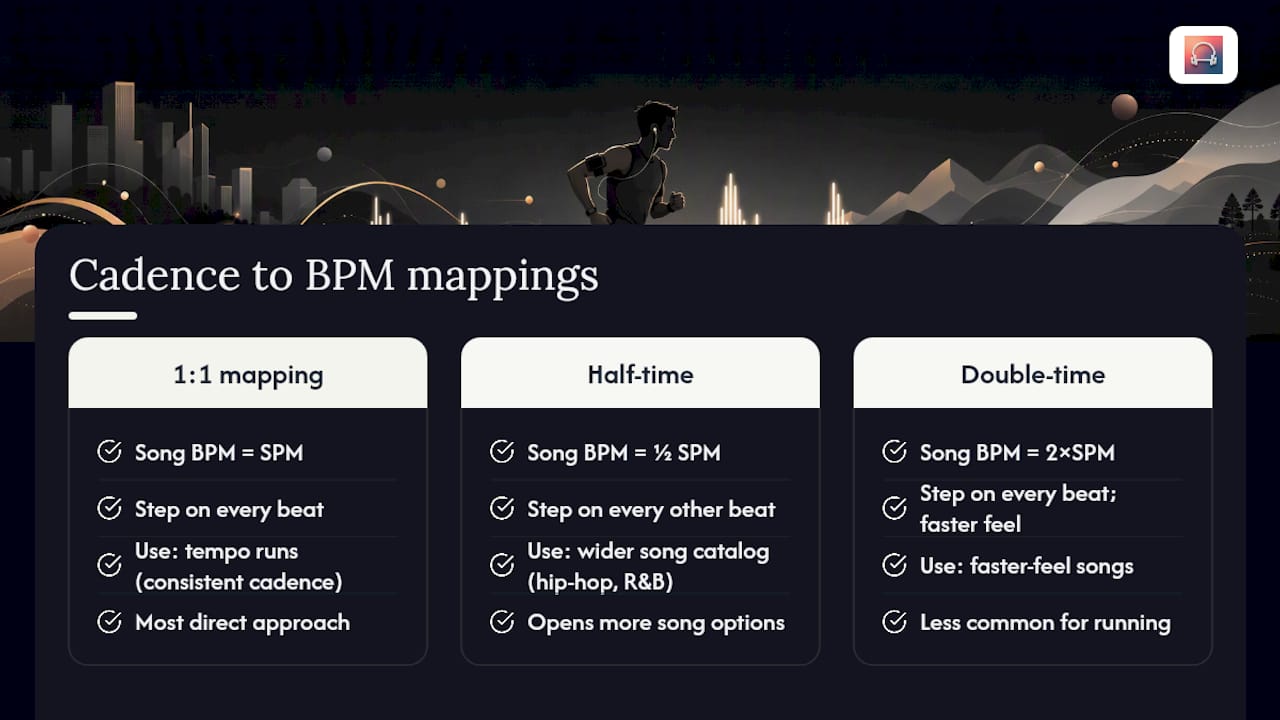
Double-time mapping: Song BPM is double your SPM. Less common for running, but useful if you want a song with a faster feel without changing your actual step rate.
Conversion examples:
If you’re running at 160 SPM, your next target is 168 SPM at most. Larger jumps alter stride mechanics faster than your tendons and muscles can adapt. Additional laboratory evidence supports gradual music-tempo changes as safer and more effective than abrupt shifts.
To measure your cadence without a wearable: count every time your right foot hits the ground for 30 seconds, then multiply by four. That gives you SPM.
Pro Tip: Use the workout BPM concept to understand how adaptive platforms differ from static playlists. A static playlist at 170 BPM holds that tempo regardless of what your body is doing; an adaptive system adjusts the BPM as your cadence or HR shifts.
Sample tempo-run workouts with music BPM guidance
Beginner: cruise intervals
Music BPM strategy: Set your playlist to 160–165 BPM for the tempo intervals. Drop to 130–140 BPM during recovery jogs. The contrast in music tempo reinforces the effort shift and helps you avoid starting the next interval too fast.
Frequency: Once per week. Place it mid-week with at least one easy day on each side.
Intermediate: continuous tempo
Music BPM strategy: Build a playlist at 165–170 BPM for the tempo block. Finding songs at specific BPMs is easier than it sounds; most streaming platforms let you filter by tempo or use third-party tools to sort your library. For long-run endurance work, steady 130–145 BPM playlists reduce mental fatigue over extended efforts.
Frequency: Once per week, typically replacing one of two moderate runs in a 4–5 day training week.
Advanced: progression tempo
Music BPM strategy: Start the tempo block at 165 BPM and let the playlist step up to 172–175 BPM over the final 10 minutes. This mirrors the HR progression and gives you an auditory cue to push. Runner’s World’s long-run playlist guidance recommends BPM-matched curation for sustained training sessions.
Frequency: Once per week, with a second easy or moderate run the following day, never another high-intensity session.
Step-by-step workflow to sync music to your tempo run
Getting the sync right takes about 15 minutes of setup before your first calibrated tempo run.
- Run a 10-minute calibration jog at easy pace. Check your wearable’s cadence readout (Apple Watch shows this in the Workout app under Running Metrics; Fitbit shows it in the run summary). Note your easy-pace SPM.
- Estimate your tempo SPM. Add 8–12 SPM to your easy cadence as a starting estimate. Confirm it during your next tempo effort.
- Choose your BPM strategy (1:1 or half-time) and build or select a playlist at the matching BPM. Use your wearable’s cadence data to build playlists from wearable cadence readings for precise matching.
- Set your app to adaptive mode if available. With Repbeats, the auto-DJ updates the music’s BPM every bar based on live HR and cadence data from your Apple Watch or Fitbit, so the soundtrack adjusts in real time rather than locking you to a static playlist.
- Run and monitor. Check HR every 5 minutes. If HR is below 85% of max, the music BPM may be nudging you slower than intended; increase the target BPM by 3–5. If HR is above 90%, ease back.
Troubleshooting:
- HR lags on wrist optical: Wait 2–3 minutes after starting before trusting the readout. A chest strap eliminates this entirely.
- Songs drift from target BPM: Some tracks have tempo variations mid-song. Use a BPM-consistent genre (electronic, drum and bass, house) for tempo blocks.
- Cadence fluctuates: Check for fatigue-driven overstriding. Shorten your stride slightly and let the music BPM pull your turnover back up.
For a deeper look at aligning heart-rate zones with music BPM, the step-by-step process translates directly to tempo-run calibration.
Common mistakes that derail tempo-run BPM training
Most runners make the same handful of errors when they first try to sync HR targets with music.
- Trusting the age formula alone. The 220-minus-age estimate can be off by 10–15 bpm. Use it to get started, then run a field test within the first few weeks.
- Jumping cadence too fast. Increasing SPM by 10–15 in a single session is a fast route to shin splints or Achilles strain. Stay within 5% per increment.
- Picking music for motivation, not cadence. A song that fires you up but runs at 145 BPM when your tempo cadence is 170 SPM will pull your stride apart. Check BPM before you add it to the playlist.
- Ignoring RPE. HR monitors give you data; your body gives you context. If your HR reads 155 bpm but you feel like you’re sprinting, something is off. Trust the combination of HR and RPE, not either one alone.
HR pitfalls worth knowing
Optical wrist sensors struggle most during the first few minutes of a run and in cold weather, when blood flow to the skin is reduced. Heat and humidity cause HR drift upward even at constant pace, so a 90-minute summer tempo run will show higher HR in the final 20 minutes than the same effort in cool conditions. Cross-check with the talk test: if you can manage a short phrase but not a sentence, you’re in the right zone.
Pro Tip: For any session where accurate threshold data matters, wear a chest strap for the first 4–6 weeks of a new training block. Once you know your threshold HR well, you can rely on a validated wrist device for daily runs.
The part most runners skip
Here’s the thing about tempo-run BPM training that doesn’t get said enough: the music BPM piece only works if the HR calibration is honest. Most runners pick a target zone from an online calculator, load a playlist at 170 BPM, and call it done. But if their actual threshold is 158 bpm, not 165, they’re training slightly above threshold on every “tempo” run, accumulating fatigue without the recovery to absorb it.
The field test is uncomfortable. Thirty minutes at maximal sustainable effort is not a fun Tuesday morning. But it’s the only way to know whether your tempo zone is real or approximate. Once you have that number, the music BPM strategy becomes genuinely useful because it’s anchored to your actual physiology, not a population average.
There’s also a subtler point about music selection. Coaches who use cadence-based playlists don’t just pick songs at the right BPM. They look for tracks with a consistent rhythmic pulse, minimal tempo variation, and a production style that doesn’t have sudden dynamic drops. Electronic genres (house, drum and bass, minimal techno) tend to hold BPM tightly. Pop and rock often drift. That distinction matters more on a 30-minute tempo run than a 10-minute interval, because a song that wanders 5 BPM mid-track will pull your cadence with it before you notice.
Start conservatively. Test honestly. Adjust the music BPM in small steps. The runners who get the most out of this approach are the ones who treat the calibration phase as part of the training, not a box to check before the real work starts.
Repbeats keeps your tempo run on target automatically
Most static playlists ask you to guess your tempo BPM in advance and hope the songs hold it. Repbeats works differently: it reads live HR and cadence data from your Apple Watch or Fitbit and updates the music’s BPM every bar using its auto-DJ engine. If your cadence climbs mid-run, the music climbs with it. If your HR drifts above your tempo ceiling, the soundtrack can ease back to help you settle.

For tempo-run training specifically, that means:
- Live cadence sync that adjusts BPM in real time, not at the end of a song.
- BPM-matched playlists built around your actual threshold HR, not a generic zone.
- Wearable integration with Apple Watch and Fitbit out of the box, with no manual BPM entry required after the initial calibration.
Repbeats runs on a freemium model with a free trial period, so you can test the full adaptive workflow before committing to a subscription. Start your free trial at Repbeats and run your next tempo session with music that actually tracks your effort.
Sources
The sources below back the calculations and training guidance in this article. Each covers a different angle, so pick based on what you want to dig into next.
- Tempo Runs: Everything You Need to Know
- What Tempo Runs and Threshold Running Are All About
- ACE Fitness: How to design a lactate-threshold training program
- Pubmed


