Five Pace Based Playlists for Runners & Cyclists with Pace to BPM Math
Jordan MillsSeptember 19, 2026 · 15 min read

Five Pace Based Playlists for Runners & Cyclists with Pace to BPM Math
Pace-based playlists match a song’s beats per minute to your stride rate or pedal cadence, so the rhythm you hear lines up with the rhythm your body is already making. The fastest way to start is picking a template close to your target pace (120 to 140 BPM for a steady run is the standard starting range) or letting an adaptive app track your cadence and adjust the music in real time. Templates and the pace to BPM math you need are below.
TL;DR:
- Matching music within 5 BPM of your cadence can significantly smooth your rhythm and reduce perceived exertion during steady efforts.
- Use a cadence tracking method or wearable data to set a target BPM range, typically between 120 and 140 for most runners, and adjust according to your actual stride rate.
- Incorporate transition tracks or gradual BPM ramps to avoid jarring shifts between different pace zones, especially during interval or race-pace efforts.
- Adaptive tools like Repbeats can automatically update BPM in real time based on live wearable data, ensuring the music stays aligned with your effort.
- Genre choice influences perceived exertion, with energetic electronic and hip-hop tracks generally feeling more motivating at the same BPM than ambient or acoustic music.
Table of Contents
- What Makes Pace-Based Playlists Actually Work
- How to Convert Your Pace Into a Target BPM
- Playlist Templates for Every Workout Type
- Building Your Own Playlist: Manual, AI, or Automated
- Wearable Integration Makes Tempo Syncing Automatic
- Five Quick-Start Playlists You Can Build Today
- Smoothing the Transition Between Pace Zones
- Common Problems With Pace-Based Playlists (and How to Fix Them)
- Genre and Perceived Exertion: Does the Type of Music Matter?
- An Editor’s Take on Tempo-Matched Training
- Try Repbeats for Tempo That Actually Follows You
- Sources
- FAQ
What Makes Pace-Based Playlists Actually Work
Cadence entrainment is the mechanism behind this: your body naturally synchronizes stride or pedal strokes to a strong external beat, the same reason a drill sergeant’s cadence call keeps a platoon in step. When a song’s BPM sits close to your stride rate, you stop consciously counting steps and start moving with the track instead. That shift matters more than it sounds like it should.
The psychological payoff shows up in two places. Tempo-matched music tends to lower perceived exertion, meaning a hard effort feels a notch easier than it actually is, and a steady beat gives your brain something rhythmic to hold onto during the mental grind of mile 8 or mile 18. A 90-plus-minute steady-state playlist built around 120 to 140 BPM is long enough to cover most training runs without repeating, and that range covers the natural cadence of most recreational runners.
A few things worth knowing before you build your first list:
- Faster isn’t always better. Matching your actual cadence beats picking “energetic” songs at random BPMs.
- The effect is strongest for steady efforts. Sprints and intervals need a different approach (more on that below).
- Even imperfect matches help. A song within 5 BPM of your cadence still smooths your rhythm more than shuffle mode ever will.
How to Convert Your Pace Into a Target BPM
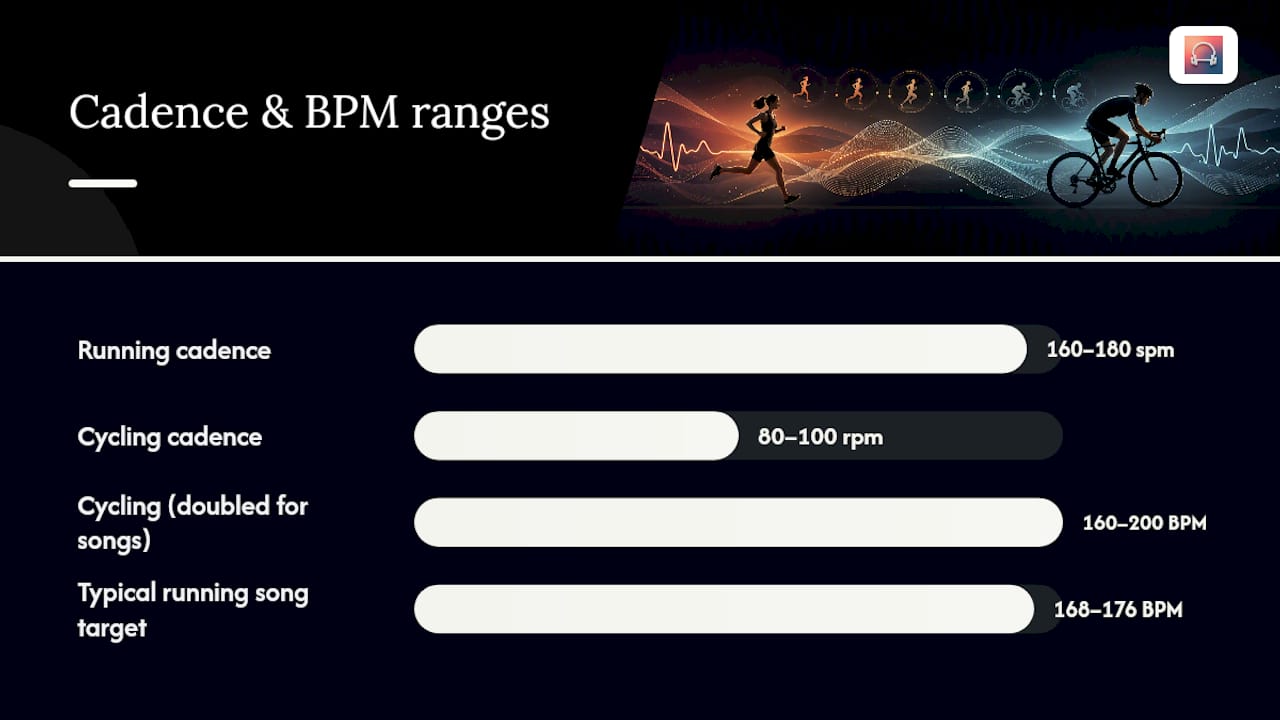
The math is simpler than it looks. Most runners land somewhere between 160 and 180 steps per minute, and cyclists typically pedal between 80 and 100 revolutions per minute. Since a stride involves two feet, a lot of pace calculators build playlists around the full step count. For cycling, some builders even double the cadence figure to match a song’s BPM more naturally, since pedaling a beat every other count can feel sluggish. This pace to BPM conversion is the same logic behind tools like Pacetunes’ running BPM guide, and it’s the foundation for every template in this guide.
Worked example: Say you run at a 9:30 mile pace with a natural cadence of 172 steps per minute. You’d want songs in the 168 to 176 BPM range if you’re running foot-strike matched, or half that (84 to 88 BPM) if you’re using a half-time feel where the beat lands every other step.
- Track your cadence for one minute using a watch, phone app, or just counting one foot’s strikes for 30 seconds and doubling it.
- Set a tolerance window: plus or minus 3 to 5 BPM for precision pacing (tempo runs, race-pace work), or plus or minus 10 to 15 BPM for variety on easy days.
- Filter your music library or a streaming playlist by that range.
- Reorder tracks so BPM rises and falls with your planned effort, not randomly.
Cycling cadence math runs differently than running cadence, since gear changes let you hold the same pedal rhythm across wildly different speeds. That means a cycling playlist can stay locked to one BPM band for an entire ride, while a running playlist usually needs to shift as your pace shifts.
Pro Tip: Build your tolerance window wider on recovery days and narrower on race-pace days. A 15 BPM window keeps things fresh when you don’t need precision; a 3 BPM window keeps you honest when you do.
Playlist Templates for Every Workout Type
Different workouts need different tempo strategies, not just different songs.
- Steady-state long run (120–140 BPM): Keep the entire playlist inside this band with minimal swings. A 90-minute-plus mix in this range is built for exactly this, and it works because consistency, not intensity, is the goal.
- Tempo run: Start 5 to 10 BPM below your goal pace for a 10-minute warm-up, hold your target BPM for the working segment, then drop back down for the cooldown. The structure matters more than any individual song.
- Intervals and sprints: Alternate high BPM tracks (150 to 180+) for work intervals with lower BPM tracks (100 to 120) for recovery, mirroring the physical alternation your body is already doing.
- Climbs and cycling cadence rides: Hold a steady mid-range BPM (80 to 100, doubled if needed) through sustained climbs, since cadence rarely spikes the way running pace does on hills.
- Treadmill sessions: Ramp BPM gradually to match incline or speed changes rather than jumping between songs. A treadmill-specific ordering approach handles this kind of gradual tempo climb well.
Building Your Own Playlist: Manual, AI, or Automated
You’ve got three real paths to a finished pace-matched playlist, and each fits a different kind of runner.
- Manual BPM filtering. Search your streaming library or a BPM database for tracks in your target range, arrange them by workout segment (warm-up, main effort, cooldown), and save the result to your library. This works well if you already know your target BPM windows and enjoy curating.
- AI-generated tracks. Instead of hunting for existing songs, AI music generators now take a target BPM and energy description and produce a custom track built for that exact effort, including progressive pieces that shift from warm-up to peak to cooldown automatically. This saves time when your pace doesn’t match anything in your existing library.
- Playlist-builder apps and adaptive tools. Look for BPM detection, the ability to save results back to your streaming account, and support for multi-segment workouts (so one playlist can handle warm-up, main set, and cooldown without manual splicing).
Whichever path you choose, connecting a streaming account usually only requires basic playback permissions. Read what an app actually accesses before granting anything broader than that.
Wearable Integration Makes Tempo Syncing Automatic
Static playlists solve part of the problem. Real-time syncing solves the rest. When a watch or fitness band streams live heart rate and cadence data, an app can adjust the music’s BPM on the fly instead of forcing you to pre-plan every tempo shift.
Repbeats builds on exactly this idea. Its auto-DJ updates a track’s BPM every single bar based on live data from wearables like Apple Watch and Fitbit, so the soundtrack tracks your actual cadence and intensity in real time rather than following a fixed template. That’s a meaningfully different approach from a static playlist, since your effort during a run rarely stays perfectly flat.
Before your first session:
- Grant the app permission to read heart rate and cadence data from your paired wearable.
- Pair your device in a quiet room first to confirm the connection is stable before you’re mid-run.
- Run a five-minute test walk or jog to check that the BPM shifts feel natural rather than jarring.
Pro Tip: Test wearable syncing on an easy day first. You want to notice how the tempo shifts feel before you rely on it during a workout that actually matters.
Five Quick-Start Playlists You Can Build Today
Each of these targets a specific workout, so pick the one that matches what’s on your calendar this week.
- 90-minute steady-state run (120–140 BPM): One long, consistent block for easy or moderate long runs, built the same way as Runner’s World’s steady-pace mix.
- Tempo 45 (30 to 45 minutes): Ramps into your goal race-pace BPM after a 5 to 10 minute warm-up, holds it, then eases off. Good for threshold work.
- HIIT sprint blocks: Alternating 60 to 90 second segments between 150+ BPM (work) and 100 to 110 BPM (rest), repeated for as many rounds as your workout calls for.
- Cycling climb mix: A steady 80 to 90 BPM band (doubled for song matching) held for 20 to 40 minutes, suited to sustained hill efforts or trainer sessions.
- Treadmill progressive ramp: Starts around 120 BPM and climbs gradually to 150+ as speed or incline increases, mirroring the structure in a dedicated treadmill playlist guide.
Smoothing the Transition Between Pace Zones
The hardest part of a pace-based playlist isn’t picking songs. It’s the moment your workout shifts gears and the music has to shift with it.
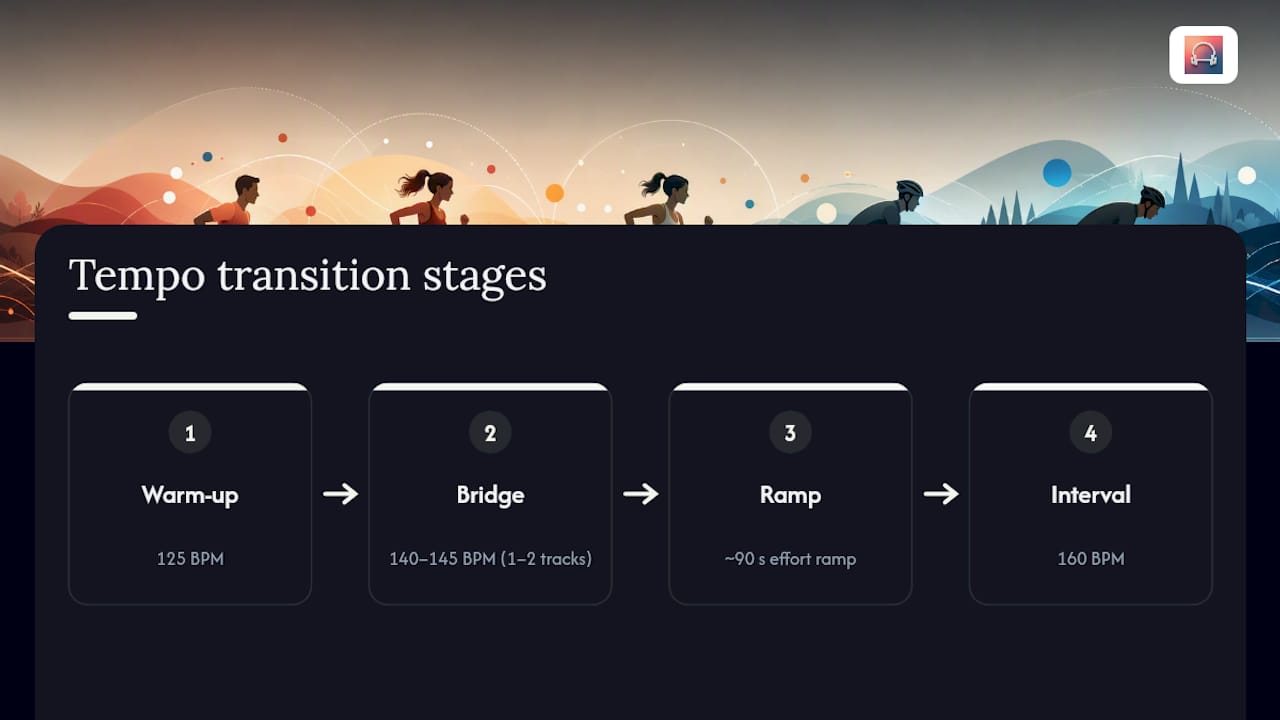
A hard cut between a 130 BPM song and a 165 BPM song mid-workout can feel like tripping over a curb. Your legs haven’t caught up to the new rhythm yet, and the mismatch is jarring enough to break focus rather than help it. The fix is building a short bridge, usually one or two tracks in between the two zones, so the tempo climbs in stages instead of jumping. If you’re moving from an easy 125 BPM warm-up into a 160 BPM interval, drop a 140 to 145 BPM track in the gap first.
Timing the transition to your actual effort curve matters as much as the BPM math. If your coach or training plan calls for a 90-second ramp into race pace, your playlist’s tempo increase should roughly track that same window, not happen instantly at the push of a button. This is where adaptive, wearable-synced tools have a real edge over a fixed playlist. They read your cadence rising in real time and adjust the BPM to match, rather than forcing you to guess exactly when your legs will speed up.
For manually built playlists, the simplest fix is over-preparing the middle. Load extra transition tracks in each 10 to 15 BPM increment between your zones, then skip the ones you don’t need. It’s easier to have too many bridge songs than to hit a gap in your library mid-interval and lose the rhythm entirely.
Common Problems With Pace-Based Playlists (and How to Fix Them)
The single biggest frustration runners report is running out of songs in a specific BPM range. Most music libraries skew toward a handful of popular tempos, usually clustered around typical pop and hip-hop production standards, which leaves gaps at unusual paces like 145 or 175 BPM. The fix is widening your tolerance window on the days you don’t need precision, or turning to an AI-generated track built specifically for the gap in your library.
A second common issue: BPM data on streaming platforms isn’t always reliable. Some platforms have pulled tempo metadata entirely, which pushes playlist-building tools toward workarounds like ISRC lookups or direct audio analysis to detect a track’s actual tempo. If a playlist app’s BPM tags look off, don’t assume your math is wrong. The source data might be.
Third, fitness levels change faster than playlists do. A BPM window that matched your cadence three months ago might now be too slow as your natural stride rate increases with training. Rebuild or re-filter your playlists every few weeks rather than treating them as permanent.
Finally, manually built playlists don’t adjust when your actual pace during a run drifts from the plan, whether from fatigue, wind, or terrain. That’s the specific gap that real-time, wearable-synced tempo adjustment closes, since the music follows what your body is actually doing instead of what you planned on paper.
Genre and Perceived Exertion: Does the Type of Music Matter?
BPM gets most of the attention, but genre shapes how a workout feels almost as much as tempo does. Two songs at the identical 140 BPM can produce very different experiences depending on instrumentation, lyrical intensity, and production style.
High-energy electronic and hip-hop tracks tend to feel more driving at a given BPM than acoustic or ambient tracks at that same tempo, largely because of how percussive and forward the beat sits in the mix. That’s part of why so many race-day and interval playlists lean electronic or hip-hop even when a folk song technically matches the BPM target. The beat needs to be audible and sharp enough to actually guide your cadence, not just mathematically correct.
Lyrical content plays a role too. Aggressive or motivational lyrics can lower perceived exertion during hard efforts by giving your brain something to focus on besides discomfort, while calmer, more ambient tracks suit recovery runs and easy long efforts where you want your mind to wander rather than push.
Genre consistency across a playlist also matters more than most runners expect. Jumping from a driving techno track to a mellow acoustic one, even at the same BPM, can feel like an unexpected mood swing mid-workout. Grouping songs by both tempo and general energy, not tempo alone, produces a smoother, more natural-feeling playlist. If you’re building manually, treat genre as a second filter after BPM rather than an afterthought.
An Editor’s Take on Tempo-Matched Training
Most runners overthink the perfect playlist and underthink the experiment. Here’s what actually moves the needle: pick one workout type, run it with a tempo-matched template for two weeks, and pay attention to whether your effort feels different at the same pace. That’s a more useful test than swapping playlists every session and never establishing a baseline.
The math and templates above will get you most of the way there manually. For runners who want the tempo to track their actual cadence in real time rather than a plan built the night before, that’s where wearable-synced tools like BPM-matched workout templates close the gap between theory and what your body is doing on any given day.
— Jordan Mills
Try Repbeats for Tempo That Actually Follows You
Repbeats is the alternative to building a new playlist every time your pace changes. Its auto-DJ technology updates the music’s BPM bar by bar, using live cadence and heart rate data from wearables like Apple Watch and Fitbit, so the soundtrack adjusts as your effort shifts instead of leaving you stuck with a playlist built for a pace you’re no longer holding.

That means no more manually filtering by BPM before every run, reordering tracks for warm-up and cooldown, or guessing at a tolerance window. The app reads your actual cadence and intensity and adapts on the fly, whether you’re running steady-state, working through intervals, or grinding up a climb on the bike. If you’ve been assembling playlists by hand and want to see what real-time adaptive syncing feels like instead, check out what Repbeats offers and start your session with music that actually keeps pace.
Sources
For deeper BPM guidance and examples of pace-matched playlists in action, Runner’s World’s steady-state running playlist offers a solid 120 to 140 BPM baseline. Neume’s AI workout music generator shows how custom tempo tracks get built on demand, and Pacetunes’ pace-matched playlist tools provide a useful BPM guide worth bookmarking. Brand-curated mixes like the Nike Running Tempo playlist on Spotify and Apple Music’s Pure Running are both solid starting pools for manual BPM filtering.
FAQ
What BPM Should I Use for a Steady Run?
Most runners hold a steady, moderate pace best with music in the 120 to 140 BPM range, which is the standard for long, steady-state running playlists. Adjust up or down slightly based on your actual measured cadence rather than the range alone.
How Do I Find My Running Cadence?
Count one foot’s strikes for 30 seconds and double that number, or use a running watch that tracks cadence automatically. Most recreational runners land between 160 and 180 steps per minute, which becomes your baseline for pace to BPM conversion.
Can Pace-Based Playlists Adjust in Real Time?
Yes, with the right tool. Some apps use live wearable data from devices like Apple Watch and Fitbit to update a track’s BPM every bar, so the music adjusts to your actual cadence and heart rate as your effort changes during a workout.
What’s the Difference Between Running and Cycling BPM Matching?
Running cadence typically maps closer to 1:1 with song BPM, while cycling cadence (80 to 100 RPM) is often doubled to find a comparable tempo match. Cycling playlists also tend to hold one steady BPM band longer since gear changes let you keep the same pedal rhythm across different speeds.
How Much Does Repbeats Cost?
Current pricing and trial details are available directly on the Repbeats site rather than published in a fixed rate here.


