130–140 BPM Threshold Run Music for Runners with Wearable Sync
Jordan MillsSeptember 9, 2026 · 9 min read
130–140 BPM Threshold Run Music for Runners with Wearable Sync
Yes, but with limits: use tempo-matched music to prime your warm-up and cooldown, and treat it as optional, secondary support once you hit threshold pace. Start with tracks in the 130–140 BPM range for warm-up energy, then either drop to neutral, lower-BPM music or go silent through the actual threshold block so your effort and breathing stay the real pacing guide. Apps that sync tempo to your heart rate can keep this adjustment automatic instead of manual.
TL;DR:
- Music during threshold running should be in the 130–140 BPM range for warm-up and near silence during the actual effort to optimize pacing and effort perception.
- Using automatic tempo syncing apps helps match music BPM to heart rate and cadence, adjusting in real time for more effective use.
- Avoid high-tempo music above 75% of VO2max during hard efforts, as physiological signals dominate and music offers limited distraction benefits.
- Build playlists with gradual tempo transitions, starting with energetic songs, then steady tracks, and finishing with relaxed music, to support mental and physical pacing.
- Testing new music at lower intensities and small BPM increases helps prevent overexertion and ensures the effort remains controlled and consistent.
Table of Contents
- Threshold Run Music: BPM Ranges by Workout Type
- When Music Helps During a Threshold Session (and When It Doesn’t)
- How to Build a Threshold Playlist That Actually Works
- Syncing Music to Your Cadence and Wearables
- Ready-to-Run Session Templates with Music Cues
- Testing New Music Safely Without Losing Pace Control
- Why Music Should Support Threshold Effort, Not Drive It
- Try Repbeats for Tempo-Matched Threshold Training
- Sources
Threshold Run Music: BPM Ranges by Workout Type
Music tempo should track what your legs are actually doing, not the other way around. Different run types call for different bands, and treating them all the same is the fastest way to end up either underpaced during easy runs or distracted during hard ones.
Here’s how the ranges break down:
- Easy or recovery runs: 100–120 BPM, low arousal, relaxed cadence
- Long runs: 120–130 BPM, steady rhythm without pushing intensity
- Tempo and threshold warm-up: 130–140 BPM, the motivational sweet spot
- High-cadence or speed work: 150–170 BPM, matched to quick turnover
That 130–140 BPM window isn’t arbitrary. Exercise research consistently points to a motivational tempo band around 125–140 BPM that raises arousal and lowers perceived effort without pulling against your natural rhythm. A 2020 study on incremental running tests found preferred music didn’t shift where the anaerobic threshold showed up physiologically, but it did change how hard the effort felt. About 70% of participants, disproportionately women in that sample, ran longer before fatigue when they listened to music they’d chosen themselves. The effect is psychological, not metabolic, and that distinction matters for how you use it.
When Music Helps During a Threshold Session (and When It Doesn’t)
Music works best as a bookend, not the soundtrack for the whole session. Research on the “intensity ceiling” suggests music’s benefits taper off above roughly 75% of VO2max, which is right around where most threshold efforts live. Below that ceiling, music distracts you from discomfort in a useful way. Above it, your body’s physiological signals take over, and music mostly becomes background noise you’re only half hearing anyway.
Here’s a simple sequence to apply:
- Warm-up (5 to 10 minutes): Use upbeat music for running in the 130–140 BPM range to raise arousal and get your legs moving before the work starts.
- The threshold block itself: Drop the volume, switch to something neutral and low-key, or go silent. Let heart rate and breathing do the pacing.
- Between reps (if doing intervals): A short, energetic track can reset focus and mood during the rest interval without interfering with the effort itself.
- Cooldown: Shift to 120–130 BPM to ease the transition back down.
Coaches who work with distance runners tend to frame music less as a pacing tool and more as attention management before and after the hard work, which is exactly how it should be used here.
How to Build a Threshold Playlist That Actually Works
A good running playlist for threshold sessions isn’t a random shuffle of favorites. It has a shape: it opens hot, holds steady, and lets you come down without a jolt.
Structure it like this:
- Primer segment (2 to 4 songs, 130–140 BPM): high-energy tracks that raise your heart rate before the real work starts
- Threshold-adjacent segment (steady tracks, minimal tempo swings): music with a stable pulse you barely notice, not songs demanding attention
- Recovery segment (120–130 BPM): softer energy to help you settle
One rule from coaching guidance is worth memorizing: never jump tempo by more than about 5% at a time. A sudden leap from 120 to 150 BPM can nudge your stride into overreaching territory before your body’s ready for it. Keep transitions gradual, and test any new playlist on an easy run first, not on race-pace day.
Genre matters less than rhythmic consistency. A steady electronic track with a flat, driving pulse often works better for the threshold-adjacent segment than a rock song with a big chorus swell, because the swell pulls your attention exactly when you want it locked on your breathing. Save the “mental reset” spike tracks, the ones with a big beat drop or key change, for between intervals, not during sustained effort.
Pro Tip: Build your playlist backward from the cooldown. Runners often nail the hype songs and forget the landing, and an abrupt silence after 20 minutes of driving beats can make the last mile feel strangely flat.
Syncing Music to Your Cadence and Wearables
Cadence and BPM aren’t the same number, but they talk to each other. If you run at 170 steps per minute and want music that lands on every other footstrike, look for tracks around 85 BPM; if you want a beat on every step, look for tracks closer to 170 BPM. Most runners find the “every other step” match more natural, since most music isn’t built to hammer a beat 170 times a minute without feeling frantic.
Setting up a useful sync takes a few steps:
- Check your average cadence and heart rate zones from your usual watch data
- Set a target BPM band for each segment of the run (warm-up, threshold, cooldown)
- Use a wearable-synced app so tempo adjusts automatically instead of requiring manual playlist switching mid-run
This is where adaptive tools separate themselves from static playlists. Some apps run an auto-DJ that updates BPM every bar based on live data from wearables, so the music tempo tracks your actual heart rate and cadence in real time instead of following a fixed track list you built the night before. That matters for threshold sessions specifically. The moment your effort drifts, the tempo can drift with it, or hold steady if that’s what you’ve set it to do, without you fumbling for the skip button mid-interval.
For runners experimenting with cadence-based drills, treadmill sessions are a low-risk place to test this since pace stays fixed and only the music adjusts.
Ready-to-Run Session Templates with Music Cues
Three templates, all built around the same logic: hype it up, quiet it down, ease it out.
- Steady 20-minute threshold run: Warm up 8 to 10 minutes with tracks at 130–140 BPM. Run the threshold portion with music off or on a neutral, low-BPM track you can tune out. Cool down at 120–130 BPM.
- Interval threshold (5x5 minutes): Music plays during recovery jogs between reps for a quick arousal boost. Go quiet or drop to a flat, low-BPM track during each 5-minute rep itself.
- Progressive cadence session: Start at your normal cadence-matched BPM, then raise tempo by no more than 5% each block, monitoring heart rate at every step up.
Pro Tip: If a session calls for silence during the hard block, don’t just mute your phone. Pull your earbuds out entirely. A muted screen still glows with the next track queued up, and that small distraction pulls focus more than people expect.
Testing New Music Safely Without Losing Pace Control
Before trusting any new playlist or BPM band on a real threshold day, run a small test on an easier session first.
- Increase tempo in small steps (5% or less) and log your rate of perceived exertion (RPE) and heart rate at each stage
- Compare how long you can hold the pace against a baseline run with no music
- Watch for overstriding or a sudden cadence spike that doesn’t match how your legs actually feel
- If early fatigue creeps in faster than normal, drop the tempo or cut the music entirely for that session
Heart rate and RPE should always outrank the beat. Music can make effort feel easier, but it can’t change what your threshold actually is.
Why Music Should Support Threshold Effort, Not Drive It
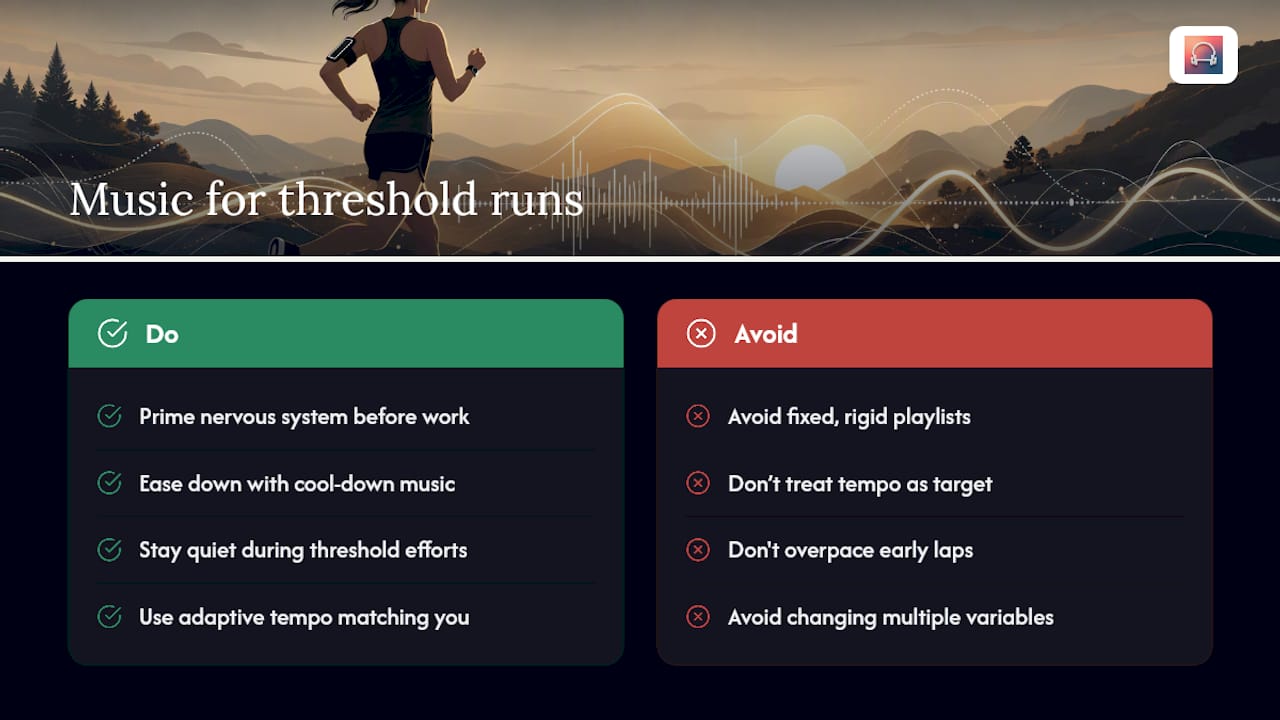
Music earns its place in threshold training as a mood tool, not a metronome. The data backs a modest, specific role: prime the nervous system before the work, ease it down after, and stay quiet in between when your own breathing is the only pacing signal that matters. Runners who treat tempo as a rigid target instead of a suggestion tend to overpack the early laps and pay for it late.
Where I’d draw the line is on rigidity. A fixed playlist forces you to adapt to it. Adaptive music, the kind that updates tempo based on live heart rate and cadence, adapts to you instead, which is the safer default for anyone experimenting with intensity. Log what you try. Change one variable at a time. Let the effort, not the drop in the chorus, tell you when you’re working hard enough.
— Jordan Mills
Try Repbeats for Tempo-Matched Threshold Training
Certain apps offer an auto-DJ feature that updates BPM every bar using live data from wearables, providing music that adjusts to your effort instead of asking you to adjust to it, so warm-up priming, cadence drills, and treadmill tempo runs can get a soundtrack that tracks what your body is actually doing, not what you guessed it would do the night before.

It’s worth trying on lower-stakes sessions first. A cadence drill or a fixed-pace treadmill block for tempo work is a good place to feel out how the BPM syncing responds before bringing it into a real threshold day. If you’re curious how wearable data actually drives the tempo shifts, the mechanics behind heart rate and music alignment are worth a look too. Start a session on Repbeats and test the auto-DJ on your next easy run before you take it into anything harder.
Sources
- Effects of preferred music on physiological responses, perceived exertion, and anaerobic threshold determination in an incremental running test on both sexes — PMC
- Running Playlist BPM: 5 Science-Backed Rules for Better Runs - Runners Connect
- Running BPM | Find the Best Music for your BPM | Runners Need


