7 Step Cadence Lock Running Setup for Runners With Wearables
Jordan MillsAugust 27, 2026 · 9 min read
7 Step Cadence Lock Running Setup for Runners With Wearables
Cadence lock running means your workout playlist’s tempo tracks your steps per minute (SPM) in real time, so the beat matches your stride instead of drifting in and out of rhythm. The payoff is immediate: steadier cadence, less mental energy spent correcting your pace, and music that actually pulls you forward instead of fighting you. The mechanics, the research behind it, and how to set it up on your own wearable follow below.
TL;DR:
- Matching the music track’s tempo to your cadence can help maintain a steady step rate, especially within a small adjustment window of 1 to 3 percent.
- A 1:1 beat-to-step mapping works best for cadences above 165 SPM, while lower cadences benefit from a 2:1 mapping to avoid rushing sounds.
- Initial setup requires measuring your baseline cadence over 60 to 90 seconds and tuning within the entrainment basin for optimal synchronization.
- Small, gradual increases in target BPM over weeks support better adaptation and performance, with caution against forcing cadence on tired or fatigued legs.
- Resolving lag issues involves checking sensor sampling frequency, using low-latency Bluetooth codecs, and reducing app buffering or audio processing delays.
Table of Contents
- How Cadence Lock Running Works With Wearables
- What Research Shows About Cadence-Synced Music
- How Do You Set Up Cadence Lock On Your Wearable?
- What BPM Should You Target For Each Run Type?
- Fixing Latency, Weak Beats, And Safety Issues
- What It’s Actually Like To Run With Cadence Lock
- Run With Music That Actually Keeps Pace
- Sources
How Cadence Lock Running Works With Wearables
Cadence lock relies on data your wearable is already collecting: accelerometer and gyroscope readings that estimate steps per minute, often refined by the watch’s own cadence algorithm. That SPM figure feeds into the music app, which recalculates the track’s beats per minute to match.
The mapping isn’t always one beat per step. Depending on your cadence and the music, an app might run:
- 1:1 mapping — one beat per footfall, common for cadences between 160 and 180 SPM
- 2:1 mapping — two steps per beat, useful for slower cadences where 1:1 would feel frantic
- Half or double tempo — the engine picks whichever multiple keeps the beat audible and danceable rather than either too fast to track or so slow it disappears
Tempo matching alone isn’t the whole story. Research on beat synchronized running shows that phase alignment, meaning where the beat lands relative to your footfall, matters as much as the raw BPM number. A track that’s tempo-correct but phase-off still feels slightly wrong underfoot.
Repbeats and similar systems handle updates continuously rather than in jarring jumps, recalculating BPM roughly every musical bar. That approach feels more natural than abrupt tempo jumps, since your ear and stride both adjust smoother to gradual shifts than sudden ones.
Pro Tip: If your music seems to lag your steps by a beat or two at the start of a run, give it 15 to 20 seconds. Most cadence engines need a few strides to lock a stable SPM reading before they commit to a tempo.
What Research Shows About Cadence-Synced Music
The core mechanism is called auditory-motor synchronization, and it’s well documented: locking a beat to footfalls helps runners hold a more consistent cadence and spend less effort on constant pace correction. Instead of your brain checking your watch every 30 seconds, the beat does the reminding.

The performance data is harder to ignore. In lab trials, tempo-matched motivational music produced a significantly longer time-to-exhaustion than running with no acoustic stimulus at all. Synchronous conditions also helped runners maintain steadier cadence throughout the test.
There’s a ceiling on how far you can push this, though. Recreational runners spontaneously adjust their cadence to match small tempo shifts, up to about 2% on average when music deviates by roughly 3%. Push the tempo further than that without coaching, and entrainment falls apart. That window is often called the entrainment basin:
- Small nudges (1 to 3%) tend to get adopted automatically, no conscious effort required
- Larger jumps need deliberate practice and instruction to stick
- Biosynchronous systems that follow cadence or heart rate can support pacing and distance goals within that basin
One nuance worth knowing: gender and individual training goals shape how people respond to tempo versus heart-rate synchronization, which is why offering both modes as a toggle tends to serve a wider range of runners than cadence sync alone.
How Do You Set Up Cadence Lock On Your Wearable?
Getting this right takes about ten minutes the first time, then almost none after that. Here’s the order that actually works:
- Measure your baseline cadence. Run at your normal easy pace for 60 to 90 seconds and let your watch’s cadence display settle. Most wearables average SPM over a rolling window, so don’t trust the first five seconds of data; you can find detailed insights on such algorithmic personalization in fitness apps in the Fitness Flywheel AI Fitness Platform Case Study.
- Note your typical range. Most recreational runners sit at a typical cadence in a moderate range at easy effort; write down your number so you know what “normal” looks like before you start tweaking anything.
- Pick a mapping rule. If your cadence is above roughly 165 SPM, a 1:1 beat-to-step mapping usually feels right. Below that, 2:1 often keeps the music from sounding rushed.
- Pair your wearable to the music app. Connect your Apple Watch or Fitbit and select cadence-sync mode rather than a fixed playlist. Repbeats reads live cadence and intensity data and updates BPM roughly every bar through its auto-DJ engine, rather than waiting for a song to end.
- Run a short latency test. Jog for 2 to 5 minutes at a steady cadence and listen for drift, does the beat land right as your foot strikes, or half a step behind? A slight lag in the first minute is normal. Persistent lag after that points to a setup issue, not a sensor limitation.
- Tune within the entrainment basin. Nudge target BPM up or down by 1 to 3% and see if your stride follows without you consciously trying. That’s the range where training-based cadence work sees the best retention.
- Save presets by run type. Once a setting feels right for an easy run, save it. You’ll want a different preset for tempo work anyway.
Pro Tip: Test latency with a simple click-track file before trusting a full song. It isolates whether lag comes from your sensor or from the app’s audio buffering.
What BPM Should You Target For Each Run Type?
Cadence and BPM aren’t identical, but they map closely enough to plan around. If you run at 170 SPM, a 1:1 mapping wants tracks around 170 BPM; a 2:1 mapping wants roughly 85.
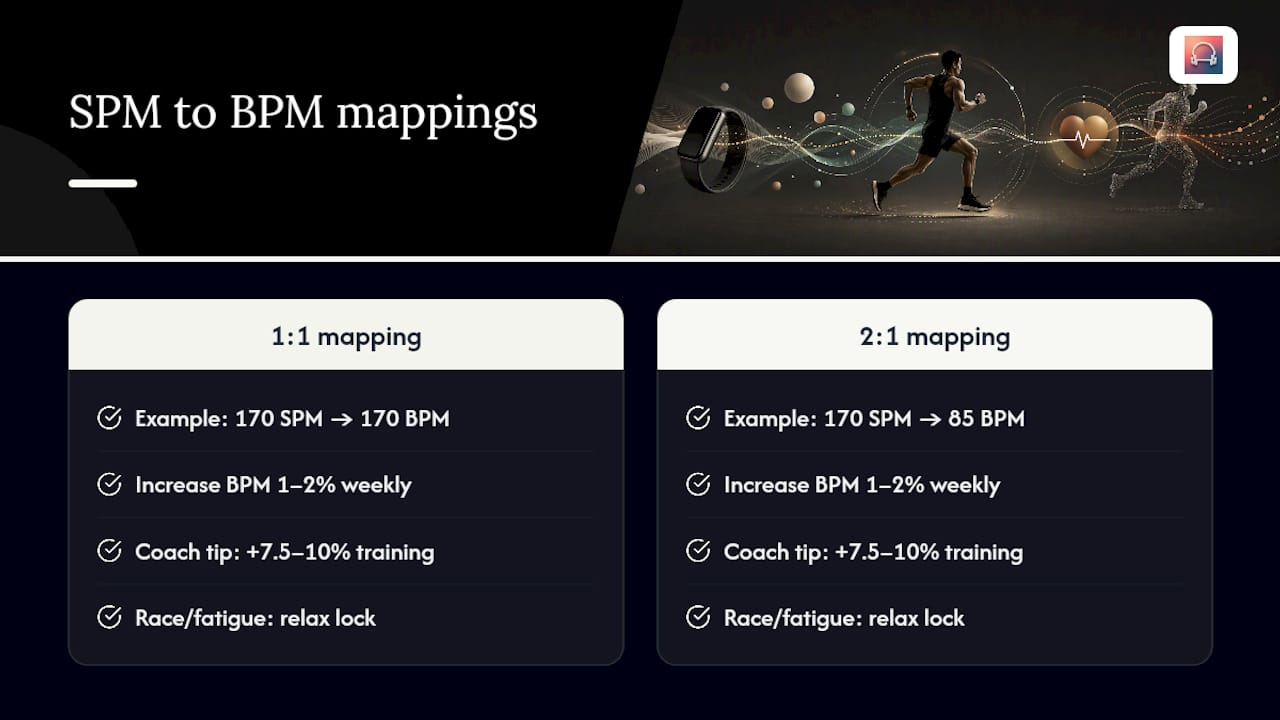
Coaches often use music running 7.5 to 10% above natural cadence as a training tool to gradually raise step rate over several weeks, not a single run. Increase target BPM by no more than 1 to 2% every week or two, and give your legs time to adapt before nudging again. On race day or on tired legs, ditch the strict lock and let effort and pace lead instead. Forcing a cadence target when you’re fatigued usually backfires. For threshold-specific guidance, Repbeats’ tempo run breakdown covers pacing math in more depth, and the full BPM chart by workout type is worth bookmarking.
Fixing Latency, Weak Beats, And Safety Issues
Most cadence-lock complaints trace back to one of three things: sensor lag, Bluetooth codec delay, or app-side buffering. Work through them in that order:
- Check your wearable’s cadence sampling frequency first; older devices sample less often and feel laggier by default
- Use a low-latency Bluetooth codec (aptX Low Latency or LDAC) if your headphones support it
- Turn off unnecessary audio processing or delay effects inside the app
- If the beat feels buried, pick tracks with prominent percussion or let an auto-DJ engine generate a clearer beat layer
For headphones, open-ear or bone-conduction models let you hear traffic and other runners, which matters more on roads than trails. Keep volume low enough to hear your own breathing, and skip both earbuds on unfamiliar routes or busy streets.
Pro Tip: If lag only shows up mid-run, it’s almost always the sensor struggling with irregular stride, not the app. Try holding a steadier pace for 30 seconds and see if sync recovers.
What It’s Actually Like To Run With Cadence Lock
The first few sessions feel slightly odd, like the music is watching you. That sensation fades fast. Within three or four runs, the beat stops feeling like an external cue and starts feeling like part of your stride, the same way a good running partner’s footsteps eventually disappear into background rhythm.
Long runs show the clearest benefit. Cadence drift late in a run is real, and having the beat gently hold your rhythm steady saves mental bandwidth for the miles that actually hurt. Tempo work is trickier, since pushing cadence and pace at once takes more adjustment time.
Go slow with the target BPM. Small nudges stick. Aggressive ones just feel like noise.
— Jordan Mills
Run With Music That Actually Keeps Pace
Repbeats gives you what a static playlist never could: a soundtrack that adjusts to your cadence, heart rate, and effort in real time, not a track list you have to babysit. The auto-DJ engine updates BPM roughly every bar, so transitions stay smooth instead of jarring, and it works directly with your Apple Watch or Fitbit data, meaning no manual tempo guessing before every run.

You get both cadence and heart-rate sync modes, so easy days and hard days each get music that fits the effort rather than one playlist trying to do everything. If you’ve been picking songs by feel and hoping the tempo lines up, this removes that guesswork entirely.
Start a free trial on the Repbeats app page and run your next session with music that actually tracks your steps instead of ignoring them.
Sources
- PLOS One / auditory-motor synchronization study (optimizing beat synchronized running to music)
- PLOS One (The Power of Auditory-Motor Synchronization in Sports)
- Sensors / biosynchronous music (HEARTBEATS) study


