The Right Treadmill Speed BPM Chart to Sync Music and Heart Rate
Jordan MillsAugust 24, 2026 · 8 min read
The Right Treadmill Speed BPM Chart to Sync Music and Heart Rate
Match your music’s tempo to your cadence and you’ll run more consistently without thinking about it. The fastest way in: find your treadmill speed in the chart below, then pick a playlist BPM that either mirrors your steps per minute or targets your heart-rate zone. A moderate jog near 6 mph usually corresponds to a cadence-matched music BPM range around the mid-150s. If you’re pacing off heart rate instead, a 40-year-old training at 50 to 85% intensity is aiming for roughly 90 to 153 beats per minute. Measure your cadence for 30 seconds or check your treadmill’s mph display, then use the tables below to lock in your number.
TL;DR:
- Match your music’s BPM to your cadence, typically around 150 to 170 for jogging, to improve running consistency and form.
- Use age or Karvonen formulas to estimate your heart rate zones, with BPM targets ranging from about 90 to 190 depending on effort level.
- Small adjustments in treadmill speed or music BPM (0.2 mph or 3-5 BPM) help fine-tune synchronization without disrupting your rhythm.
- Full-step sync suits interval training, while half-time BPM reduces chaos during longer steady runs; adjust based on effort and comfort.
- Automating BPM adjustments with tools like Repbeats streamlines workout management by syncing music tempo to live heart rate and cadence data.
Table of Contents
- Treadmill Speed BPM Chart for Pace, Cadence, and Music Tempo
- How to Use the Treadmill BPM Chart Step by Step
- Matching BPM to Heart-Rate Training Zones
- Cadence Versus BPM: What to Do When They Don’t Line Up
- A Printable Treadmill Speed and BPM Reference
- Why Tempo-Matched Music Actually Changes How You Train
- Let Repbeats Handle the BPM Math for You
- Key Takeaways
- Sources
Treadmill Speed BPM Chart for Pace, Cadence, and Music Tempo
The math behind treadmill pace is fixed: minutes per mile equal 60 divided by mph. Run at 6.0 mph and you’re holding a 10:00 mile pace. Push to 7.5 mph and that drops to 8:00 per mile, and at 8.0 mph you’re at 7:30, a conversion confirmed by Runner’s World’s treadmill pace chart. Cadence, though, doesn’t follow a clean formula the way pace does. It depends on your height, stride length, and running economy, which is why the ranges below are just that: ranges, not absolutes.
A few things shape how you’ll actually use this table:
- Cadence climbs faster than pace at low speeds, then levels off once you’re running efficiently near 170 to 180 steps per minute.
- At sprint speeds, full-tempo music can feel frantic, so many runners switch to a half-time BPM (the beat lands every other step) to keep the energy without the chaos.
- Music BPM works best as a range, not a fixed number. Give yourself 5 to 10 BPM of wiggle room around your cadence.
If you want deeper playlist logic by workout category, Repbeats built out a complete tempo chart by workout type that expands on these baseline numbers.
How to Use the Treadmill BPM Chart Step by Step
You don’t need a lab to figure out your number. Three steps get you there in under two minutes.
- Measure your cadence or note your speed. Count left-foot strikes for 30 seconds and multiply by four, or just read your treadmill’s mph display and find that row in the chart above.
- Pick your sync method. Cadence sync means one beat equals one footstrike, ideal for rhythm and consistency. Heart-rate sync means you choose a BPM that corresponds to your target zone, better when the goal is a physiological outcome like fat-burning or threshold work.
- Adjust in small increments. Nudge speed by 0.2 mph or tempo by 3 to 5 BPM, then reassess how you feel using RPE (rate of perceived exertion) or a quick heart-rate check. Small changes, not big jumps.
Pro Tip: If a song’s tempo feels slightly off your stride, try the half-time or double-time version mentally. A 174 BPM track can double as an 87 BPM half-time cue during recovery jogs.
The talk test is your backup check. If you can’t speak a full sentence at your current pace and BPM, you’ve drifted into a harder zone than intended.
Matching BPM to Heart-Rate Training Zones
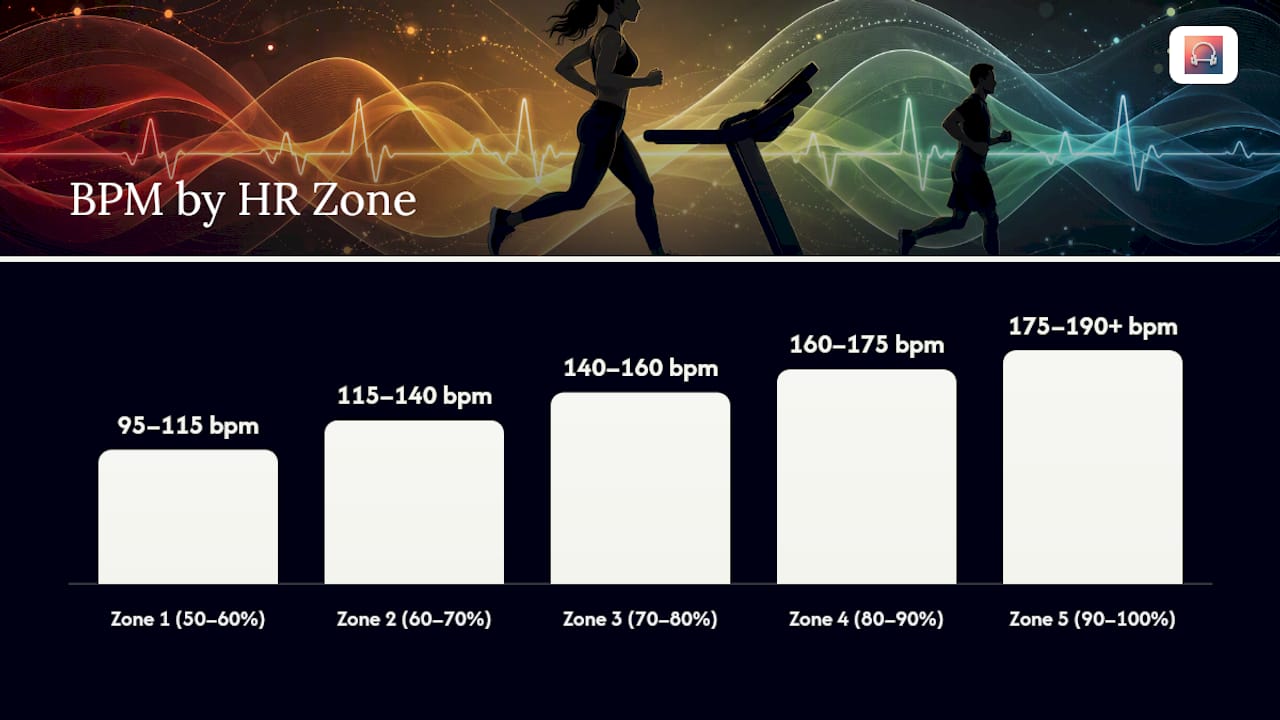
Cadence tells you how fast your feet are moving. Heart rate tells you how hard your body is actually working, and the two don’t always agree. The five standard training zones, based on percentage of max heart rate, break down like this:
- Zone 1 (50–60%): recovery and warmup pace, BPM around 95–115
- Zone 2 (60–70%): aerobic base building, BPM around 115–140
- Zone 3 (70–80%): steady endurance effort, BPM around 140–160
- Zone 4 (80–90%): tempo and threshold work, BPM around 160–175
- Zone 5 (90–100%): sprint and max effort, BPM around 175–190+
For a simple estimate, use the age-based formula: HRmax = 220 minus your age. A 30-year-old’s estimated max is 190 bpm, meaning Zone 3 for that person lands around 133 to 152 beats per minute. The American Heart Association’s target heart rate charts show a 20-year-old’s Zone-equivalent range running from 100 to 170 bpm at 50 to 85% intensity, a useful comparison point if you’re coaching mixed-age groups.
Age-based estimates are a starting point, not gospel. The Karvonen method factors in your resting heart rate for a sharper target: Target HR = (HRmax − HRrest) × intensity% + HRrest. Someone with a low resting heart rate from years of training will get a meaningfully different number than the flat age formula suggests.
Cadence Versus BPM: What to Do When They Don’t Line Up
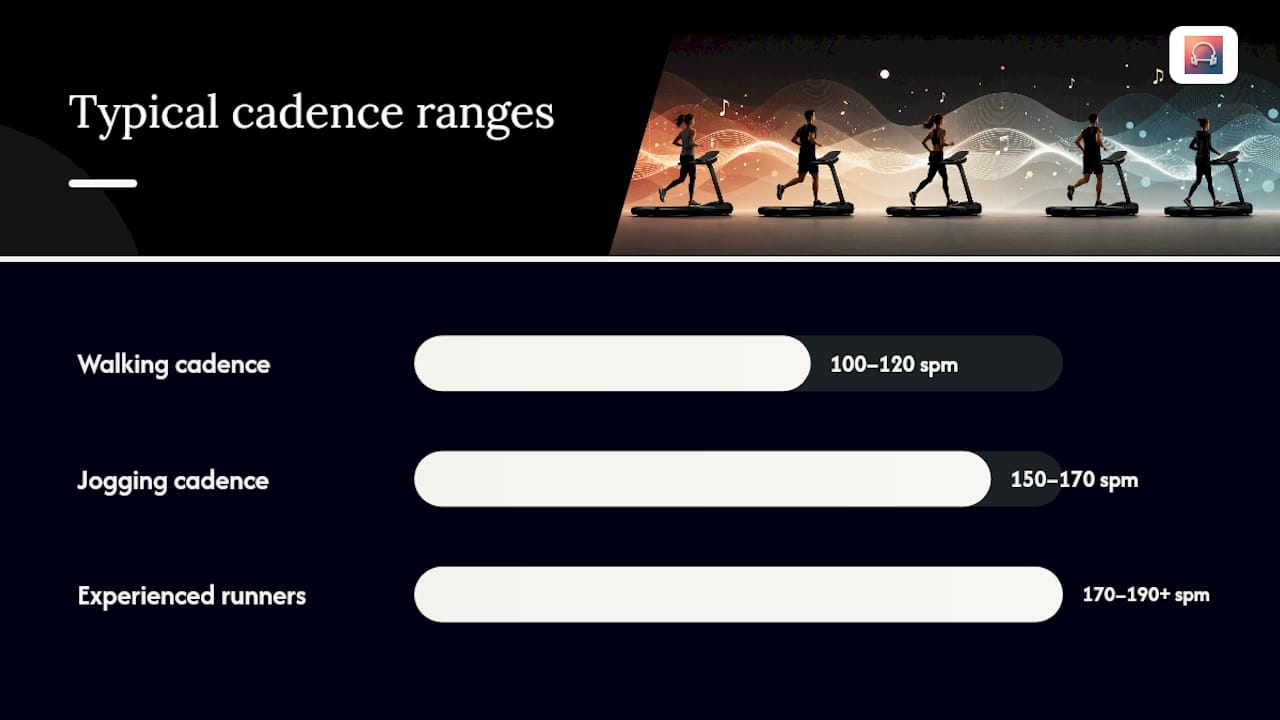
Cadence and music tempo rarely match perfectly on the first try, and that’s normal. Walking cadence typically sits around 100 to 120 steps per minute. Jogging brings that up to 150 to 170, and experienced runners often hit 170 to 190-plus at faster efforts.
The bigger decision is whether you want one beat per full step or one beat per half-stride. Full-step sync feels punchier and works well for intervals. Half-stride sync (playing a track at double its BPM value relative to your cadence) smooths out the experience for longer steady efforts, since your brain isn’t registering a beat on every single footstrike.
- If cadence and BPM are within 5 beats of each other, leave the tempo alone.
- If they’re off by more than 10, adjust treadmill speed slightly rather than forcing a track that doesn’t fit.
- For sprint work, try two-beat-per-stride mapping so the tempo doesn’t outrun your legs.
Pro Tip: Walking playlists benefit most from Repbeats’ cadence-matched BPM guides, since low-cadence music is harder to find in standard streaming playlists.
A Printable Treadmill Speed and BPM Reference
Save this version for quick glances mid-workout, especially if you don’t want to scroll back through the full breakdown above.
Incline changes everything here. Stride length, fitness level, and even shoe choice shift these ranges by a few beats in either direction, so use the chart as your first guess, then fine-tune based on how you actually feel.
Why Tempo-Matched Music Actually Changes How You Train
The evidence keeps pointing the same direction: when music tempo tracks your cadence, form gets steadier and workouts feel shorter than they are. Runners burn less mental energy on pacing decisions because the beat is already doing that work.
I’d still pair it with a check, not replace it with one. Heart rate and RPE catch what tempo alone misses, since a BPM that matches cadence doesn’t always match your actual physiological zone. Repbeats automates this pairing directly, and its heart rate music zone guide is worth a look if you want the syncing done for you instead of managed by hand.
— Jordan Mills
Let Repbeats Handle the BPM Math for You
Every chart in this guide takes a few minutes to check manually, and your pace changes mid-run whether you plan for it or not. Repbeats removes that lag: its auto-DJ pulls live heart rate and cadence data from Apple Watch and Fitbit, then updates the music’s BPM every bar, so the tempo tracks your actual effort instead of the number you picked before you started.

That means no manual playlist swaps mid-tempo run, no guessing whether your Zone 3 track is still a Zone 3 track once you speed up on an incline. The music adjusts, you don’t have to. If you’re ready to stop cross-referencing charts on your phone between intervals, start a free trial at Repbeats and let your next treadmill session set its own soundtrack.
Key Takeaways
Matching music BPM to either your cadence or your heart-rate zone, using the age-based or Karvonen formula, gives you a faster and more consistent workout than picking songs at random.
| Point | Details |
|---|---|
| Use the conversion formula | Min/mile equals 60 divided by mph; 6.0 mph is a 10:00 pace. |
| Match cadence to BPM | Jogging cadence around 150 to 170 steps per minute pairs with similar music BPM. |
| Calculate your HR zones | Use HRmax = 220 minus age, or the Karvonen method for a personalized target. |
| Cross-check with RPE | The talk test and perceived exertion confirm whether your BPM choice is really matching your effort. |
| Automate it with Repbeats | Repbeats syncs music BPM to live heart rate and cadence data from Apple Watch and Fitbit automatically. |
Sources
- MedlinePlus image: target heart rate zones
- Target heart rates | American Heart Association
- Treadmill pace chart — Runner’s World
- Heart rate training zones explained (NASM)


