Save Prep Time: Auto DJ Workouts with Wearable Sync for Instructors
Jordan MillsSeptember 20, 2026 · 9 min read
Save Prep Time: Auto DJ Workouts with Wearable Sync for Instructors
Yes, modern auto-DJ tools can build seamless, choreography-friendly workout mixes. The fastest reliable method is to let software handle track sequencing and BPM matching, then manually check beatgrids and hand-tune the transitions before class.
TL;DR:
- Auto-DJ tools can create seamless workout mixes by analyzing track metadata and manually fine-tuning transitions before class.
- Rebuilding a 45-minute automix takes minutes using templates for different workout types, saving time compared to manual mixing.
- Verifying beatgrid accuracy and phrase alignment is crucial to prevent tempo drift and dissonance in automated mixes.
- Wearable data integration allows real-time tempo adjustment based on heart rate or cadence, enhancing the workout’s responsiveness.
- Automated sequencing is ideal for consistent, reproducible classes, but live DJing remains better for unpredictable energy shifts or special moments.
Table of Contents
- What a Clean Auto DJ Workout Mix Sounds Like
- What Is an Automated DJ Tool for Workouts?
- Why Use Auto DJ for Workout Sessions Instead of a Playlist?
- How to Build an Auto DJ Workout Mix Step by Step
- Best Practices for Instructor-Ready Auto DJ Sets
- Automation Gets You There Faster, But Not Alone
- Try Repbeats for Adaptive, Wearable-Synced Workout Mixes
- Sources
- FAQ
What a Clean Auto DJ Workout Mix Sounds Like
Picture a 45-minute strength class. The mix opens around 120 to 128 BPM for warm-up, climbs to 140 to 150 BPM through the working sets, then eases back to 100 to 110 BPM for cool-down. A well-built automix hits appropriate tempo ranges without you touching a slider.
Here’s what to listen for when you audition a finished set:
- No silence or clipped endings between tracks, even at fast tempo changes
- Tempo drifts gradually, never jumps, across a transition
- Harmonic blends sound intentional, not muddy or dissonant
- Phrase points line up so a downbeat lands where a rep or move would naturally reset
Export as WAV or high-bitrate MP3 and always play the full file through your actual gym speakers before class. Headphones lie about how bass and transitions translate in a room.
What Is an Automated DJ Tool for Workouts?
An automated DJ, or auto-DJ, tool analyzes your music library and builds a continuous set without you manually beatmatching anything. These tools generally split into two categories. Set builders analyze a library to construct professional-sounding sets, reading BPM, key, and energy metadata to sequence tracks and generate transitions automatically. AI coaching tools do something different: they teach you mixing technique, set architecture, and crowd psychology, which matters if you eventually want manual mixing skills rather than just a finished file.
For most instructors, set builders are the faster route to a usable class mix. Coaching tools are the better pick if you want to understand DJing itself.
Either type typically pulls from a few sources:
- Local music files tagged with metadata
- DJ software databases like Rekordbox libraries
- Streaming service catalogs
- Wearable telemetry, for tools that adapt tempo to heart rate or cadence in real time
Why Use Auto DJ for Workout Sessions Instead of a Playlist?
A standard playlist has gaps. Even a well-ordered Spotify queue drops a beat or two of silence between songs, and that silence is exactly when a class loses momentum. Automated mixing that matches BPM and key keeps the energy continuous through fitness classes, which is the whole point of using auto DJ workouts instead of manual playback.
Three concrete advantages show up fast once you switch:
- No dead air. Tracks blend instead of cutting, so participants never lose the rhythm mid-set.
- Energy arc control. You can map warm-up, peak, and cool-down phases in advance instead of guessing track order on the fly.
- Faster iteration. Rebuilding a 45-minute mix for a new class theme takes minutes, not an evening of manual crossfading.
Pro Tip: Build three or four energy templates once (HIIT peak, yoga flow, cycling climb) and reuse them as starting points. You’ll cut mix-prep time by editing an existing arc instead of building from zero every week.
Tools with wearable integration go a step further, adjusting BPM to a participant’s actual cadence or heart rate rather than a fixed tempo target. That’s a meaningfully different experience than a static playlist, since the music adapts to effort level instead of assuming everyone in the room is working at the same intensity.
How to Build an Auto DJ Workout Mix Step by Step
Building a reliable class mix follows a repeatable sequence. Skip a step and you’ll hear it in the transitions.
- Curate and analyze your tracks. Pull your candidate songs, run BPM and key analysis, and spot-check a handful of beatgrids manually. Software occasionally misreads a track’s actual downbeat.
- Plan the energy arc first. Sketch warm-up, build, peak, and cool-down phases before you touch any software. Mark phrase points using the rule of 32, a phrasing convention where tracks are cut and blended in 32-beat blocks so transitions land on choreography-friendly counts instead of arbitrary bars.
- Import and set parameters. Connect your library or streaming source, set target session length, and choose whether the automix should prioritize tempo matching or key matching. Longer blend lengths tend to work better for choreographed classes than quick crossfades.
- Run the automix and listen straight through. Play the entire mix start to finish before class, not just the transition points. Seams and tempo hiccups often only show up in full context.
- Fine-tune anything that snags. Bench tracks that won’t blend cleanly, adjust blend length on rough transitions, and add a signature intro or outro if you want a recognizable branding touch.
- Export and test on your real playback rig. Save cue points or a backup file in case your primary device fails mid-class. A mix that sounds perfect on laptop speakers can behave differently on a gym sound system.
Pro Tip: Keep a “bench list” of tracks that consistently cause drift or bad blends. After a few sessions you’ll notice patterns, usually tracks with unusual intros or tempo changes mid-song, and you can exclude them before they cost you class time.
Best Practices for Instructor-Ready Auto DJ Sets
A short checklist prevents most of the problems instructors run into with automated mixes:
- Verify beatgrids manually rather than trusting software defaults across the board
- Use longer blend lengths on tracks tied to choreography, shorter ones for filler transitions
- Bench any track the software flags as unstable instead of forcing a fix
- Confirm phrase boundaries align with your planned cue points before finalizing
Beatgrid drift is the most common failure mode, and it’s usually not the algorithm’s fault. Advanced users recommend anchoring the first beat to a track’s real kick drum rather than trusting an auto-detected grid, since misalignment there is what causes tempo to creep during a transition. Tools that re-anchor beatgrids to transient detection catch this automatically in some cases, but a manual check still catches the outliers.
If you’re using a tool with wearable-adaptive syncing, decide upfront whether you want tempo tied to cadence or heart rate. Cadence syncing works better for steady-state cardio like running or cycling, where footfall rate is a clean signal. Heart-rate syncing fits interval or strength formats better, since effort spikes even when movement slows. Repbeats leverages live wearable data to make that kind of real-time adjustment, updating tempo bar by bar rather than waiting for a track to end.
Pro Tip: Wearable-adaptive integrations only need workout telemetry, things like heart rate and cadence, to sync tempo. There’s no reason a fitness music tool needs access to anything beyond that data.
Automation Gets You There Faster, But Not Alone
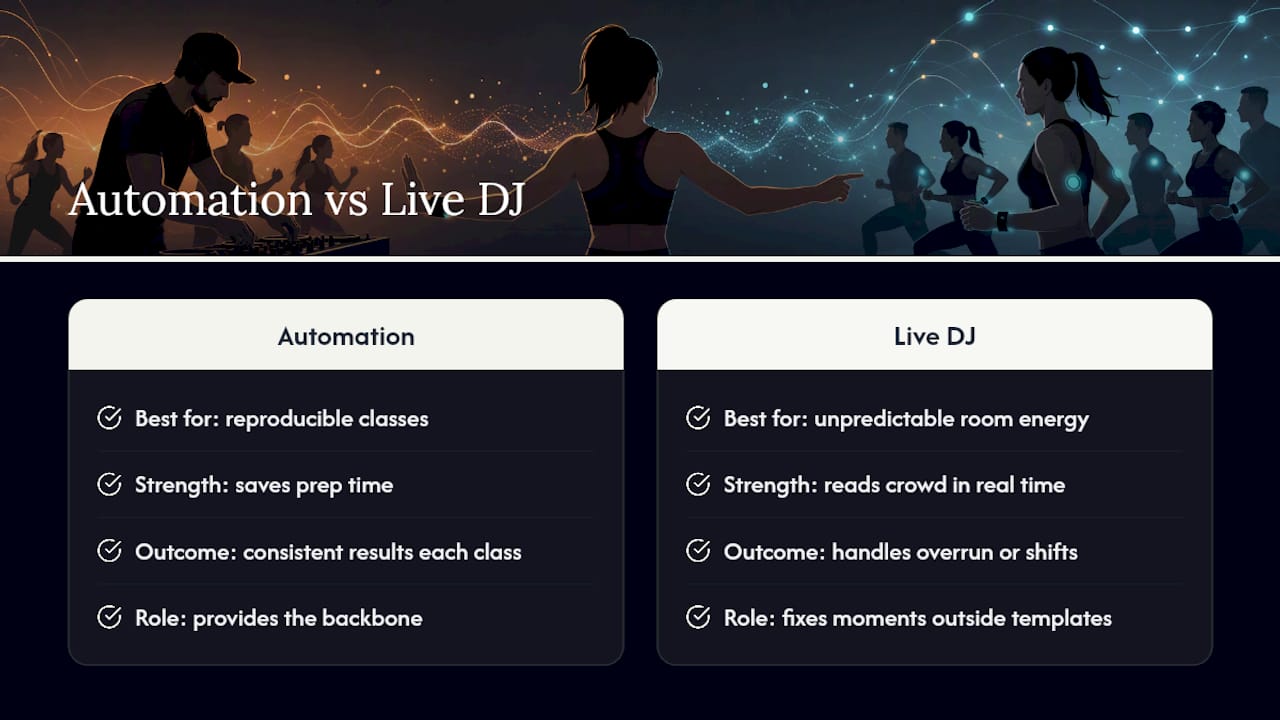
Automated sequencing earns its keep on reproducible classes: the same HIIT format every Tuesday, the same cycling climb every week. That’s where auto-DJ workouts save real prep time and produce consistent results class after class.
Live DJing still wins when a room’s energy shifts unpredictably, a class runs long, or the crowd needs a read a machine can’t make. Automation handles the backbone. Your judgment handles the moments that don’t fit a template.
— Jordan Mills
Try Repbeats for Adaptive, Wearable-Synced Workout Mixes
If you want automation that goes beyond static sequencing, Some adaptive fitness apps build mixes that adjust in real time to the person actually working out, updating BPM bar by bar, syncing tempo to heart rate, cadence, and session intensity using data from wearables.

That’s a different proposition than a pre-built automix file: instead of one fixed arc for everyone in the room, the music shifts with each participant’s actual effort. It fits instructors who want the prep-time savings of auto-DJ workouts but also want the tempo to respond to real performance data rather than a fixed template. You can see how the adaptive system works and what it takes to get started on the Repbeats about page, or check current features on the Repbeats homepage if you’re ready to try it with your own class.
Sources
For deeper technical detail, the Engine DJ community’s beatgrid discussion covers manual grid verification. DJ.Studio’s fitness-focused breakdown explains automix features built for continuous play, and Repbeats covers syncing music to workout intensity in more depth.
FAQ
What Is the Rule of 32 in DJing?
The rule of 32 is a phrasing convention where mixes are structured in 32-beat blocks so transitions land on natural musical boundaries. Fitness-focused auto-DJ tools use this phrasing to keep cue points aligned with choreography instead of cutting mid-phrase.
What Are Some Good Automatic DJ Apps for Workouts?
Options range from general-purpose set builders that analyze BPM and key across a library to wearable-adaptive tools built specifically for fitness. Some fitness apps fall into the category of syncing tempo to heart rate and cadence in real time rather than producing a single static file.
Is There a Free AI DJ Mixer Available?
Several set-builder tools offer free tiers or trial periods with limited export options or watermarked audio. Check each tool’s current pricing page directly, since free-tier limits change often and vary by feature set.
Can I Do Auto DJ Workout Mixes Daily?
Yes, running an automated mix daily works fine as long as you rebuild or rotate the track list periodically to avoid repetition fatigue for regular class attendees. Reusing a solid energy-arc template while swapping tracks keeps daily prep fast without sounding stale.


