Per bar BPM sync for Auto DJ workout music on Apple Watch and Fitbit
Jordan MillsSeptember 5, 2026 · 13 min read
Per bar BPM sync for Auto DJ workout music on Apple Watch and Fitbit
Auto DJ workout music is adaptive audio that reads your heart rate and cadence in real time, then adjusts the song’s tempo to match your effort as you move. Research backs the concept: heart-rate driven tempo shifts have been shown to lower perceived exertion and improve cadence entrainment during exercise. For anyone training with an Apple Watch or Fitbit, the practical verdict is simple: it works often enough to be worth setting up, and Repbeats is built specifically to run it.
TL;DR:
- Per-bar BPM updates are essential for smooth, musical transitions that match your effort, with some apps updating less frequently and feeling less responsive.
- Wearable compatibility and real-time heart rate data access are critical; delayed or inaccurate readings can cause tempo lag or mismatch during exercise.
- Adaptive music benefits structured workouts like intervals and tempo runs more than casual or recovery sessions due to clearer tempo zones and pacing cues.
- Privacy controls and the ability to revoke health data sharing are important, as these apps access sensitive live heart rate information through platforms like HealthKit and Fitbit API.
- Repbeats is built around real-time, per-bar BPM adjustment from Apple and Fitbit devices, making it particularly effective for maintaining effort-driven playlists during training.
Table of Contents
- How Adaptive Auto-DJ Music Actually Works
- Does the Research Actually Support Adaptive Workout Music?
- What to Look for in an Adaptive Auto-DJ App
- Setting Up Adaptive Music on Apple Watch and Fitbit
- Best Practices for Training With Adaptive Music
- Beyond Apple Watch and Fitbit: Wider Device Compatibility
- Where Auto-DJ Workout Music Still Falls Short
- Customizing Your Adaptive Music Experience
- Is Your Wearable Data Safe With These Apps?
- When Adaptive Auto-DJ Actually Helps (and When It Doesn’t)
- Repbeats: Adaptive Music Built Around Your Heart Rate
- Sources
How Adaptive Auto-DJ Music Actually Works
The system runs as a closed loop. Your wearable’s sensor reads heart rate or step cadence, sends that data to the app, and the app makes a tempo decision, either through a mapping rule (“above 150 BPM heart rate, play tracks at 160+ BPM”) or a more adaptive model that weighs recent trends. The output is playback that shifts in near real time, not a static playlist.
A few techniques make this feel smooth instead of jarring:
- BPM mapping: grouping tracks into tempo ranges and switching between groups as your heart rate crosses thresholds, an approach described in patent filings for real-time adaptive playback.
- Tempo-stretching: digitally speeding up or slowing down a track without changing its pitch.
- Segment-aware cutting: identifying high-energy sections (a chorus, a drop) and timing them to land at your peak exertion. The RISE adaptive playback research found users rated this approach as more seamless and motivating than blunt tempo swaps.
- Per-bar updates: recalculating BPM on every musical bar instead of every few seconds, which is how Repbeats keeps transitions musical rather than robotic.
Latency matters more than people assume. Apple Watch heart rate sampling can run around one reading every few seconds in some modes, and researchers often average readings over multi-minute windows for stability. An app reacting to every noisy blip will sound twitchy. One reacting too slowly will feel disconnected from your effort. Apple HealthKit and the Fitbit API both expose live heart rate, but sampling behavior differs by device and mode, which is why good wearable tracking design matters as much as the music logic itself.
Does the Research Actually Support Adaptive Workout Music?
The short answer is yes, with caveats. Studies on physiological-adaptive playback show it can reduce perceived exertion and shift cadence toward a target range, usually measured against scales like the Borg Category-Ratio 10. Separate work on heart-rate adaptive running music found that reordering playlists by BPM metadata to match target heart-rate zones improved both psychological and physiological responses during runs.
A systematic review of personalized interactive music systems covering studies from 2010 through 2024 found consistent improvements in affect and motivation, though many trials were small feasibility studies rather than large controlled experiments.
That’s the honest limitation. Sample sizes tend to be modest, methods vary study to study, and effect sizes differ depending on whether researchers measured mood, RPE, or actual pacing behavior. The clearest signal shows up in structured efforts: interval training, tempo runs, and cadence-focused sessions, where a tempo cue gives you something concrete to lock onto. For an easy recovery jog where you’re not chasing a number, the benefit is smaller and harder to measure.
What to Look for in an Adaptive Auto-DJ App
Not every app claiming “smart” music actually updates in real time. Run through this checklist before you commit to one:
- Update frequency. Per-bar BPM updates feel musical. Apps that only check every 30 to 60 seconds will feel like they’re playing catch-up with your body.
- Wearable compatibility. Confirm real support for Apple HealthKit or the Fitbit API, not just generic Bluetooth heart rate straps, since permission models differ between platforms.
- Personalization depth. Can you use your own music library, set tempo ranges, and exclude genres, or are you stuck with a fixed catalog?
- Transition quality. Segment-aware cutting that lines up high-energy sections with your effort peaks beats a blunt track-to-track tempo jump.
- Privacy controls. Check what health data the app stores, for how long, and whether you can revoke access after linking your wearable.
Pro Tip: Test any adaptive app on a short, familiar interval workout first. If the tempo lags behind your effort by more than a few seconds, the sampling rate or update frequency is too slow for how you train.
Setting Up Adaptive Music on Apple Watch and Fitbit
Getting the pairing right the first time saves you from chasing lag issues mid-workout later.
- Connect your wearable to the app. For Apple Watch, this runs through HealthKit permissions; for Fitbit, it’s an OAuth login that grants the app access to live heart rate data. Both require you to explicitly approve real-time health data sharing, not just historical sync.
- Grant live heart rate access. Look for a permission specifically labeled for real-time or workout heart rate, separate from general health history access. Skipping this step is the single most common setup mistake.
- Pick your playback device. A low-latency Bluetooth headset or earbuds will track tempo shifts more accurately than devices with heavier audio processing delays.
- Check background refresh settings. If your phone aggressively limits background app activity to save battery, the app may sample heart rate less often mid-run, causing tempo to lag your actual effort.
- Confirm HR zone calibration. Most apps ask for resting and max heart rate, or estimate them, to build your tempo mapping correctly.
If something’s off, work through this troubleshooting list:
- Lag between effort and tempo change: check background refresh and Bluetooth connection stability first.
- Zone mismatch (music too slow or fast for your actual effort): recalibrate your max heart rate settings.
- Dropped connection mid-run: reduce distance between phone and wearable, and confirm Bluetooth isn’t shared with another paired device.
Open-source projects like Cue, which connects HealthKit and Bluetooth heart rate data to a Spotify queue, show this pairing pipeline is a well-understood pattern, not an exotic one.
Best Practices for Training With Adaptive Music
Treat tempo as a guide, not a hard rule. Set a target BPM range for warm-up, steady-state, threshold, and recovery phases so the app has real zones to work with instead of guessing.
- Use perceived exertion (RPE) alongside tempo. If the music pushes toward a faster BPM but your RPE is already high, back off, don’t chase the beat.
- Segment-aware transitions help most during intervals, where a high-energy section landing right at your work-interval peak improves adherence and motivation.
- Build session templates around tempo zones rather than fixed playlists; see practical synchronization examples for structuring a session this way.
- Stay aware of your surroundings outdoors. Immersive, tempo-locked audio can pull focus away from traffic or trail hazards, so keep volume at a level where you can still hear your environment.
Beyond Apple Watch and Fitbit: Wider Device Compatibility
Apple Watch and Fitbit dominate the conversation, but they’re not the only devices generating usable data. Garmin watches, Polar chest straps, and Wear OS devices all broadcast heart rate over standard Bluetooth Low Energy profiles, which most adaptive music apps can read regardless of brand. Gym equipment is a bigger variable. Treadmills and stationary bikes with built-in heart rate grips or cadence sensors sometimes connect through ANT+ or proprietary Bluetooth implementations that don’t always play nicely with a phone app running in the background.
Cadence sensors on bikes deserve a separate mention. Cycling cadence (pedal strokes per minute) behaves differently than running cadence, and an app tuned only for foot-strike patterns may need a distinct mapping profile for cycling to feel accurate. Cross-training adds another layer: rowing machines and ellipticals produce cadence signals that don’t map cleanly to either running or cycling models, so some apps fall back to heart rate alone in those contexts.
Smart speakers and home gym setups introduce their own quirks. Casting adaptive audio to a Bluetooth speaker instead of headphones typically adds a small amount of processing delay, which matters more for tightly timed segment-aware transitions than for simple tempo shifts. If you’re training on a mix of devices across gym sessions, outdoor runs, and home workouts, check whether your app maintains a consistent HR zone calibration across all of them, or resets it each time you switch context.
Where Auto-DJ Workout Music Still Falls Short
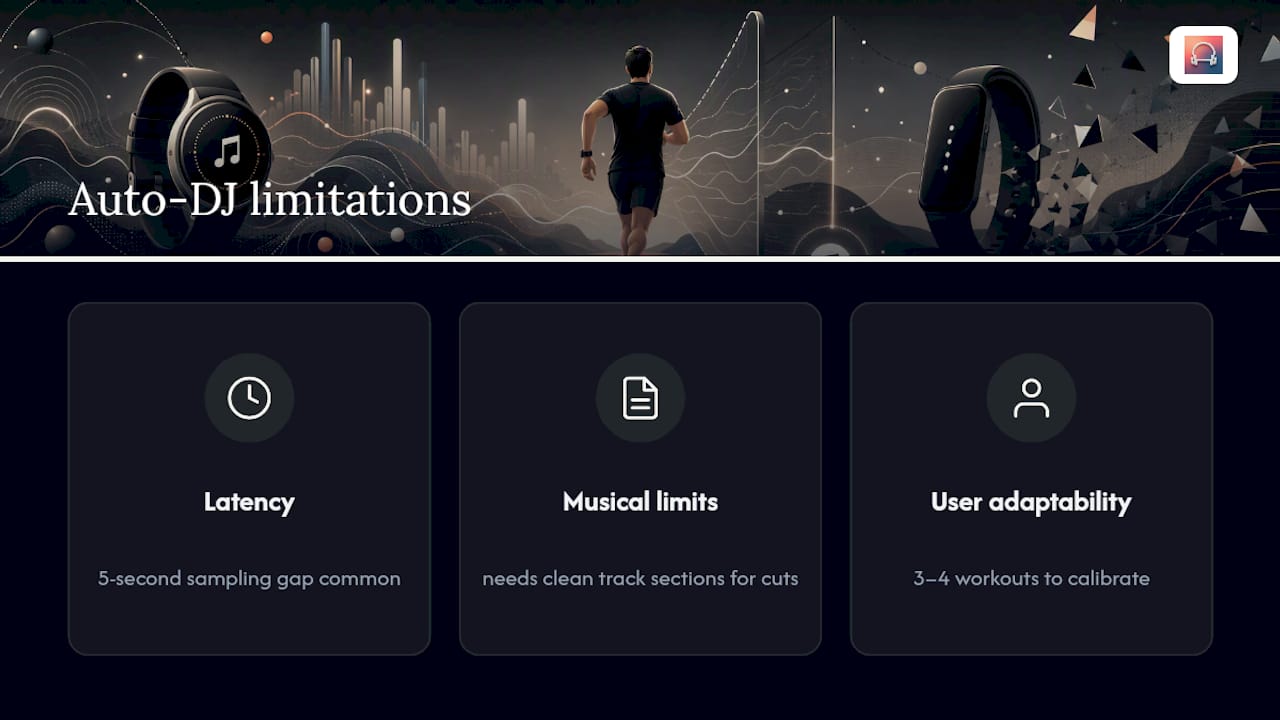
Latency is the recurring pain point. Even a well-tuned system depends on how fast your wearable samples heart rate and how quickly your phone can act on that data. A five-second sampling gap, common on several devices, means the music is always reacting to where your heart rate was, not exactly where it is now. During sudden intensity changes, like a hill sprint, that lag becomes noticeable.
Musical constraints are the second limitation. Not every song can be tempo-stretched without sounding warped, and segment-aware cutting depends on the source track having clean, identifiable sections. A dense, unstructured track gives the algorithm less to work with than a pop song with an obvious verse-chorus-drop structure.
User adaptability is the least discussed challenge. Some people find real-time tempo shifts motivating; others find them distracting, especially early on. The systematic review of personalized interactive music systems noted that personalization moderates outcomes heavily. People who could pick genres and favorite tracks before the tempo logic kicked in reported fewer rejections of the whole approach. If adaptive tempo feels off on your first few sessions, that’s a normal calibration curve, not necessarily a sign the technology doesn’t work for you. Give it three or four workouts before deciding.
Customizing Your Adaptive Music Experience
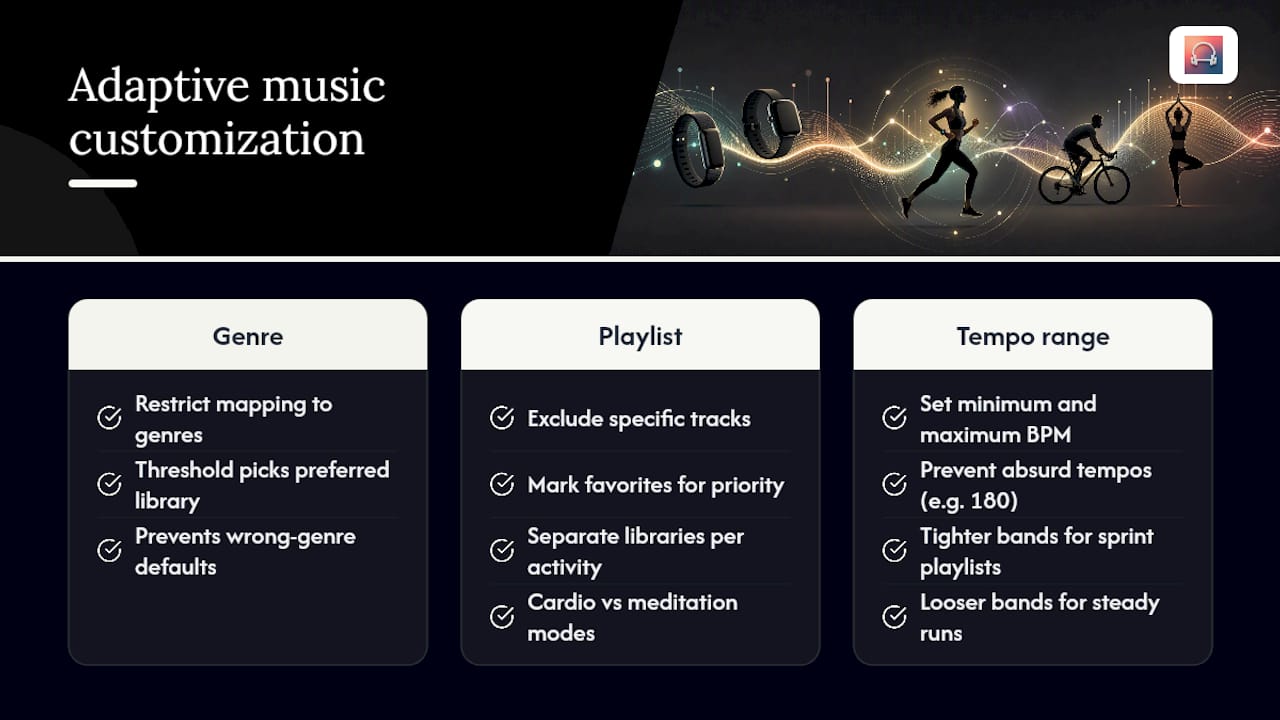
Genre and playlist control determine whether adaptive tempo actually feels like your workout or like a stranger’s. The strongest apps let you restrict tempo mapping to genres you already enjoy, so a threshold interval pulls from your electronic or hip-hop library instead of defaulting to whatever track happens to sit in the right BPM range.
Playlist management matters just as much as genre filtering. Being able to exclude specific tracks, mark favorites that get priority, or build separate libraries for cardio versus meditation sessions keeps the experience from feeling random. The app splits this further by offering distinct cardio and meditation modes, since a meditation session calls for slow, stable tempo, not real-time BPM chasing.
Tempo range customization is the more technical layer. Setting a minimum and maximum BPM prevents the app from ever pushing you into a tempo that feels absurd for the activity, like a 180 BPM track during a cooldown walk. This is also where genre-based mapping matters: a workout with more layered mixing, like sprint-focused BPM playlists, benefits from tighter tempo bands than a steady long run does.
Is Your Wearable Data Safe With These Apps?
Connecting a wearable to a music app means granting access to live health data, and that access deserves scrutiny before you approve it. Apple HealthKit and Fitbit’s API both use permission-based sharing, meaning the app can only see what you specifically allow, typically heart rate and activity type, not your full medical history.
Check whether an app stores raw heart rate data on its own servers or processes it only on-device and discards it after your session ends. On-device processing generally means less exposure if a server is ever compromised. Also check whether you can revoke wearable access from within your phone’s settings at any time, separate from deleting the app itself, since that’s the fastest way to cut off data sharing if you switch devices or simply change your mind.
Bluetooth connections carry a smaller but real consideration too. Most heart rate straps broadcast unencrypted by default, which is a known limitation of the standard, not a flaw specific to any one app. It’s a low practical risk for most people, but worth knowing if you train in crowded gyms with many nearby Bluetooth devices.
When Adaptive Auto-DJ Actually Helps (and When It Doesn’t)
Adaptive tempo earns its place during structured work: intervals, tempo runs, and circuit training, where you need a consistent external cue to hold pace. On an easy recovery day, a fixed playlist works just as well, and forcing tempo logic onto a slow run adds complexity without much upside.
The bigger mistake is overfitting tempo to short-term heart rate spikes. A brief surge from a hill or a red light shouldn’t yank the music into a different zone entirely; look for smoothing behavior, not raw reactivity. Personalization matters more than people expect. An app that respects your genre preferences before applying tempo logic will feel like your music, not a metronome wearing headphones.
— Jordan Mills
Repbeats: Adaptive Music Built Around Your Heart Rate
Everything covered in the checklist above, per-bar BPM updates, wearable permissions, genre control, transition quality, is what Repbeats was built around from the start. It reads live heart rate and cadence data from Apple Watch and Fitbit, then updates the music’s BPM every single bar through its auto-DJ engine, rather than checking in every few seconds and lagging behind your effort.

Beyond running and cycling, Repbeats includes dedicated cardio and meditation modes, so the same app handles a threshold interval session and a slow-tempo wind-down without forcing one tempo logic onto both. You control your music library, set genre preferences, and adjust tempo ranges so the adaptive engine works within music you already like. If you’re training with a wearable and want the soundtrack to actually track your effort instead of guessing at it, set up Repbeats and connect your device before your next session.
Sources
Research cited above comes from IEEE, arXiv, JMIR Human Factors, and IEEE Access. For setup help, see Repbeats’ guide to wearable-driven soundscapes.
- Real-time adaptive music playback based on physiological data
- RISE: Adaptive music playback for Realtime Intensity Synchronization with Exercise
- Personalized Interactive Music Systems for Physical Activity and Exercise: Exploratory systematic review and meta analysis


