60–80 BPM Breathing Music That Follows Your Apple Watch Heart Data
Jordan MillsSeptember 11, 2026 · 13 min read
60–80 BPM Breathing Music That Follows Your Apple Watch Heart Data
Yes. Adaptive music synced to your Apple Watch’s heart rate and HRV data can pace breathing and support relaxation, but only if the tempo mapping and phrase structure are built right. The mechanism is straightforward: an app reads your biometrics through HealthKit, maps a tempo to your current state, and updates the beats per minute every bar instead of every song. Your next move is simple. Pick an adaptive app that accepts live heart-rate data, pair a decent pair of headphones, and run one short session, five to ten minutes, before judging whether it works for you.
TL;DR:
- Adaptive music apps need accurate tempo and phrase structure, with frequent BPM updates per bar, to effectively support breathing synchronization.
- The recommended calming BPM range is 60 to 80, with 10-second phrase arcs linked to autonomic response, but individual response levels vary.
- Connecting your Apple Watch to an app requires granting HealthKit permissions, enabling background refresh, pairing through Bluetooth, and testing BPM shifts before long sessions.
- Sessions should last between 5 and 30 minutes, starting with a slower tempo for resets or wind-downs, and adjusting based on real-time heart rate and HRV feedback.
- Building playlists based on target BPM ranges and low-dynamic, steady tracks improves entrainment, while quality headphones and consistent volume enhance the experience.
Table of Contents
- What Is Apple Watch Breathing Music, and How Does It Work?
- What Does the Research Say About Tempo, Heart Rate, and HRV?
- What BPM Range Should You Use for Breathing Music?
- How Do You Connect Your Apple Watch to an Adaptive Music App?
- Three Breathing Music Templates You Can Run Today
- How Do You Build a Playlist for Breathing Exercises on Apple Watch?
- How Can You Get Better Audio Quality During Breathing Sessions on Apple Watch?
- Why Per-Bar Tempo Updates Change the Experience
- Try Apple Watch Breathing Music Built Around Your Own Biometrics
- Key Research Behind This Guide
- Sources
- FAQ
What Is Apple Watch Breathing Music, and How Does It Work?
Your Apple Watch already collects a steady stream of heart rate, HRV, and motion data. Adaptive music apps pull that feed through Apple’s HealthKit framework and use it to drive tempo decisions in near real time, rather than relying on a static playlist you picked in advance.
The Apple Watch itself doesn’t measure respiratory rate directly, but heart rate variability tracks closely enough with breathing rhythm that apps can approximate your breathing pace from it. That’s the raw material. What turns it into something you can actually breathe along to is tempo and phrase design.
Musical phrases built around roughly ten-second arcs give your body something to anticipate, and that predictability is what makes entrainment possible in the first place. A King’s College London lab study found that expressive phrase structures of about that length correlated with autonomic nervous system measures at roughly 0.55, a meaningful link between musical structure and physiological response.
The technical piece that makes this work in practice is update speed. Repbeats built its auto-DJ system to adjust BPM per bar instead of per track, which matters because biometric data changes faster than most music can keep up with on its own.
What actually makes breathing music effective:
- Steady, unwavering rhythm with no sudden tempo jumps
- Low to moderate dynamic range, so nothing startles you mid inhale
- Simple, uncluttered instrumentation that doesn’t compete for attention
- Tempo updates frequent enough to track real biometric shifts, not just song changes
Pro Tip: If an app only changes tempo between tracks, you’re not getting real entrainment. Test any adaptive app by watching whether the BPM shifts within a single song when your heart rate changes.
What Does the Research Say About Tempo, Heart Rate, and HRV?
The evidence supports a real, if modest, physiological effect. A clinical review of music and cardiovascular regulation found tempo to be one of the biggest levers on heart rate, respiratory rate, and HRV across multiple studies, and slower, predictable tempos tend to increase respiratory periodicity and support improved HRV in some interventions.
A 2026 Frontiers review narrows that down further, recommending tempos of 60 to 80 BPM with regular, predictable rhythm and low-moderate dynamics for anyone targeting better autonomic balance. It also flags wearable and AI technology as the piece that finally makes real-time adaptation practical outside a lab.
Not every study agrees, and that’s worth stating plainly. Some experiments find little direct heart-rate entrainment to recorded music without a live performer in the room, which suggests context and predictability matter more than the recording itself. Other research on phase-randomized versus original song structures found that scrambling the phrasing cuts respiratory periodicity, reinforcing that structure, not just tempo, drives the effect.
A few numbers worth anchoring on:
- Phrase arcs near 10 seconds: correlation ≈0.55 with autonomic measures (p=0.005)
- Recommended calming range: 60 to 80 BPM
- Session durations in clinical protocols: 15 to 30 minutes
The honest framing: this is a probable improvement in breathing rhythm and subjective calm, not a guaranteed clinical outcome. Individual variability is real, and predictable, structured music consistently outperforms random or unpredictable playback.
What BPM Range Should You Use for Breathing Music?
Sixty to eighty BPM is the range backed by both the Frontiers review and the cardiovascular literature for sessions aimed at calming the nervous system. Where you land in that range depends on your starting heart rate and how slow you want the session to feel.
Here’s how the math actually works:
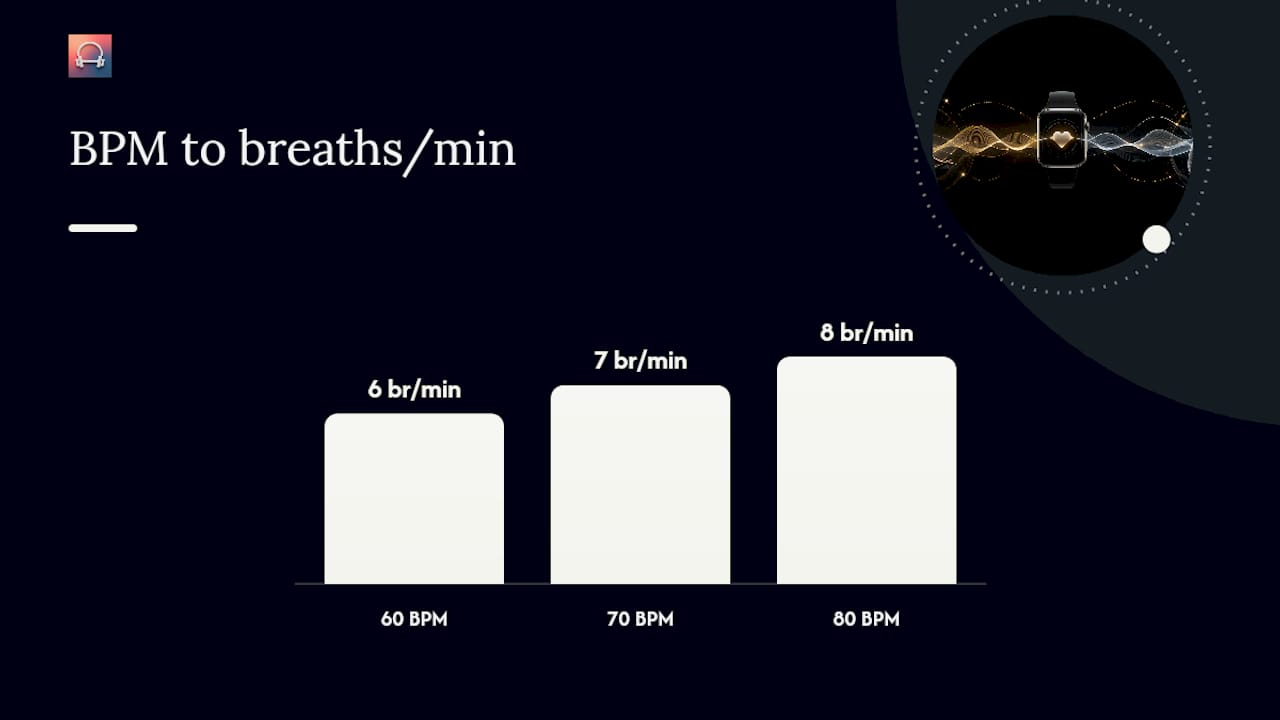
- Set your beat, then your breath. At 60 BPM, you get one beat per second. A ten-beat cycle, five beats in and five out, works out to six breaths per minute, a rate commonly used in HRV-focused sessions.
- Structure phrases in ten-second arcs. That window lines up with the phrase length shown to support entrainment, giving your body a consistent cue for when an inhale or exhale should begin.
- Pick a breathing ratio that fits your goal. A 4-4 count suits a quick reset, 5-5 suits sustained HRV work, and 4-6 (longer exhale) suits sessions built specifically for winding down.
- Adjust the ratio, not just the tempo, if a session feels rushed. Slowing BPM from 72 to 60 changes the count math more than people expect.
Pro Tip: Don’t chase the lowest possible BPM. Sixty sounds soothing on paper but can feel sluggish if your resting heart rate runs high. Start at 70 and adjust down.
One safety note that applies across every range here: if you feel dizzy, short of breath in a way that doesn’t ease, or notice chest discomfort, stop the session. Anyone with a diagnosed cardiac or respiratory condition should check with a clinician before using paced-breathing audio as a regular practice.
How Do You Connect Your Apple Watch to an Adaptive Music App?
Getting the biometric feed talking to your music takes about five minutes the first time, less after that.
Start with permissions. Open the adaptive app on your phone and grant it HealthKit access to heart rate and workout data. Skip this step and the app has nothing to adapt to, no matter how good its music engine is.
Next, allow background app refresh for the app in your phone’s settings. Without it, the heart-rate feed stalls whenever the app isn’t in the foreground, which defeats the entire point of real-time pacing.
Pair the app to your Apple Watch through its own setup flow, then connect your headphones over Bluetooth. Codec choice matters more than people assume here. Low-latency codecs like aptX Low Latency, or AAC on iOS devices, keep the audio tight against the biometric trigger. A cheap Bluetooth codec can introduce enough lag that the tempo shift feels a half beat behind your body.
Before committing to a full session, run a one to two minute test. Watch for the BPM to visibly shift as your heart rate changes, whether from a few jumping jacks or just standing up. If it doesn’t move, something in the chain is broken.
Common failure points, in order of likelihood:
- No live heart-rate feed reaching the app (check HealthKit permissions first)
- Tempo frozen despite heart-rate changes (background refresh is probably off)
- Audio dropouts or lag (switch headphones or check your Bluetooth range)
Three Breathing Music Templates You Can Run Today
These three sessions map directly onto the BPM logic above and work with any app that reads live heart rate to guide tempo.
- The 5-minute reset. Tempo: 60 to 65 BPM. Breathing count: 4-4. Check in after the first minute. If the pace feels too slow, nudge toward 65; if it feels rushed, hold at 60.
- The 12-minute HRV focus session. Tempo: 62 to 72 BPM, mapped to roughly six breaths per minute using ten-beat windows. This is the template where per-bar tempo tracking earns its keep. As your HRV improves through the session, the tempo should shift with it rather than staying static.
- The 15-minute wind-down. Tempo starts at 72 BPM and grades down to 60 over the session, ending with one to two minutes of silence before you open your eyes. The graded slowdown mirrors what the body naturally does when settling toward sleep, rather than dropping tempo abruptly.
Mid-session adjustments matter more than picking the “perfect” starting BPM. If your Apple Watch shows heart rate climbing instead of settling during a calming session, that’s a signal to drop tempo a few BPM, not push through. If HRV is rising steadily, you can often hold tempo steady rather than continuing to slow it down. This is where the auto-DJ approach outperforms a fixed playlist. It’s reacting to your actual state, not a curve someone else assumed you’d follow.
How Do You Build a Playlist for Breathing Exercises on Apple Watch?
A good breathing playlist isn’t really a playlist in the traditional sense. It’s a tempo range with a mood attached, and the app fills in the specifics based on your biometrics in the moment.
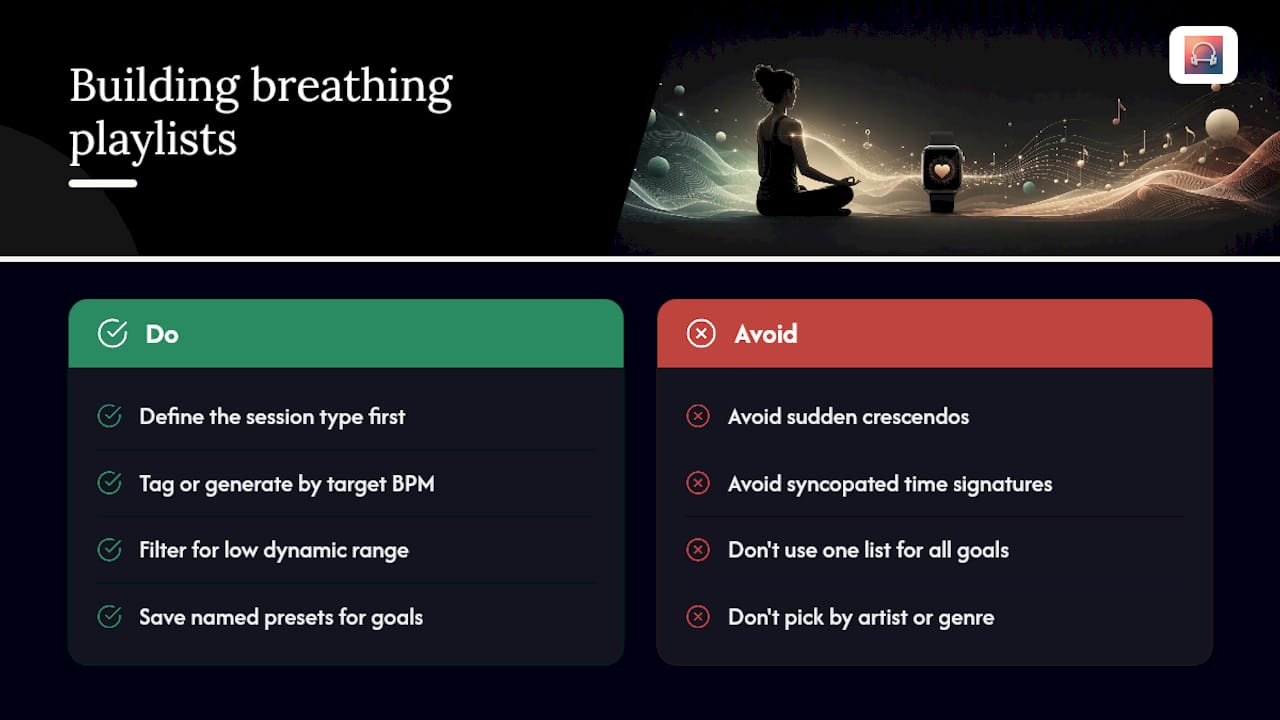
Start by defining the session type rather than picking songs. Decide whether you’re building a quick reset, a longer HRV session, or a wind-down, since each calls for a different BPM band and a different phrase pace, as covered above. Most adaptive apps let you tag tracks or generate sets by target BPM range and intensity rather than by artist or genre, which is the setting you actually want to touch.
Filter for low dynamic range and steady, non-syncopated rhythm. Tracks with sudden crescendos or unpredictable time signatures work against entrainment, even if the average tempo sits in your target zone. If your app supports manual track tagging, mark anything with jarring transitions as unsuitable for breathing sessions, even if it’s fine for a workout playlist.
Save separate sets for separate goals. A morning reset session and a bedtime wind-down have different starting and ending tempos, and trying to use one playlist for both usually means neither works particularly well. Most adaptive apps let you save these as named presets so you’re not rebuilding the tempo range every time. Once you’ve built two or three presets, you’ll rarely need to touch the settings again. The app handles the moment-to-moment tempo work; your job is just choosing which preset fits the next ten minutes.
How Can You Get Better Audio Quality During Breathing Sessions on Apple Watch?
Playback quality affects entrainment more than most people realize. A muddy mix or inconsistent volume undoes a lot of the careful tempo work described above.
Headphone choice is the first lever. Over-ear or well-sealed in-ear headphones block outside noise better than open-ear designs, which matters because breathing sessions rely on you noticing subtle tempo shifts you’d otherwise miss over ambient sound. Codec latency, mentioned earlier, is the second lever. Stick with AAC on iOS or a low-latency Bluetooth codec if your headphones support one, since lag between your Watch’s biometric reading and the audio response undermines the whole point of real-time pacing.
Volume consistency matters more than absolute loudness. Set a moderate level and leave it. Constantly adjusting volume mid-session pulls attention away from your breath and back onto the phone in your hand. If your Apple Watch is playing audio directly rather than through your phone, check that Watch volume and any connected app volume aren’t fighting each other, a common cause of unexpectedly loud or quiet playback.
Turn off audio ducking or notification sounds during sessions. A text message chime cutting through a calming 65 BPM track spikes attention exactly when you’re trying to lower it. Do Not Disturb mode, paired with a clean Bluetooth connection, removes most of the friction that keeps breathing sessions from feeling smooth.
Why Per-Bar Tempo Updates Change the Experience
Most music apps treat tempo as a track-level setting, decided once and left alone until the next song starts. That approach never made sense to me for breathing work, where your heart rate can shift meaningfully inside thirty seconds. Repbeats built its per-bar auto-DJ system specifically to close that gap, updating BPM every bar instead of every track so the music tracks your actual physiological state rather than a guess made before the session started.
The caveat worth repeating: individual response varies, and no adaptive system replaces basic judgment about how your body feels during a session. Test short before you commit long.
— Jordan Mills
Try Apple Watch Breathing Music Built Around Your Own Biometrics
An app reads your Apple Watch heart rate and HRV data and adjusts tempo every bar, not every track, which is the core mechanic behind every BPM range and template covered above — similar to approaches used in walking meditations guided by Haley Fountain that support mindfulness through paced movement. Some apps include dedicated breathing and meditation programs alongside workout modes, so the same per-bar auto-DJ engine that paces a run can pace a wind-down session instead.

If you’ve been running the 5-minute reset or the 12-minute HRV template manually, checking your Watch and adjusting playlists by hand, that’s exactly the friction the auto-DJ system removes. The tempo mapping happens automatically once your HealthKit data is connected. Head to Repbeats to start a trial and run your first adaptive breathing session today.
Key Research Behind This Guide
- Autonomic entrainment to expressive musical phrase structures: links ten-second phrase arcs to autonomic response.
- Effects of music on the cardiovascular system: reviews tempo’s role in heart rate, respiratory rate, and HRV.
- Auditory stimuli and heart rate variability: sets the 60 to 80 BPM guidance and session-length ranges.
- Rhythmic entrainment of heart rate to music: adds balance on mixed findings in recorded-music studies.
This article is general information, not a substitute for advice from a qualified doctor. Consult a qualified healthcare professional about your own circumstances before acting on anything here.
Sources
- Autonomic entrainment to expressive musical phrase structures
- Effects of music on the cardiovascular system - PMC
- Auditory stimuli and heart rate variability: the role of music in cardiovascular regulation
FAQ
What BPM Is Best for Apple Watch Breathing Music?
Sixty to eighty BPM works best for calming, parasympathetic-favoring sessions, based on recommendations in the Frontiers review.
Can My Apple Watch Actually Measure Breathing Rate?
Not directly. It measures heart rate and HRV, and adaptive apps use those signals as a close proxy for respiratory rhythm.
How Long Should a Breathing Music Session Last?
Clinical protocols commonly use 15 to 30 minute sessions, though a 5-minute reset using a slower tempo can still produce a noticeable calming effect.
Does Repbeats Support Apple Watch Breathing Sessions?
Yes. Repbeats reads live Apple Watch heart rate and HRV data and updates music tempo per bar to match, including dedicated breathing and meditation programs.
Is Entrainment to Music Guaranteed to Work?
No. Some studies show little direct heart-rate entrainment without predictable phrasing or live performance, so results vary by person and by how structured the music is.


