4-Week Cadence Plan: Make Your Workout Music Follow Your Heart Rate
Jordan MillsSeptember 3, 2026 · 9 min read

4-Week Cadence Plan: Make Your Workout Music Follow Your Heart Rate
Planning adaptive workout music means mapping your wearable data, whether that’s heart rate, cadence, or intensity, to specific BPM ranges and using an app that updates tempo live as you move. The next step is simple: set your target BPM bands for each phase of your session, pair your wearable, and let an adaptive app like Repbeats handle the tempo shifts in real time instead of you fumbling with a playlist mid-run.
TL;DR:
- Adjust BPM ranges for each workout phase, with tempo above 120 BPM linked to better performance across sports.
- Use full-beat (1:1) mapping for cadences under 170 steps per minute and half-beat (1:2) for higher stride rates to maintain listenability.
- Ensure a smooth tempo transition of no more than 3 to 5 BPM per bar to prevent stride disruption and improve rhythm tracking.
- Pair wearable devices correctly, favor local playback over streaming, and test setup with a short walk before actual workouts.
- Follow a four-week cadence-increase plan aiming for 7.5 to 10% above habitual cadence, with sessions monitored through cadence, heart rate, and RPE tracking.
Table of Contents
- Quick Setup Checklist Before You Start
- What BPM Range Fits Each Workout Phase?
- How Do You Build a 45-Minute Adaptive Session?
- Fixing Common Wearable Pairing and Latency Problems
- A 4-Week Plan to Raise Your Habitual Cadence
- How to Measure Whether It’s Actually Working
- What Most People Get Wrong About Adaptive Tempo
- Try Adaptive, Wearable-Synced Music With Repbeats
- Sources
Quick Setup Checklist Before You Start
Nothing kills momentum faster than stopping three minutes into a run to fix a Bluetooth glitch. A few minutes of setup prevents most of that.
You need four things in place: a wearable that streams heart rate or cadence (Apple Watch, Fitbit, Garmin, or a chest strap), a phone with Bluetooth headphones, an adaptive music app, and clear session goals written down before you start moving.
- Enable heart-rate and cadence sharing permissions in your wearable’s companion app before you leave the house.
- Pair headphones directly to your phone, not your watch, to cut audio lag.
- Set a hard ceiling on heart rate and a rating of perceived exertion (RPE) limit for the session (RPE 7 out of 10 is a common cap for tempo work).
- Run a 60-second pairing test at home to confirm live data is streaming and audio isn’t stuttering.
Pro Tip: Test your setup on a short walk around the block before a real workout. A five-minute dry run exposes pairing issues you’d otherwise discover halfway through mile two.
What BPM Range Fits Each Workout Phase?
Every phase of a workout has a tempo that matches it best, and getting this wrong is the most common reason adaptive music feels off instead of helpful.
Warmups generally range in lower BPM bands, steady aerobic work sits in a moderate BPM range, tempo efforts increase to a higher BPM range, intervals push to even higher BPM depending on stride rate, and cooldowns move back to lower BPM bands. A 2025 review of tempo and performance indicators found that tempo above 120 BPM consistently links to better performance markers across sports, which is why most aerobic and tempo work clusters in that upper range.
Converting cadence to BPM comes down to two mapping styles. Full-beat mapping (1:1) matches one musical beat to one stride, ideal for cadences under 170 steps per minute. Half-beat mapping (1:2), where two strides land per beat, works better for very high stride rates because it keeps the music in a listenable tempo range instead of racing into territory that sounds frantic.
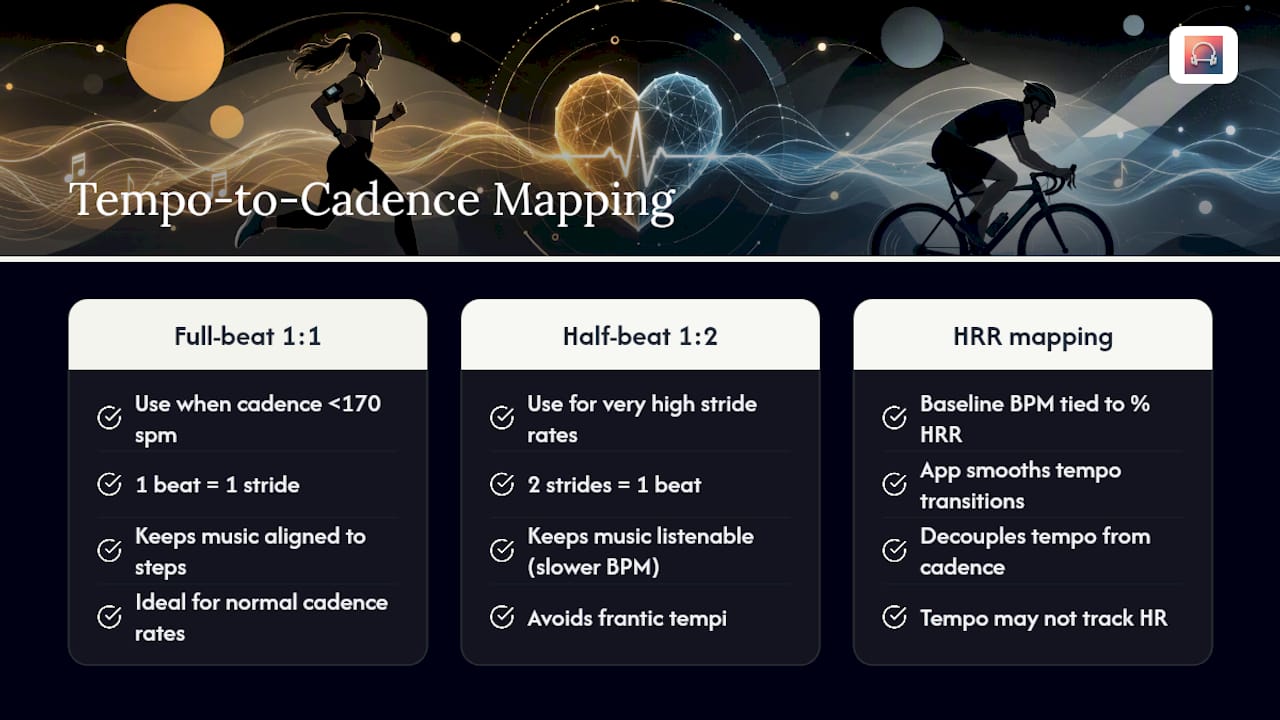
Heart-rate-based mapping works differently: instead of matching cadence directly, you set a baseline BPM tied to a percentage of heart-rate reserve (HRR), then let the app smooth transitions as your HR climbs or drops. Fast-tempo music near 140 BPM can enhance walking performance and encourage cadence adjustments without substantially affecting heart rate, so don’t assume tempo and heart rate move in lockstep. They often don’t.
The evidence behind it: A meta-analytic review covering dozens of exercise-music studies found music produces measurable improvements in mood, performance, and perceived exertion, with tempo acting as a significant moderator of those effects. Tempo choice isn’t a preference. It’s a lever.
How Do You Build a 45-Minute Adaptive Session?
Here’s a template you can copy into your next workout, whether you’re running or on the bike.
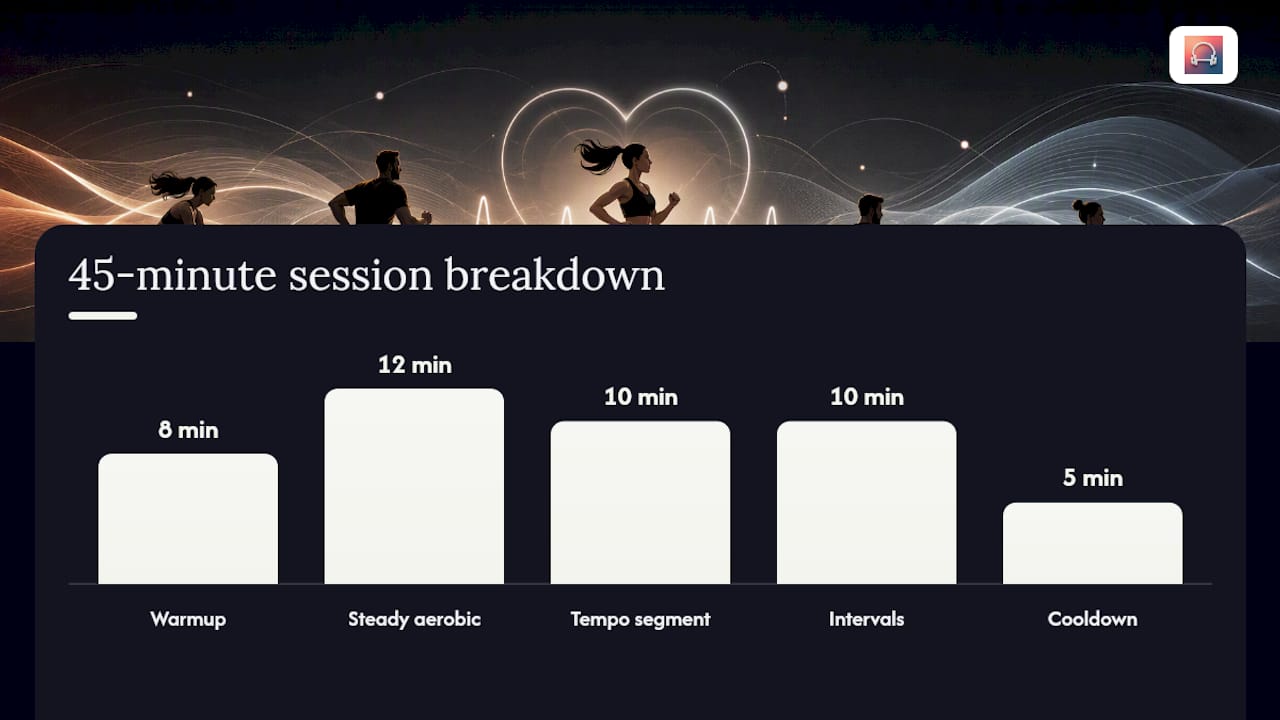
- Warmup (0 to 8 minutes): 100 to 115 BPM. Trigger the shift to aerobic pace once your heart rate reaches 60% of HRR.
- Steady aerobic block (8 to 20 minutes): 120 to 132 BPM. Hold here until cadence stabilizes for at least 90 seconds.
- Tempo segment (20 to 30 minutes): 135 to 148 BPM. Shift up when RPE reads 5 to 6 and HR sits between 70 and 80% of HRR.
- Intervals (30 to 40 minutes): Alternate 150 to 165 BPM work bursts with 110 to 120 BPM recovery. A 30/30 split (30 seconds on, 30 seconds off) or a 1:2 sprint-to-recovery ratio both work well here.
- Cooldown (40 to 45 minutes): Drop to 95 to 105 BPM as heart rate falls below 60% of HRR.
For tempo transitions, cap the change at roughly 3 to 5 BPM per bar. Abrupt jumps break the sense that the music is actually tracking you, and your stride tends to stumble trying to catch up. This smoothing rule matters more than people expect.
When picking tracks, prioritize beat salience over familiarity. Research on entrainment and rhythm-driven movement synchronization shows a clear, consistent beat matters more than whether you recognize the song. Unfamiliar, beat-forward tracks in the 130 to 150 BPM range cover a surprising amount of workout ground.
Pro Tip: If you’re building your own interval structure beyond the template above, a BPM chart broken out by workout type saves you from guessing tempo bands from scratch.
Fixing Common Wearable Pairing and Latency Problems
Most adaptive music failures trace back to three things: pairing, latency, or a dropped signal, not the music logic itself.
Start with pairing. On Apple Watch, this means opening Bluetooth settings, confirming heart-rate broadcasting is on, and granting workout data access to your music app. Fitbit and Garmin follow similar patterns through their companion apps, usually under a “connected apps” or “data sharing” menu.
Latency is the biggest threat to the illusion that music is actually following you. Local, on-device playback beats streaming, and fewer Bluetooth hops between your wearable, phone, and headphones means less delay. A primer on how wearables measure exercise intensity explains why sensor accuracy varies enough between devices to matter here.
- Favor phone-local playback over streaming when tempo needs to shift within a bar.
- Use a chest strap over wrist-based HR if your app supports it. It reads faster and drops fewer beats.
- When cadence data drops out entirely, most adaptive apps fall back to your last known heart-rate zone rather than freezing tempo.
One quick note on privacy: granting live HR and cadence access to a music app should always be reversible in your wearable’s settings, and you should check what’s shared before your first session.
A 4-Week Plan to Raise Your Habitual Cadence
Adaptive tempo isn’t just for motivation. It’s a legitimate tool for training your body to run at a slightly faster cadence, and the data backs a specific approach.
- Week 1: Run at your normal pace with tempo set 2 to 3% above your habitual cadence. Three sessions, 20 to 30 minutes each.
- Week 2: Increase the offset to 5%. Same frequency, same duration.
- Week 3: Push to 7.5%. Add a fourth session if recovery feels solid.
- Week 4: Hold at 8 to 10% above baseline across all sessions to consolidate the change.
The research behind this progression: A controlled study on tempo-based cadence training found that four weeks of running to a beat set 7.5 to 10% above habitual cadence produced a sustained cadence increase of roughly 7.9 to 8.5%, even after the intervention ended. That’s a real, lasting change from a month of tempo-guided running, not a temporary bump during the session itself.
Log cadence, heart rate, and RPE after every session. If you notice joint pain or heart rate spiking well above your usual response to the same pace, drop back to the previous week’s offset rather than pushing through.
How to Measure Whether It’s Actually Working
Track five numbers after each session: average cadence, average and peak heart rate, minutes spent in your target HR zone, RPE, and pace or distance.
The interpretation matters more than the raw numbers. If cadence rises without a corresponding jump in heart rate, that’s a sign of improved running efficiency. If heart rate climbs right along with cadence, you’re adding metabolic load, which is fine for interval work but worth watching during steady aerobic sessions.
- Cadence up, HR flat: efficiency gain, keep progressing.
- Cadence up, HR up sharply: reduce tempo offset next session.
- RPE consistently above your ceiling for two sessions in a row: back off the whole block.
A simple post-session log, even three lines in a notes app, turns guesswork into a pattern you can actually adjust.
What Most People Get Wrong About Adaptive Tempo
The biggest mistake I see is treating BPM jumps like a light switch instead of a dial. People set an interval app to snap from 120 to 165 BPM the instant their heart rate crosses a threshold, and it throws off their stride rhythm for a good ten seconds. Smoothing that transition over a few bars solves it almost entirely.
The second mistake is chasing familiar songs over ones with a strong, steady beat. Beat salience beats nostalgia every time for actual performance gains.
For deeper templates, Repbeats’ guide on adaptive music best practices covers scenario-specific defaults worth bookmarking.
— Jordan Mills
Try Adaptive, Wearable-Synced Music With Repbeats
Repbeats is built to do everything this guide just walked you through, automatically. Instead of manually mapping cadence to BPM bands or capping tempo jumps yourself, some adaptive music apps read live heart rate and cadence data from wearables and update the music’s BPM every bar, smoothing transitions so your stride never has to catch up to a sudden tempo jump.

The setup mirrors the checklist above: pair your wearable, grant live data permissions, and pick a session template built around warmup, main set, and cooldown phases with BPM targets mapped in. Sensor data stays tied to your workout session, and permissions are adjustable anytime in your device settings.
If you’ve been manually building playlists around guessed BPM ranges, this replaces that guesswork with tempo that actually tracks your effort in real time. Visit Repbeats to start a session and hear the difference between a static playlist and music that moves with you.
Sources
- Tempo-based cadence training study (2022)
- Effects of Music in Exercise and Sport: A Meta-Analytic Review (2019)
- Effects of musical tempo on self-selected walking pace (2015)
- Review: music tempo and performance indicators (2025)


