Zone 3 Music: 3 Session Templates for Wearables and BPM Setup
Jordan MillsSeptember 1, 2026 · 10 min read
Zone 3 Music: 3 Session Templates for Wearables and BPM Setup
Zone 3 music is a soundtrack whose tempo is matched or synced to your heart-rate Zone 3, the moderate-to-hard training band where cadence and rhythm matter more than raw motivation. Matching beats per minute to your Zone 3 cadence helps you hold that intensity with less mental effort, since your body locks onto the beat instead of fighting to keep pace. The move: set a BPM target from your Zone 3 heart rate or step cadence, or let an adaptive app adjust tempo live.
TL;DR:
- Matching music tempo to Zone 3 cadence improves pacing and reduces mental effort, especially during moderate-to-hard exercise sessions.
- Syncing BPM with heart rate or cadence data from wearables allows adaptive music adjustments that keep effort within your target zone.
- Using a 4 to 6 BPM range around your calculated tempo prevents abrupt changes, maintaining an effective and motivating rhythm.
- Tempo-synced music mostly influences psychological factors, like mood and perceived exertion, rather than directly affecting heart rate.
- Start conservatively by setting BPM slightly below your Zone 3 target and let adaptive systems like Repbeats adjust tempo gradually to avoid overtraining.
Table of Contents
- Why Tempo-Synced Music Helps in Zone 3
- How Do You Convert Zone 3 Heart Rate Into a BPM Target?
- How Do Wearables Sync Music to Your Heart Rate?
- What BPM Range Works Best for Zone 3 Training?
- Sample Zone 3 Session Templates You Can Use Today
- When Should You Ignore the Tempo and Trust Your Body Instead?
- An Editorial Take on Adaptive Zone 3 Training
- Get Started With Repbeats for Zone 3 Training
- Sources
Why Tempo-Synced Music Helps in Zone 3
Your legs and your ears are more connected than you’d think. Runners who sync footstrikes to a musical beat maintain steadier cadence and can push time to exhaustion further than runners with no acoustic cue at all, according to a study on auditory-motor synchronization. The mechanism is simple: a strong, predictable downbeat gives your motor system an external clock, so you spend less energy on pacing decisions and more on the work itself.
That matters because Zone 3 is exactly where pacing tends to drift. It’s not easy enough to zone out and not hard enough to force discipline through pain.
Here’s what the research says about music’s actual effects during exercise:
- Perceived exertion drops modestly (according to meta-analysis, a small effect size)
- Mood and affect improve more (moderate effect according to meta-analysis)
- Performance output increases (small-to-moderate effect reported in meta-analysis)
- Heart rate itself shows little change according to analysis
Statistic Callout: A large multilevel meta-analysis covering hundreds of exercise studies found music’s biggest impact is psychological, not cardiovascular. It changes how hard the work feels long before it changes what your heart is doing.
That’s the case for synchronization over just picking fast songs. A track that’s loud and quick but rhythmically messy won’t help your cadence nearly as much as one with a clean, prominent pulse.
How Do You Convert Zone 3 Heart Rate Into a BPM Target?
First, confirm you’re actually in Zone 3. Most training guides put it at 70 to 80% of your max heart rate, roughly a 7 out of 10 on perceived effort. The speech test is the easy field check: you can talk in short phrases, but a full conversation is out of the question.
Once you know you’re there, build your BPM target with these steps:
- Pull your current cadence from your wearable. Most running watches and cycling computers report steps per minute or pedal RPM in real time.
- Match tempo directly for runners. If your Zone 3 cadence sits around 160 steps per minute, look for tracks around 160 BPM, or half that for tracks with a slower feel that still lands a beat on every other step.
- Double it for cyclists. Pedaling naturally hits two beats per revolution, so a 75 RPM cadence maps to roughly 150 BPM.
- Set a band, not a single number. Give yourself a 4 to 6 BPM range rather than one fixed target, since cadence naturally fluctuates on hills, wind, or fatigue.
Pro Tip: Don’t chase exact-match BPM to the decimal. Let your playlist or app smooth changes in 2 to 4 BPM increments so tempo shifts feel like a gradual push, not a jarring gear change.
Repbeats’ guide on creating heart-rate music zones walks through this mapping in more detail if you want to build a static playlist by hand instead of relying on live adjustment.
How Do Wearables Sync Music to Your Heart Rate?
Your watch or chest strap is already collecting more data than most people use. Optical wrist sensors typically stream heart rate every one to five seconds; footpods and running watches add cadence on top of that, and cycling computers report RPM continuously.
Adaptive apps take that stream and translate it into tempo changes on the fly:
- Heart rate and cadence data get pulled from the device every few seconds
- The music engine recalculates a target BPM against your set Zone 3 band
- Tempo updates apply per bar, not per song, so transitions stay musical rather than abrupt
- Smoothing caps limit how fast BPM can climb, which keeps a motivating track from accidentally dragging your effort into Zone 4
Repbeats runs on exactly this model, pulling live data from wearables like Apple Watch and Fitbit and adjusting the beat every bar to hold you in your chosen intensity zone. Pairing is usually a three-step chain: watch to phone, phone to app, app to your headphones. Keep your watch’s Bluetooth connection active and your phone in range. A dropped signal mid-run just means the app reverts to your last known BPM until the connection re-establishes.
For more on what your device is actually reporting, Repbeats breaks down how wearables measure exercise intensity for adaptive music systems.
What BPM Range Works Best for Zone 3 Training?
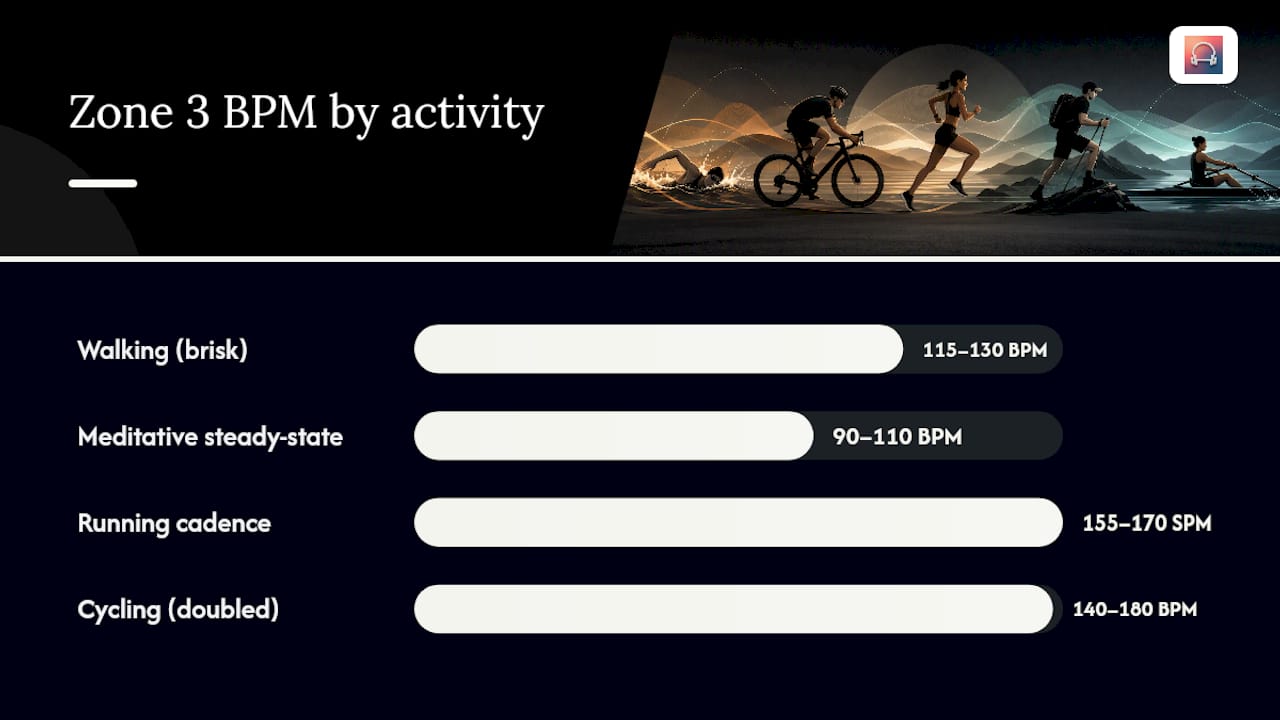
Numbers vary by activity, but these bands give you a starting point:
- Walking (brisk, Zone 3 effort): 115 to 130 BPM
- Running cadence: 155 to 170 steps per minute, matched one-to-one or at half-tempo
- Cycling: 70 to 90 RPM, doubled to roughly 140 to 180 BPM
- Meditative steady-state cardio: 90 to 110 BPM, prioritizing breath rhythm over stride rhythm
Playlist strategy matters as much as the numbers. Letting BPM drift gradually across a session, rather than jumping between wildly different tempos, keeps your nervous system from having to reset its rhythm every few minutes. Repeating a handful of familiar tracks also helps. Familiarity lowers the mental load of processing new music, which frees up attention for pacing.
Curated, tempo-stable playlists work fine for steady runs where your effort barely changes. Adaptive tempo pulls ahead once your route includes hills, intervals, or anything that shifts your Zone 3 target mid-session. Repbeats’ BPM chart for every workout type is a useful reference if you’re building a manual playlist instead of using live sync.
Sample Zone 3 Session Templates You Can Use Today
Three ready-made structures, built around time and BPM rather than distance:
- 30 to 45 minute run. Warm up 5 minutes below Zone 3, ramping BPM up gradually. Hold one 30 minute block at your target BPM band, or split it into two 15 minute segments with a 2 minute easy recovery between them. Cool down 5 minutes, dropping tempo by roughly 20 BPM.
- 45 to 60 minute ride. Settle into your RPM to BPM mapping within the first 10 minutes. Check cadence against your target every 10 minutes and nudge gearing rather than fighting the tempo. Finish with a 5 to 10 minute spin at a lower BPM band.
- Steady-state meditation or recovery cardio. Drop into the 90 to 110 BPM range and sync breath rather than footstrike. A four-count inhale and four-count exhale across two bars of music tends to hold this pace without forcing it.
Repbeats’ running alignment tips cover more variations on the run template if you’re training toward a specific race pace.
When Should You Ignore the Tempo and Trust Your Body Instead?
Motivating music has a downside: it can push your heart rate up without you noticing, a phenomenon closely related to cardiac drift, where heart rate creeps upward over a long session even at constant output. A track that feels great at minute 5 can quietly carry you into Zone 4 by minute 35.
Build in simple checks so tempo never overrides your own signals:
- Run a mental RPE check every 10 to 15 minutes. If effort feels higher than a 7, dial back regardless of what the music is doing.
- Take a manual pulse or glance at your wearable’s HR reading rather than trusting the playlist to reflect your zone.
- Use the speech test. If you can’t get out a short phrase, you’ve likely drifted above Zone 3.
Statistic Callout: Controlled studies on tempo and endurance exercise show high-tempo tracks produce larger physiological activation than low-tempo tracks, meaning faster music can genuinely raise effort, not just perceived effort.
Stop immediately for dizziness, chest pain, or breathlessness that feels sharp rather than the expected burn of hard cardio. No playlist is worth pushing through those signs.
An Editorial Take on Adaptive Zone 3 Training
Most people treat tempo like a volume knob: louder music, harder effort. That’s backwards. The research keeps pointing to synchronization, not intensity, as the lever that matters. A 150 BPM track with a muddy beat does less for your cadence than a 150 BPM track with a clean, obvious pulse.
My practical bias, after working through how adaptive systems like Repbeats handle this: start conservative. Set your BPM band a touch below your calculated Zone 3 target and let the smoothing catch up rather than starting hot and hoping the tempo doesn’t drag your heart rate past where you want it. Adaptive tempo should follow your effort, not lead it. That’s the balance Repbeats is built around, capping how fast BPM can climb so the music never outpaces your body’s actual state.
— Jordan Mills
Get Started With Repbeats for Zone 3 Training
Repbeats is built specifically for the problem this guide just walked through: converting your Zone 3 heart rate or cadence into a live, moving BPM target instead of a static playlist you have to babysit.

The setup takes minutes. Install the app, pair your wearable (Apple Watch, Fitbit, and most major chest straps work directly), and either select a Zone 3 program or set a custom BPM band based on the conversion steps above. From there, the auto-DJ engine updates tempo every bar, using live heart rate and cadence data to keep you inside your target zone without manual adjustment. Cardio sessions and meditation programs both run on the same underlying tempo logic, so you can switch between a Zone 3 run and a steady-breath recovery session without rebuilding a playlist from scratch. If you want to see how the mapping works before your first session, try Repbeats and set up your first Zone 3 program today.
Sources
- The Power of Auditory-Motor Synchronization in Sports: Enhancing Running Performance by Coupling Cadence with the Right Beats | PLOS One
- Meta-analysis on music effects in exercise contexts | APA/PsychNet
- Heart rate zones | Polar


