BPM ÷ 2 = Target RPM: Cadence First Cycling Tempo Music With Live Sync
Jordan MillsSeptember 14, 2026 · 10 min read
BPM ÷ 2 = Target RPM: Cadence First Cycling Tempo Music With Live Sync
The rule is simple: match one pedal stroke to every two beats of music, so BPM divided by two equals your target RPM. For quick reference, aim for moderate BPM ranges that typically rise from warm-up through sprints, with lower BPMs suitable for recovery phases. Measure your actual cadence first, then pick tracks (or let an adaptive app pick them) that land in the matching range.
TL;DR:
- Using music with a BPM roughly half your pedaling cadence generally aligns well across most training intensities, from warm-up to sprints.
- Low cadence training below 60 RPM may benefit from a 1:1 beat-to-step ratio, whereas higher cadences above 100 RPM sometimes require the same.
- Adaptive tools that sync music tempo to real-time cadence or heart rate can improve pacing consistency and increase workout effort, especially during intervals.
- Building playlists that allow a ±4 to 10 BPM offset around measured cadence helps maintain motivation without sounding mechanical during longer sessions.
- Rigid BPM playlists are unsuitable for outdoor group rides or technical terrain, where situational awareness outweighs perfect tempo sync.
Table of Contents
- The BPM-to-RPM Cheat Sheet for Cycling Tempo Music
- What Does the Research Say About Music Tempo and Cycling Performance?
- How Do You Build a Tempo-Synced Cycling Playlist?
- Sample Cycling Workout Playlist by Training Phase
- Which Tools Help You Track Cadence and Find BPM?
- Repbeats Case Notes on Cadence-Synced Cycling Music
- When Cadence-Synced Music Helps Most (and When to Skip It)
- Try Repbeats for Cadence-Matched Cycling Music
- Selected Studies and Practical Resources
- Sources
- FAQ
The BPM-to-RPM Cheat Sheet for Cycling Tempo Music
The math behind cycling tempo music comes down to one division. Most riders pedal one stroke for every two beats, so a track at 160 BPM lines up with roughly 80 RPM. That 2:1 relationship works for the vast majority of cadence ranges cyclists actually train in, from a lazy warm-up spin to a full sprint effort.
There are exceptions. Very low cadence work, like strength intervals under 60 RPM, sometimes plays better against a 1:1 mapping so the beat doesn’t feel sluggish. High-cadence spin-ups above 100 RPM occasionally call for a 1:1 match too, since a strict 2:1 ratio would require music at 200+ BPM, which starts to sound frantic rather than motivating.
| Training phase | Target RPM | Matching BPM (2:1) | Typical genre |
|---|---|---|---|
| Warm-up | low cadence range | moderate BPM range | Melodic house, mellow electronic |
| Endurance | moderate cadence range | moderate to higher BPM range | Upbeat house, indie electronic |
| Tempo/threshold | higher cadence range | higher BPM range | Driving techno, high-energy pop remix |
| Sprint | very high cadence range | very high BPM range | Drum & bass, fast electro |
| Recovery | low cadence range | lower BPM range | Ambient, chill electronic |
Steady 4/4 electronic tracks give the most reliable cadence guidance, since the kick drum acts like a metronome your legs can lock onto without thinking about it.
What Does the Research Say About Music Tempo and Cycling Performance?
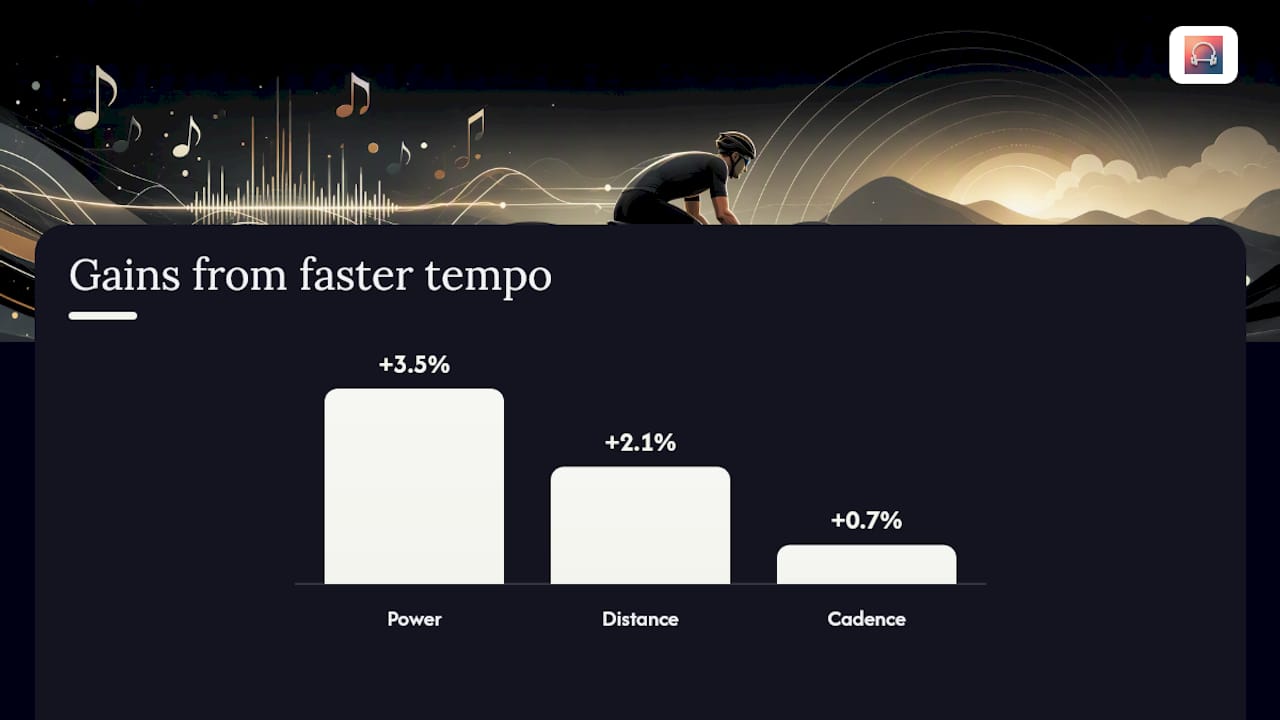
Cycling tempo music has real, measurable effects on output, though the size of the effect depends on the study and the rider. A controlled lab test found that speeding up a training program’s music increased distance covered, power output, and pedal cadence, while slowing the tempo down dragged all three metrics back down. Riders also rated the faster music as more enjoyable, even though it nudged perceived effort up slightly.
- Faster program tempo: distance up 2.1%, power up 3.5%, cadence up 0.7%
- Slower program tempo: measurable drops across the same three metrics
- Faster tempo also raised how much riders said they liked the music
A separate 30-minute stationary cycling trial found that preferred music at roughly 140 BPM increased total work performed compared to riding with no music at all. Medium tempo music at 120 BPM, interestingly, didn’t produce a significant difference from silence in that same study.
The takeaway: tempo can be genuinely ergogenic, meaning it improves physical performance, not just mood. But both studies used small samples, and personal preference clearly moderates the effect. A rider who dislikes techno isn’t going to get the same boost from a 140 BPM techno track that a fan would.
How Do You Build a Tempo-Synced Cycling Playlist?
Building a bike riding playlist that actually holds up under load takes more than dragging songs into a folder. Follow this sequence and you’ll end up with something that matches effort instead of fighting it.
- Measure your target cadence for the session. Pull this from a cadence sensor, your trainer’s telemetry, or a wearable’s cadence metric. Don’t guess. A tempo ride you think is 85 RPM might actually be sitting at 78.
- Set BPM targets using the cheat sheet above, but leave room to move. For time trial or FTP work, a 4 to 10 BPM offset window around your measured cadence tends to feel better than a rigid exact match, since dead-precise sync can sound mechanical and actually distract from pacing.
- Find or adjust tracks to hit those numbers. BPM detection apps, DJ software, or an adaptive music app that reads live cadence data all work, though manual matching takes longer and needs periodic rechecking as fatigue changes your natural rhythm.
- Arrange transitions with short crossfades. A song that drops from 160 BPM to 90 BPM with no warning will break your rhythm mid-interval, and on the road that kind of jolt is more than an annoyance. It’s a distraction you don’t want during a fast descent.
Pro Tip: Test one interval’s worth of music before committing a full ride to a new playlist. A track that sounds perfect on your couch can feel completely wrong once your heart rate climbs and your legs are burning.
Sample Cycling Workout Playlist by Training Phase
Here’s a genre-by-phase template you can rebuild on any major streaming platform without needing a specific app.
- Warm-up (100–120 BPM): gentle house or melodic electronic with a steady 4/4 kick, nothing jarring.
- Endurance/steady-state (120–140 BPM): upbeat house or indie electronic, favoring longer tracks so you’re not skipping songs every three minutes.
- Tempo/threshold (140–160 BPM): driving techno or high-energy pop remixes, the kind of tracks that keep your legs turning without you noticing the effort.
- Sprint blocks (160–180+ BPM): drum & bass or fast electro, kept short since sprint efforts themselves are short.
- Cool-down (80–100 BPM): ambient or chill electronic, deliberately low on abrupt dynamic shifts.
Search any streaming service’s BPM or workout-tagged playlists and sort by tempo, or build a folder for each phase and drag songs in as you find them. Curated fitness mixes that plan out an entire ride as an arc, shifting energy deliberately from warm-up to peak effort and back down, can save you the trouble of assembling five separate playlists.
Which Tools Help You Track Cadence and Find BPM?
Matching music for cycling workouts to your actual pedaling rate depends on having decent cadence data to begin with.
- Trainer telemetry on most smart trainers reports cadence in real time and syncs to apps over Bluetooth or ANT+.
- Cadence sensors (magnet-based or hall-effect) mount to your crank arm and work on any bike, indoors or out.
- Wearable cadence metrics from a watch or bike computer give you a running average, useful for building playlists after the ride once you know your typical numbers.
For BPM discovery, mobile BPM analyzers give a fast estimate for a single track, desktop DJ software gives frame-accurate readings for building a full set, and streaming metadata (where available) saves you the analysis step entirely. Baked, pre-mixed playlists work fine for steady rides; live adaptive syncing earns its keep on interval days when your cadence swings from 60 to 95 RPM inside one session. Outdoors, keep volume low enough to hear traffic, and skip rigid tempo-locked playlists on technical terrain where you need your ears more than your legs.
Repbeats Case Notes on Cadence-Synced Cycling Music
Adaptive tempo tools take the manual work out of the workflow above. Repbeats syncs music tempo to heart rate and cadence live, using an auto-DJ that updates BPM every bar so the track never falls out of step with what your legs are actually doing.
Cadence-matched sprint sessions have shown measurable gains within a single session, and syncing time trial music inside a 4 to 10 BPM window around measured cadence has improved pacing consistency compared to a fixed, non-adaptive playlist.
For riders who want to test this without building playlists by hand, running a guided sprint or time trial template through an adaptive app is a faster way to see whether cadence-synced music for cycling workouts actually changes how a session feels.
When Cadence-Synced Music Helps Most (and When to Skip It)
Tempo-synced playlists earn their place during intervals, FTP tests, time trials, and indoor trainer sessions, where the environment is controlled and cadence is the whole point. Skip rigid BPM playlists on technical outdoor group rides. Situational awareness matters more than perfect sync there. Two rules: match tempo to phase, not to a single number, and always keep one ear open when riding with traffic or a group.
— Jordan Mills
Try Repbeats for Cadence-Matched Cycling Music
Building a bike riding playlist by hand works, but it means rechecking BPM every time your cadence drifts mid-ride. Adaptive engines can read live heart rate and cadence data from wearable devices and run auto-DJs that update the music’s BPM every bar so the track stays matched to your effort without manual intervention.

That’s the practical difference between a static playlist and adaptive cycling rhythm music. One requires you to build five separate playlists and swap between them; the other adjusts on its own as your session moves from warm-up to threshold to cool-down. If you’re building out a broader training plan alongside your music setup, pairing tempo work with structured off-bike strength training rounds things out. To try the adaptive approach yourself, visit Repbeats and start a session with your own wearable data.
Selected Studies and Practical Resources
- Effects of music tempo upon submaximal cycling performance
- How to Use Music to Get Faster | TrainerRoad Blog
- How Music Tempo Affects Your Workout | Repbeats
Sources
- Effects of music tempo upon submaximal cycling performance
- How to Use Music to Get Faster | TrainerRoad Blog
FAQ
What Is the 75 Rule in Cycling?
The “75 rule” isn’t a standard cycling or music-tempo term, and no established coaching framework defines it as a specific number. If you’ve seen it referenced, it likely refers to a specific coach’s personal cadence or pacing guideline rather than a universal standard.
What’s the Most Famous Cycling Song?
There’s no single universally agreed “most famous” cycling song, since preference drives so much of music’s effect on performance. What matters more for cycling tempo music is BPM range: a track at 140 BPM has been shown to increase total work in a 30 minute cycling test versus riding with no music at all.
What Song Works Best for a Cycling Reel or Short Video?
For short cycling clips, a track in the 120 to 140 BPM range tends to read as energetic without feeling frantic, matching the endurance and tempo bands cyclists train at most often. Pick something with a steady, recognizable beat so the edit feels rhythmic rather than random.
What Are Some Popular Songs for Cycling?
Popularity matters less than BPM fit. Steady 4/4 house and electronic tracks in the 120 to 160 BPM range are the most commonly recommended for cycling workouts, since they give clear, consistent cadence guidance without abrupt tempo changes.
Does Cadence-Synced Music Actually Improve Performance?
Yes, within limits. Controlled research shows faster program tempo can increase distance, power, and cadence, but the effect size is modest and shaped heavily by personal music preference, so results vary rider to rider.


